
Most plans look tidy at the start. Everyone works Monday to Friday, 8 hours a day. Every task takes whole days, and nothing has started yet. Then the plan meets a real week. Fridays end at 13:00 in summer, a machine becomes unavailable for a couple of hours on Tuesday, and several tasks are already in progress when something changes.
DHTMLX Planning Engine 1.1 is about that real week. Version 1.0 delivered Gantt-compatible scheduling, with resource leveling and assignment on top. Version 1.1 builds on it with more accurate calculations for shifts, calendars, and replanning that real projects need. The main changes are:
- Effort-Driven scheduling and task types. A task can store work in addition to duration. The Fixed Work, Fixed Duration and Fixed Units task types, together with the effort-driven flag, determine what is recalculated when work, duration or assignment units change.
- Progress-Aware replanning. Tasks with recorded progress keep their start dates, and a cutoff date prevents the engine from scheduling new work before that date, so it reschedules only the forecast.
- Calendar inheritance and recurring exceptions. Calendars can inherit working hours and rules from other calendars (company, office, personal). Weekdays can have several shifts, working hours can change by season, and holidays can repeat by rule.
- Availability-based resource load. Load by hour, day, or week is measured against the working time each resource actually has.
- Forward resource leveling and improved workload management. A new strategy that places tasks in dependency order, starting each task as early as resource availability allows, and then repairs remaining overload. V1.1 adds work-weighted resource load calculations, more control over task splitting, and previews of leveled schedules.
- Configurable working-day length. Day-based durations are calculated from a working day of configurable length (480 minutes by default). Fractional durations are calculated precisely.
New to the engine?
DHTMLX Planning Engine is a headless scheduling engine: no UI, just the calculations. Feed it tasks, dependencies, calendars, and resources. It returns realistic dates, resource overloads, and the knock-on effects of any change. It runs in the browser and on the server (TypeScript, WASM, Rust, .NET, Java).
The rest of this post covers what’s new in v1.1 and the planning cases it handles.
Effort-Driven Scheduling and Task Types
Adding a person to a task has different consequences depending on the task. In v1.1, a task can have work (effort) as well as a duration. The engine supports three task types (Fixed Work, Fixed Duration, and Fixed Units) and effort-driven scheduling. All these concepts are also used in MS Project and DHTMLX Gantt v10.1+. The engine maintains the relationship Work = Duration × total Assignment Units, and the task type decides which of the three values is recalculated when another one changes. To explain properly how these task type settings work in practice, let’s assume that a task initially has one person assigned at 100% capacity.
- Fixed Work. Content migration holds 8 person-days of work. Assign Ben at 100% in addition to Ana, and the total units rise from 100% to 200%, so the duration drops from 8 days to 4. Fixed Work tasks are always effort-driven.
- Fixed Duration. A launch campaign runs for 6 days. Assign Cy as well, and the dates stay the same. With effort-driven scheduling the work is shared, so each person carries 50% units and the total work is unchanged.
- Fixed Units (default). The support desk is staffed for 5 days. With effort-driven scheduling switched off, assigning Ben keeps the duration at 5 days, and the total work doubles.
For an application, this means users can add or remove assignees and see the recalculated duration, units or work immediately. The application doesn’t need duration formulas of its own that have to be kept in sync after every edit. Projects that don’t specify work continue to be scheduled by duration, as in version 1.0. Work-based recalculation applies in native mode; with compat: “gantt”, the application supplies the task duration. The effort and task types guide explains how work and task types function in Planning Engine, while work and task types compared with MS Project highlights the difference between the two.
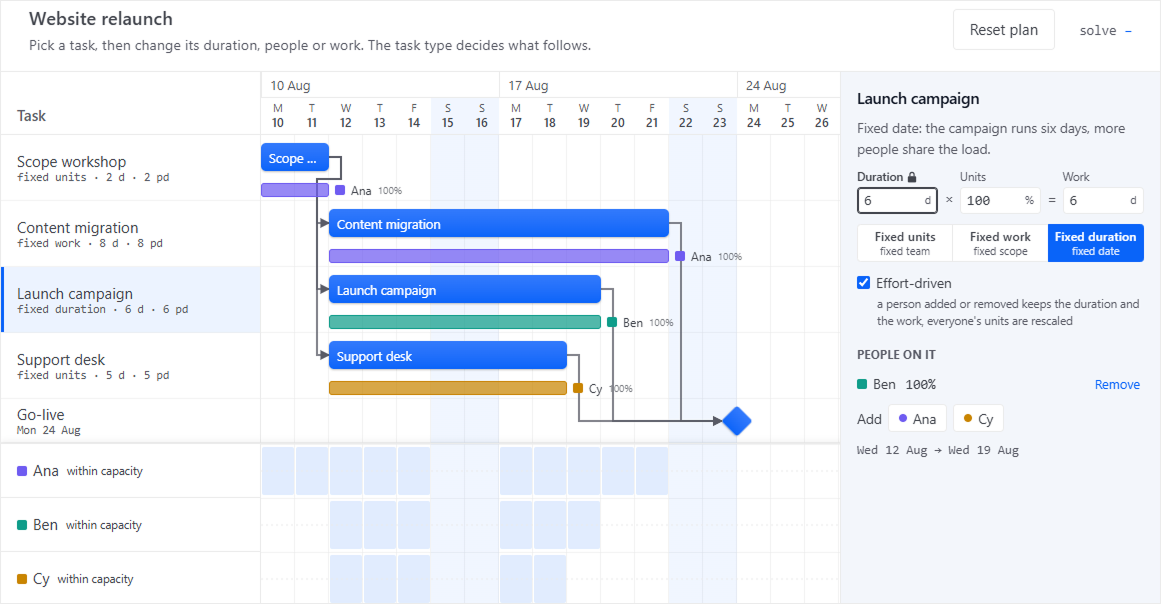
A task panel with duration, units and work: the lock marks the value that the task type keeps fixed when another one changes. Open demo >
Progress-Aware Replanning
Scheduling a new project is straightforward. Once work is under way, part of the plan is history and part is forecast, and Planning Engine 1.1 keeps the two apart. To protect the history, enable freeze_started to preserve the start dates of tasks with recorded progress. Also, pass the same freezeBefore cutoff on each scheduling or leveling call to prevent tasks from being scheduled before that date. If a started task needs more time, its finish can still move.
Take a website relaunch three weeks into the build. Ana is away for a week, the client requests one more page, and a task overruns. The engine reschedules the forecast. It reports dependency violations and missed required project end dates, including how late the affected task is in working time, such as a dependency violated by 2 working days or a launch finishing 1 working day after the required project end. After leveling, it also identifies any remaining resource overload and explains what prevented a correction. Because these results are returned as data, the application decides how to present them to its users. The replanning a running project guide shows how to set this up.
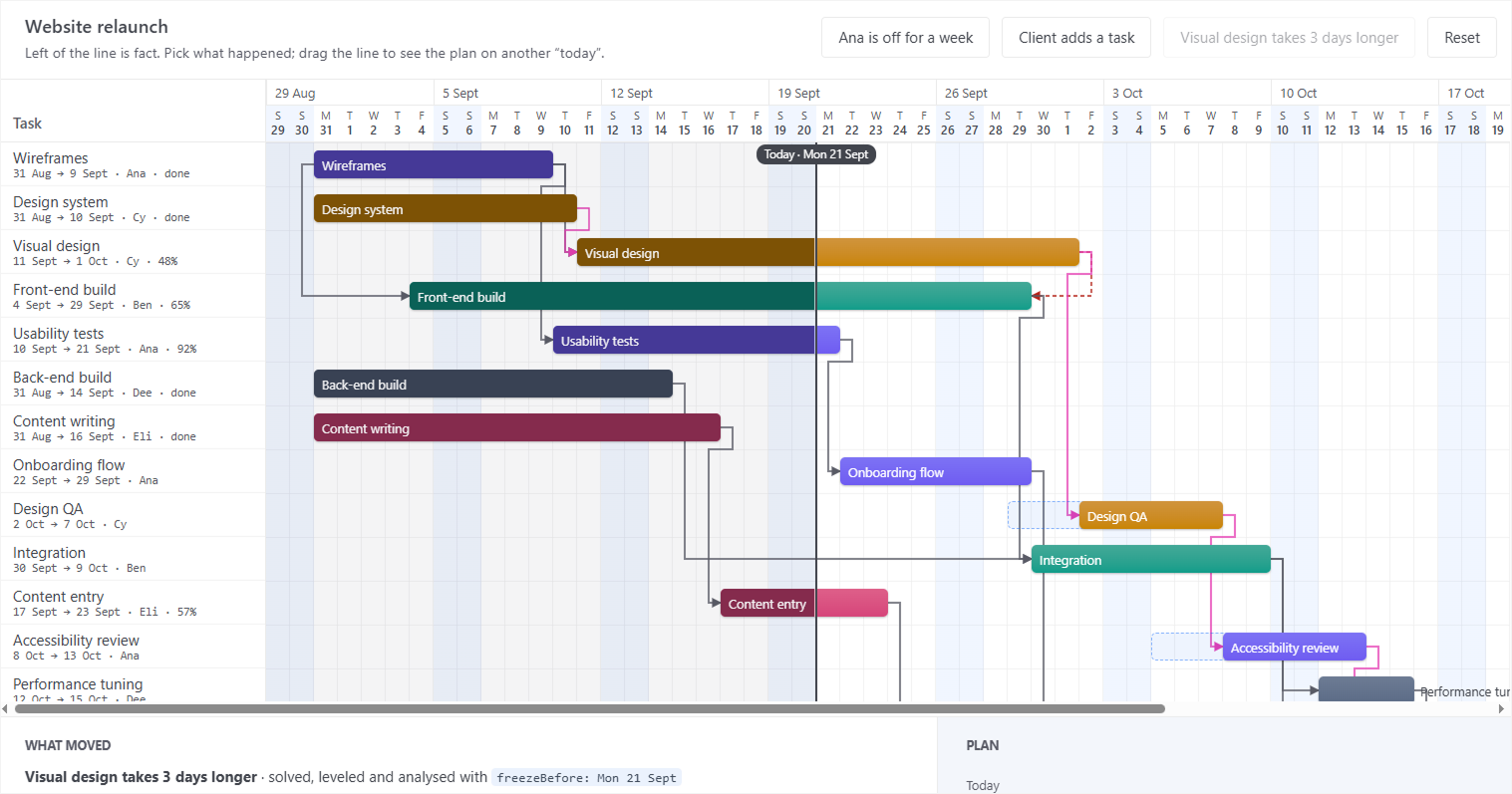
A running project with a status-date line: completed work appears to the left, the remaining forecast to the right, and a panel highlights schedule changes and delays. Open demo >
Calendar Inheritance and Recurring Exceptions
Calendars in v1.1 follow the MS Project’s model and can represent an organization’s working arrangement. The application defines the company calendar once. Office calendars inherit from it and add local holidays, and personal calendars inherit from the office and add leave or a part-time schedule.
Each weekday can have its own hours and several shifts, working hours can change by season, and exceptions can repeat by rule: a plant closure on the first Friday of every month, or the same holidays every year. Shared rules are defined once on the company calendar, and office and personal calendars inherit them wherever they use the base calendar’s settings. A child calendar can override an inherited weekday: in the demo below, changing the company’s Friday affects London, while Boston keeps its explicitly configured Friday hours. The application therefore doesn’t have to maintain copies of shared rules or expand recurrence rules into individual dates. The calendars and working time guide covers the model, and calendars compared with MS Project shows what changed from 1.0.
A calendar change can also be previewed as a what-if scenario, like any other edit. Say an application lets users request a day off for Ana. Before it commits the change, it can show which tasks would move and whether the project still meets its deadline. It can also compare several candidate dates side by side, so users pick the one that costs the plan least.
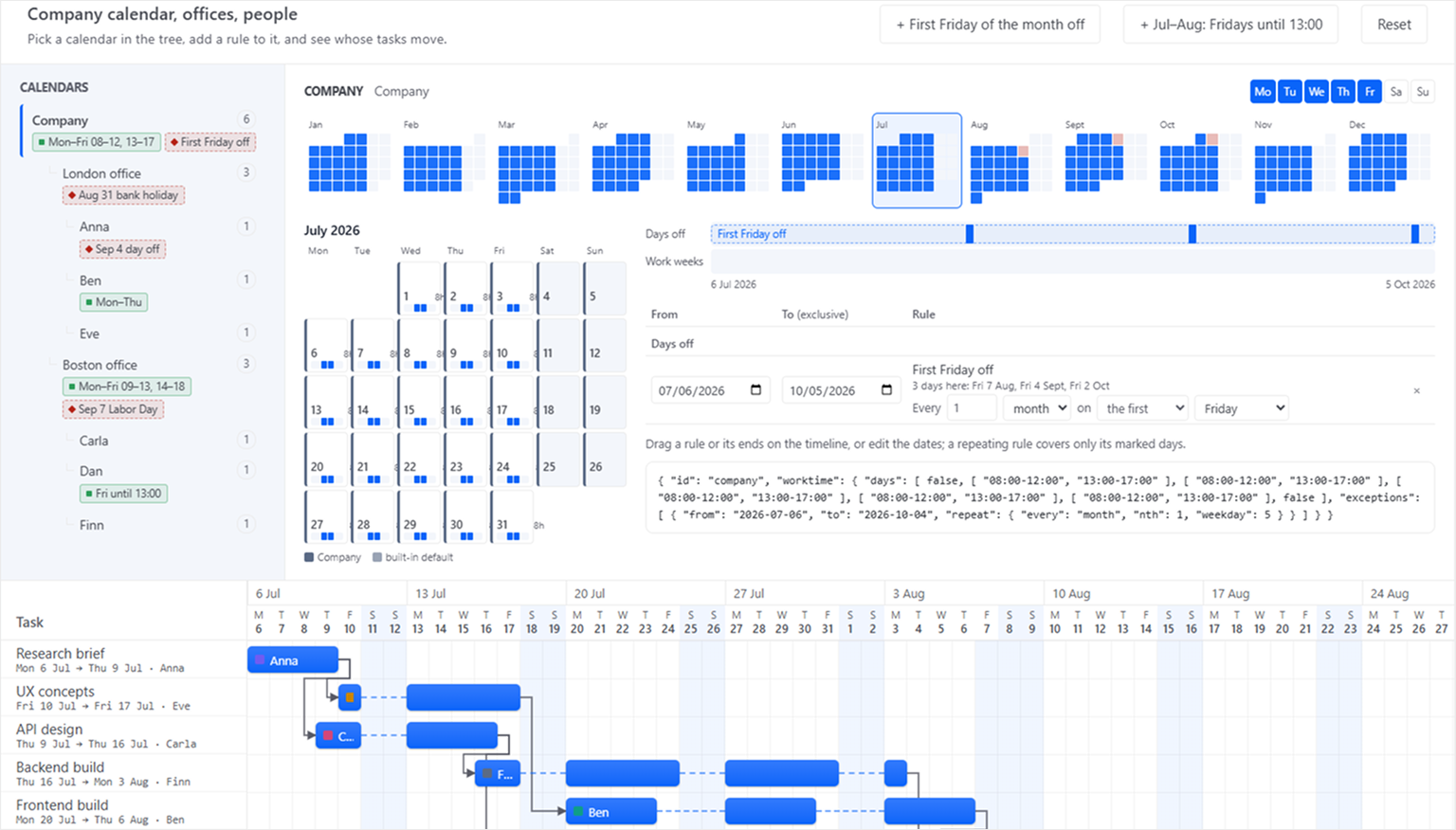
A calendar hierarchy showing company, office (London and Boston), and personal calendars, alongside a project plan where moved tasks indicate which calendar rules affected their dates. Open demo >
Availability-Based Resource Load
Resource load follows the same calendars. In resource-calendar mode, an application can show load per person, rolled up by team, by hour, day or week, as a share of the time each resource actually has available. A part-time person who is fully booked shows 100%, the same as a full-time person. A week of leave has no available time, so it isn’t reported as spare capacity. Use hourly buckets to detect overlaps that daily or weekly averages can hide. See reading load and capacity for how to read the results.
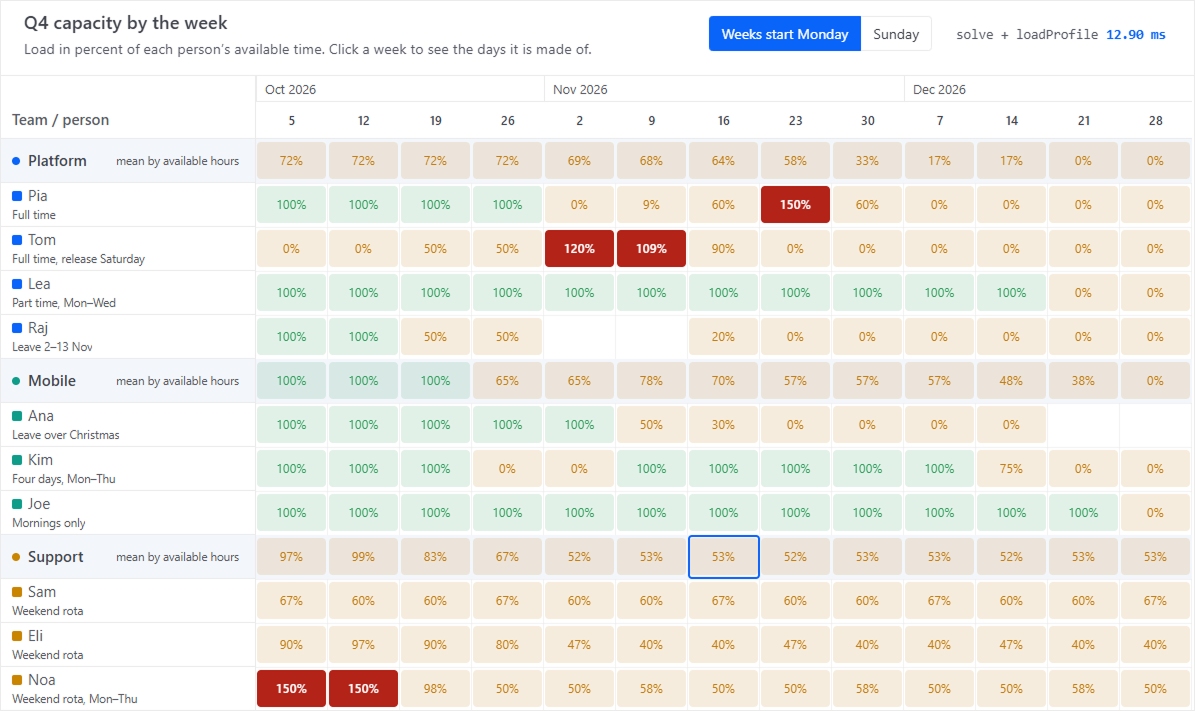
A quarterly view of resource load by week: one cell per person and week showing the share of available time that the plan books, with teams rolled up. Open demo >
Forward Resource Leveling: New Strategy and Greater Flexibility
In general, leveling handles resource overallocation by delaying or splitting tasks. DHTMLX Planning Engine now offers two leveling strategies.
The default strategy, frontier, works like leveling in MS Project. It finds the first overallocation, delays or splits a task, and repeats, keeping the current dates wherever it can. Version 1.1 adds a new, opt-in forward strategy that rebuilds the plan differently.
It schedules tasks in dependency order, each at the earliest time its assigned resources have available capacity, and then repairs the overallocations that remain. On contended plans, it often finishes earlier with fewer splits. When two tasks need the same person, the new leveling strategy can favor an earlier project finish or protect higher-priority tasks first.
The forward strategy also offers three effort settings:
- Fast runs one pass,
- Balanced runs six passes with different task orders and keeps the best result,
- Thorough adds randomized passes on top.
Leveling normally pauses a running task to preserve its earlier work, and a cutoff protects work before a specified date (see deciding which work gives way). With either strategy, the same input always produces the same plan.
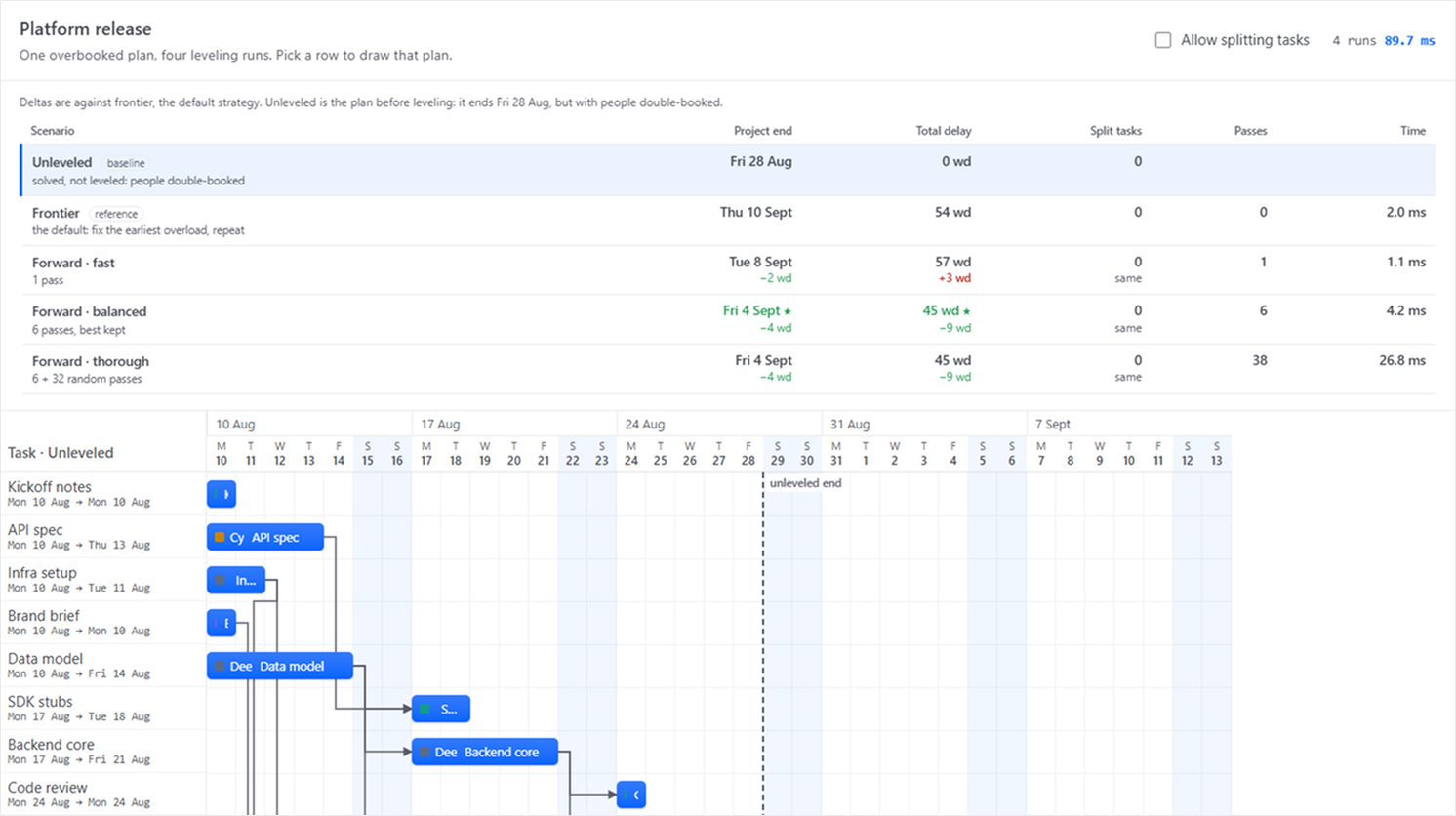
The same overallocated plan leveled with the default strategy and with the new one at three search-effort settings, with project end, total delay and splits for each run. Open demo >
Overallocation is calculated from work, not from the number of tasks. A resource assigned at 50% to two tasks isn’t overallocated, and partial assignments add up correctly. Applications can also configure the minimum split length, the minimum pause between pieces and the time step that partial moves snap to, so leveling doesn’t produce fragments shorter than the application allows.
A split that a user makes by hand can be preserved: mark the pause with by: “user” so leveling keeps its length, although its position can still shift if earlier work moves. When some overallocation can’t be resolved, the result reports it. Understanding unresolved overload explains how to read it, and controlling the tradeoffs covers the settings above.
Before a user accepts a staffing or calendar change, your application can preview the resulting leveled schedule. The preview shows the dates and resource load that applying the change and leveling with the same options would produce. See previewing and accepting a leveled plan.
Configurable Working-Day Length
In 1.0, as in DHTMLX Gantt, a “day” meant one working date. A Friday with 4 working hours still counted as a full day, regardless of its shorter hours.
By default, one day is now 480 working minutes, so a four-hour Friday counts as half a day.The day length can be configured, or DHTMLX Gantt compatibility can be enabled to retain working-date semantics. Scheduling, leveling and the resource load reports use the same working-time arithmetic, so a short day or a half-day task is counted identically in each of them.
The guide to using Planning Engine with DHTMLX Gantt describes what matches, and calendars and working time explains how working time is counted.
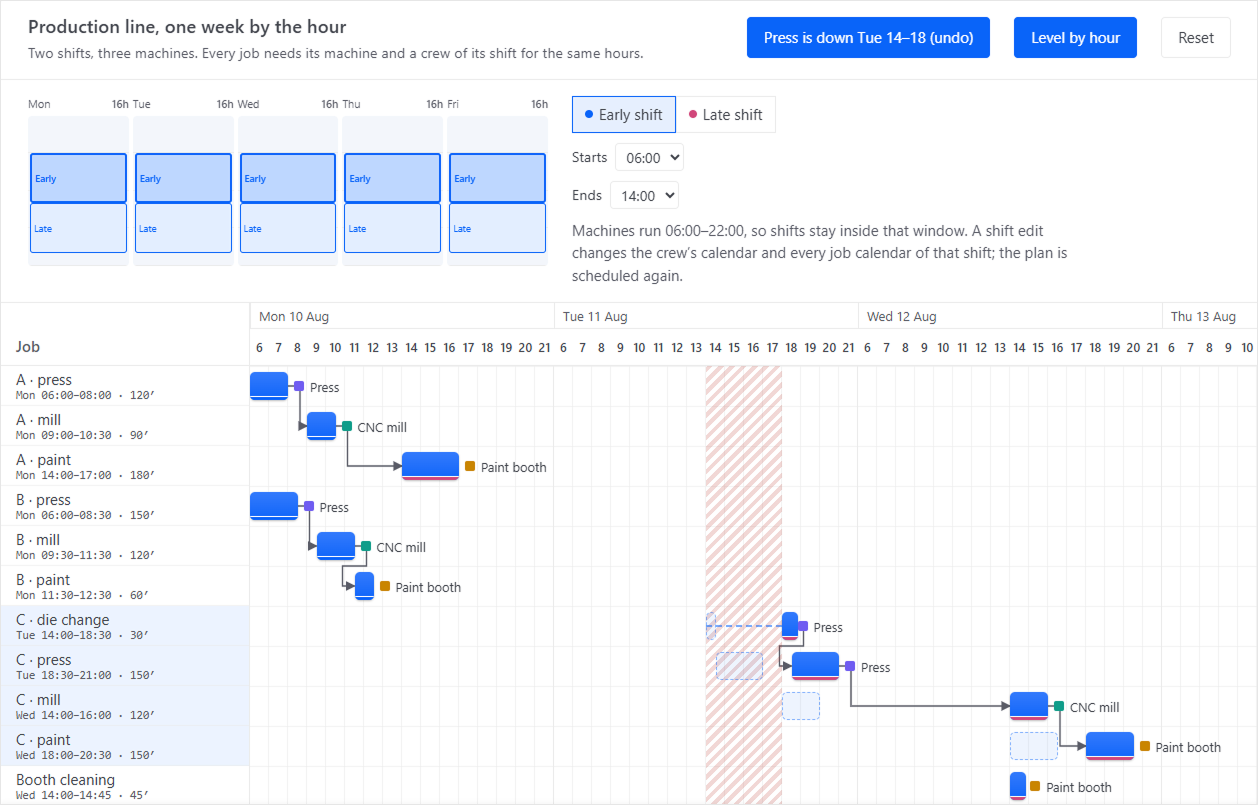
A week on a production line planned by the hour: press, mill and paint jobs on early and late shifts, with load rows per machine and crew. Open demo >
Try the Demos, Request a Trial, or Submit Your Planning Challenge
Planning Engine 1.1 builds plans that hold up in real conditions: shifts, part-time staff, shared teams, and projects already in progress. It levels resources, resolves conflicts, and suggests solutions when the plan doesn’t fit. Your application keeps its own UI and data.
- Explore the demos. Every case in this post runs in your browser.
- Request a trial and run the engine on your own data.
- Submit your planning challenge. Send us your calendars, shift patterns, resource constraints, and the way your users edit plans. Our team will show how Planning Engine solves your scenario, from scheduling and leveling to load balancing.
- Ask about pricing and licensing.