
In June 2026, DHTMLX Gantt v10.0 introduced the Community Edition under the MIT license, making a mature, commercial-grade Gantt component free for commercial use with no copyleft restrictions. In November 2026, Bryntum followed suit: with the release of Bryntum Gantt 8.0, the company introduced its own Community tier. Both are free and MIT-licensed, but they are not equal in what they can do.
Key Takeaways:
- Both DHTMLX Gantt Community Edition and Bryntum Gantt Community are free and distributed under the MIT license, including use in commercial projects.
- DHTMLX Gantt Community Edition includes export to Excel, PDF, PNG, iCal, and MS Project (with a watermark on online exports); Bryntum Gantt Community does not (these capabilities are reserved for Bryntum’s paid tiers).
- Bryntum Gantt Community is built on a lighter scheduling engine and does not support working time, task constraints, critical path, lead/lag settings, or effort management.
- DHTMLX Gantt Community ships with a fully configurable task editor; Bryntum Gantt Community offers a simplified editor that covers only basic task parameters.
- For real-world planning apps that go beyond basic project visualizations, DHTMLX Gantt Community covers more scenarios out of the box.
What DHTMLX Gantt Community Edition Includes
DHTMLX Gantt Community Edition brings together the core capabilities and maturity of the commercial DHTMLX Gantt (PRO Edition):
- a codebase tested in thousands of real projects,
- export and import of project data (Excel, PDF, PNG, iCal, MS Project, XML),
- rich timeline visualizations (task labels, timeline marks, scroll buttons, drag-scrolling),
- a fully configurable task editor (custom fields can be added) and inline editing,
- comprehensive documentation, a rich collection of demos, and an active community forum,
- the ability to save and restore UI state for a more convenient and consistent planning experience,
- real-time updates ensuring live data synchronization.
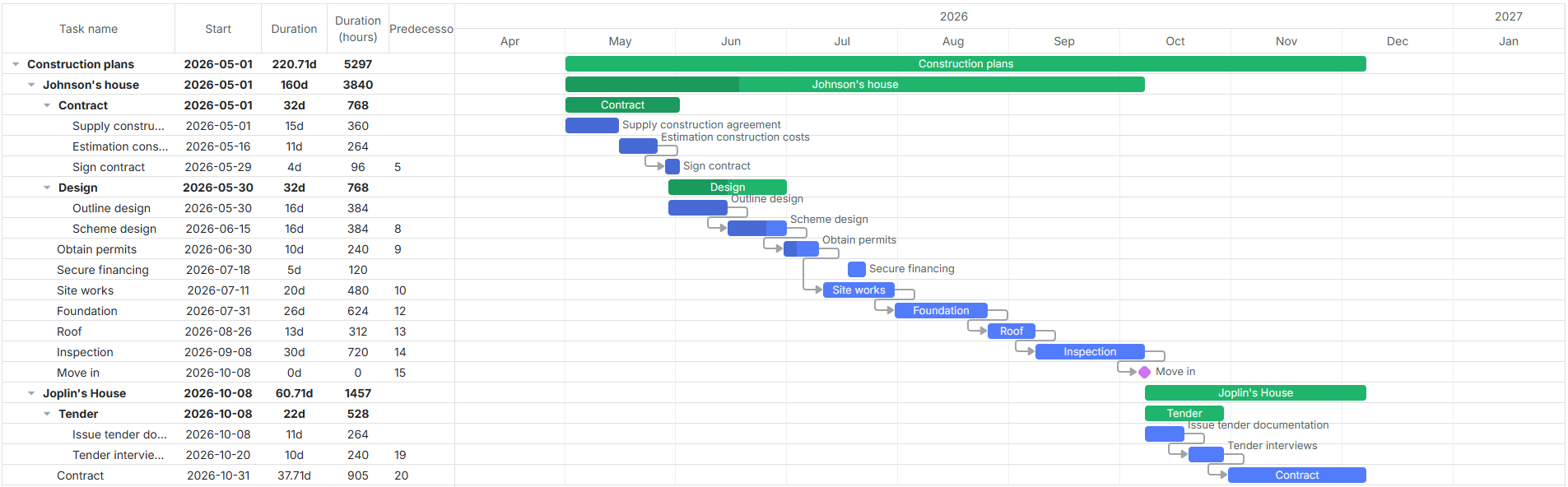
If an application outgrows the Community Edition’s scope, there is a clear migration path to DHTMLX Gantt PRO with 20+ advanced features (auto-scheduling, critical path analysis, resource planning) and official technical support.
What’s Missing in Bryntum Gantt Community
According to the official Bryntum documentation, the Community tier is built on a lighter scheduling engine. Here is what it does not support:
- working time and calendars,
- task constraints,
- critical path,
- lead and lag settings,
- effort management,
- scheduling direction and time-phased scheduling
Among other missing capabilities mentioned in Bryntum Gantt docs, it is worth noting the following:
- no export to Excel, PDF, PNG, iCal, or MS Project (available only in Bryntum’s commercial tiers),
- a simplified single-form editor (basicTaskEdit) instead of the full tabbed editor,
- no built-in options for saving and restoring UI state or real-time data updates,
- no task labels, timeline marks, or task scroll buttons on the timeline.
Bryntum’s features page lists constraint and dependency columns under the free Community tier, while the official tier-specific documentation makes no mention of them. As of early November 2026, we verified that these columns are not available in the @bryntum/gantt-community npm package. Before adopting a free Gantt component, it makes sense to check the tier-specific documentation and the actual package rather than relying on marketing claims.
Feature Comparison: Where DHTMLX Gantt Community Has the Edge
Features Available in DHTMLX Gantt Community but Missing in Bryntum Gantt Community
| Feature | DHTMLX Gantt Community | Bryntum Gantt Community |
|---|---|---|
| Export to Excel | * |
|
| Export to PDF / PNG | * |
|
| Export to iCal | * |
|
| Import/export MS Project | * |
|
| Loading data from XML | ||
| Importing data from Excel | ||
| Printing Gantt contents | ||
| Full task editor | ||
| Task labels | ||
| Marking specific times in the timeline area | ||
| Scrolling the timeline by clicking and dragging | ||
| Task scroll buttons | ||
| Predecessor and successor columns | ||
| Save and restore UI state | ||
| Real-time updates | ||
| Share data between Gantt and Scheduler |
* Online exports in the Community edition include a DHTMLX watermark
Note: ✗ means the feature is not available out of the box and requires a paid tier or custom implementation.
Features Available in Both Gantt Community Editions
| Feature | DHTMLX Gantt Community | Bryntum Gantt Community |
|---|---|---|
| Task dependencies, moving tasks by drag-and-drop, tooltips, context menu | ||
| Customizable time scale, virtualized rendering | ||
| Localization, themes, RTL, keyboard navigation | ||
| Filtering, sorting, configurable columns | ||
| Accessibility, CSP, touch and cross-browser support |
Task Editor: Full vs Simplified
The difference is most visible in the task editor. DHTMLX Gantt Community ships with the same configurable task editor used across DHTMLX Gantt editions, where developers can add custom fields and controls to the editing form. Bryntum Gantt Community, by contrast, offers a simplified editor that covers only basic parameters. Bryntum’s own changelog names it basicTaskEdit, and the tabbed editor is reserved for the Business and Enterprise tiers.
Bryntum vs. DHTMLX Gantt Community: Q&A
Is Bryntum Gantt free for commercial use?
Yes, the Bryntum Gantt Community tier is free and MIT-licensed, including commercial use. However, it is built on a lighter engine and lacks working time, constraints, critical path, and export to Excel, PDF, PNG, or MS Project.
Can Bryntum Gantt Community export to PDF or Excel?
No. Export capabilities are available only in Bryntum’s commercial Business and Enterprise tiers. DHTMLX Gantt Community includes export to Excel, PDF, PNG, iCal, and MS Project (with a watermark on online exports).
Does Bryntum Gantt Community support critical path or working time?
No. These scheduling features require Bryntum’s paid tiers. DHTMLX Gantt Community does not include them either (they are part of DHTMLX Gantt PRO), but unlike Bryntum Community, it includes export and import of project data and a full task editor.
Is DHTMLX Gantt Community really free?
Yes, it is free and MIT-licensed for both open-source and commercial projects. The Community edition covers the core Gantt functionality; auto-scheduling, resource planning, and official technical support are part of the PRO edition.
DHTMLX vs Bryntum: which free Gantt component is better?
For real-world planning applications, DHTMLX Gantt Community covers more scenarios out of the box: data export and import, a fully configurable task editor, and richer timeline visualization. Bryntum Gantt Community is closer to a basic visualization tool with a paid upgrade path.
Can I upgrade from a Community edition to a paid one later?
Yes. DHTMLX Gantt has a clear migration path from Community to PRO. Moving between Bryntum tiers also requires a new license key and code changes.
Final Verdict
Both DHTMLX Gantt Community Edition and Bryntum Gantt Community are free, MIT-licensed components. But they are not equally capable. DHTMLX Gantt Community ships with export to Excel, PDF, PNG, iCal, and MS Project, a fully configurable task editor, richer timeline visualizations, and support for saving UI state and real-time updates. These are the features that real planning apps need on day one. In the Bryntum Gantt Community, these scenarios require upgrading to a paid tier or writing custom code. If you are building a planning tool, not just a task visualization, DHTMLX Gantt Community Edition is the stronger free choice.
Try Both Yourself
To get a better feel for what each open-source Gantt has to offer, you can install their official npm packages and try the components in your scenarios:
npm install @bryntum/gantt-community
Alternatively, it is possible to access the source code and related resources via the GitHub repositories of DHTMLX Gantt and Bryntum Gantt.
Just try them in your scenario — the difference shows up quickly.
If the Community editions don’t cover your project requirements, take a look at how the commercial versions of DHTMLX Gantt and Bryntum Gantt compare with each other.