
In real-world applications, project requirements often grow beyond the capabilities of lightweight tools, prompting teams to seek more comprehensive alternatives. But it is often easier said than done. For Frappe Gantt users facing complex requirements, however, there is an official migration guide to a more feature-rich DHTMLX Gantt chart component.
In this article, we’ll consider when and why developers decide to switch from Frappe Gantt to DHTMLX Gantt, outline two possible migration paths, and highlight the key steps involved in this process.
What Makes Teams Look for Frappe Gantt Alternatives
Frappe Gantt works well during early project stages (prototypes and MVPs) or in apps with basic requirements, where simplicity and integration speed are priorities. But should developers consider Frappe Gantt for enterprise projects? What happens when the project outgrows the initial Gantt implementation?
If the Gantt chart is the app’s core functionality, it often requires more configuration options for standard Gantt features to grow and evolve with time. With Frappe Gantt, for instance, there is no built-in API for establishing different dependency relations between tasks (Finish-to-Start only), configuring the task edit form, or organizing task hierarchies. And that’s not to mention more advanced features (auto-scheduling, critical path, resource management, etc.), which are in great demand in modern project management apps.
At this point, the question is what to do next: either extend Frappe Gantt or switch to a more feature-complete Gantt component, such as DHTMLX Gantt. Continuing to build on Frappe Gantt makes sense when the project requires only a few extra features, and they can be implemented via workarounds without creating much maintenance burden. When the number of such custom features is constantly growing, the migration may become a more cost-effective solution.
Why Migrate to DHTMLX Gantt
Last time, we explored Frappe Gantt and DHTMLX Gantt Community Edition, comparing their feature sets and typical use cases. The comparison makes it clear that Frappe Gantt is a valid option for simple project visualizations, while DHTMLX Gantt is designed to support more advanced project planning workflows. This Frappe Gantt enterprise alternative provides not only a more powerful feature set but also a flexible migration path, setting it apart from other Gantt components.
Choosing the Migration Strategy from Frappe Gantt to DHTMLX Gantt
Once it becomes clear that Frappe Gantt no longer covers project needs, there are two possible migration paths to DHTMLX Gantt, depending on the current and future project requirements.
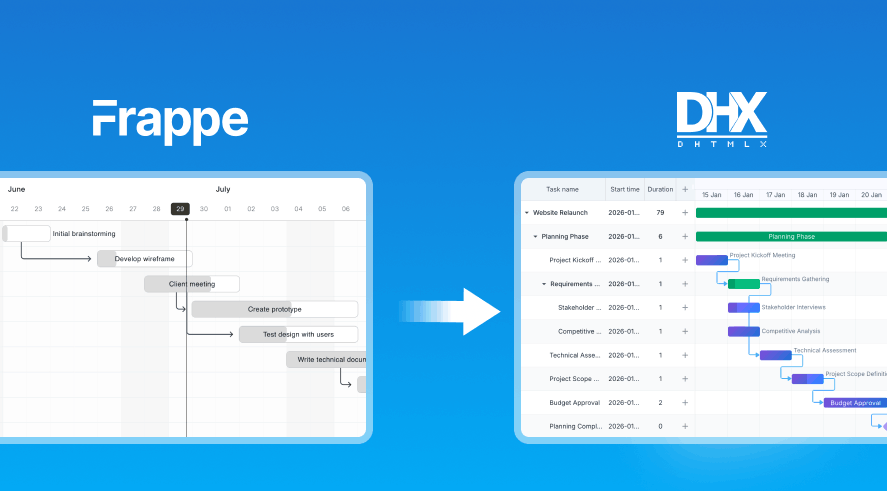
Path 1: Frappe Gantt → DHTMLX Gantt Community Edition → PRO Edition
Teams can opt for this path if they prefer a gradual approach to modernizing their Gantt charts and minimizing the initial costs. Taking the first step from Frappe Gantt to the DHTMLX Gantt Community Edition, teams get access to the mature Gantt component with plenty of configuration and customization options and still enjoy the benefits of the MIT license. When the need for advanced capabilities arises, they can invest in the commercial license and upgrade to the PRO version.
Key advantages:
- gradual migration process
- no need to immediately pay for the commercial license
- seamless transition from the Community Edition to the PRO edition (the same ecosystem)
Path 2: Frappe Gantt → DHTMLX Gantt (PRO Edition)
This option is optimal for scenarios that already require enterprise-level features. In this case, it becomes reasonable to skip the intermediate stage (Gantt Community Edition) and switch directly to the PRO edition. It will open access to a package of advanced features, including auto-scheduling, split tasks, a resource view panel, enhanced export, and other capabilities.
Key advantages:
- all DHTMLX Gantt features (standard + PRO extensions)
- official tech support from the DHTMLX team
- free access to all product releases during the licensed period
Now, let us find out what it takes to migrate from Frappe Gantt to DHTMLX Gantt.
Key Steps for Migrating from Frappe Gantt to DHTMLX Gantt
Regardless of which Frappe Gantt migration path is chosen, the overall process can be divided into four well-defined steps:
1. Adapt the data model
These Gantt components store project data (tasks and dependency links) differently. With Frappe Gantt, dependencies are stored inside tasks, while in DHTMLX Gantt tasks and links are treated as separate database entities. This separation provides the flexibility required to specify complex relationships within the project. That is why the migration starts with adapting the Frappe Gantt data model to the DHTMLX Gantt structure.
2. Adjust the server-side integration
The backend logic must be adjusted to conform to the principles used by DHTMLX Gantt for data loading and synchronization. This includes replacing Frappe-specific endpoints for data loading and CRUD operations (for both tasks and links), and adding helper functions needed to process requests and responses.
3. Replace Frappe Gantt implementation
Now we come to the key step of the migration, namely replacing the Frappe Gantt implementation with DHTMLX Gantt. Specifically, it is necessary to update the frontend configuration, remove all items related to Frappe Gantt (custom UI controls, styles, initialization code), and initialize DHTMLX Gantt.
In practice, Frappe Gantt is often extended with custom capabilities, some of which can be replaced with built-in features during the migration. This can reduce the amount of custom code that needs to be maintained.
4. Validate the migration
After completing the migration, it is recommended to check that the migrated functionality operates as expected. Start by launching the backend and frontend, then ensure that the migrated data successfully loads in the DHTMLX-based Gantt chart from the database. Further testing can include other aspects of working with the Gantt chart, like CRUD operations and dependency editing.
For technical details on migrating from Frappe Gantt to DHTMLX, check the official migration guide and the companion demo on GitHub.
Wrapping Up
Frappe Gantt is good at what it is designed for: simple visualizations of scheduling scenarios with minimal setup. But when such lightweight libraries reach their functional limits and project requirements continue to grow, it is natural to consider migration to more advanced components like DHTMLX Gantt. Instead of rebuilding the Gantt functionality from the ground up, developers can follow a clear migration path, bringing the existing implementation into the DHTMLX Gantt ecosystem. This way, basic timeline interfaces can gradually evolve into enterprise-grade project planning solutions.