
A Gantt chart is a long-standing tool for efficiently managing complex workflows and presenting processes in a clear format. This advanced functionality hasn’t lost its relevance in modern project management apps, as well as the question of how to implement it with minimal cost and effort. Fortunately, development teams can expand their tech stacks with open-source JavaScript libraries to speed up the delivery of Gantt charts without any expenses. The most notable options in this category are DHTMLX Gantt Community Edition and Frappe Gantt.
The DHTMLX Gantt offers a feature-packed solution with a clear upgrade path to the commercial PRO version, known for multiple enterprise-grade capabilities. Frappe Gantt relies on simplicity and a quick setup for timeline-based visualizations of projects without exceeding standard requirements. There are tangible differences between these tools, making them suitable for projects of different complexity levels.
In this article, we’ll explore these free-to-use Gantt components and provide a detailed comparison of their feature sets to help developers make the right choice for their projects.
Frappe Gantt
Frappe Gantt is another cost-free Gantt tool that takes a minimalist and visually clean approach to presenting a project’s tasks, schedule, and dependencies. Created as a Gantt view for the ERPNext platform, it eventually evolved into a standalone library for addressing essential planning and scheduling needs.
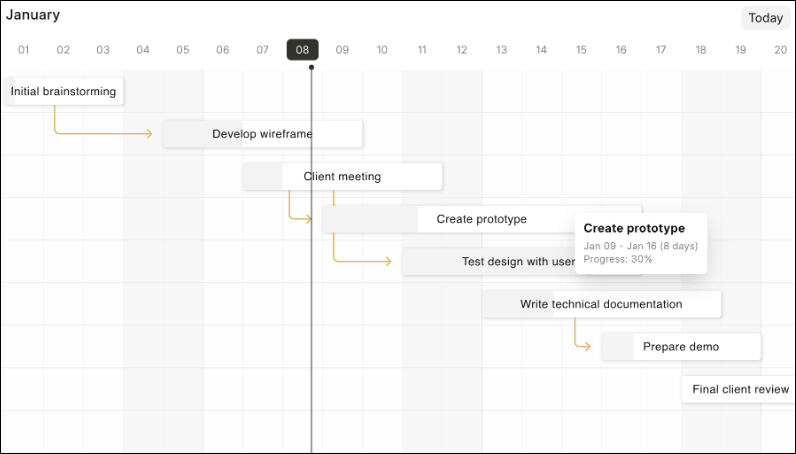
Frappe Gantt comes with a straightforward API that should not take much time to understand and start using. It allows configuring the appearance and behavior of the key Gantt elements, including view modes, task bars, dependencies, timescales, and popups, while keeping the overall setup easy to maintain. The library has a minimal footprint, meaning it won’t add unnecessary architectural complexity to a web project. Also, it relies on SVG for rendering the chart on a web page, providing a browser-native visualization approach.
Since this Gantt library remains an integral part of Frappe’s ERPNext system and other projects, the team has a strong incentive to continue supporting and gradually improving Gantt’s capabilities. Many online resources note that Frappe Gantt has a relatively basic feature set, minimal configuration guidance, and limited customization. Nevertheless, it remains effective for its core purpose – simple visualizations of project workflows.
DHTMLX Gantt Community Edition
The Community Edition of DHTMLX Gantt is an open-source version of the mature JavaScript Gantt component, providing a developer-friendly way to add functional Gantt charts to web projects. Introduced as part of the DHTMLX Gantt 10.0 release, it replaces the previous GPL-licensed version and continues the library’s open-source offering under the MIT license.
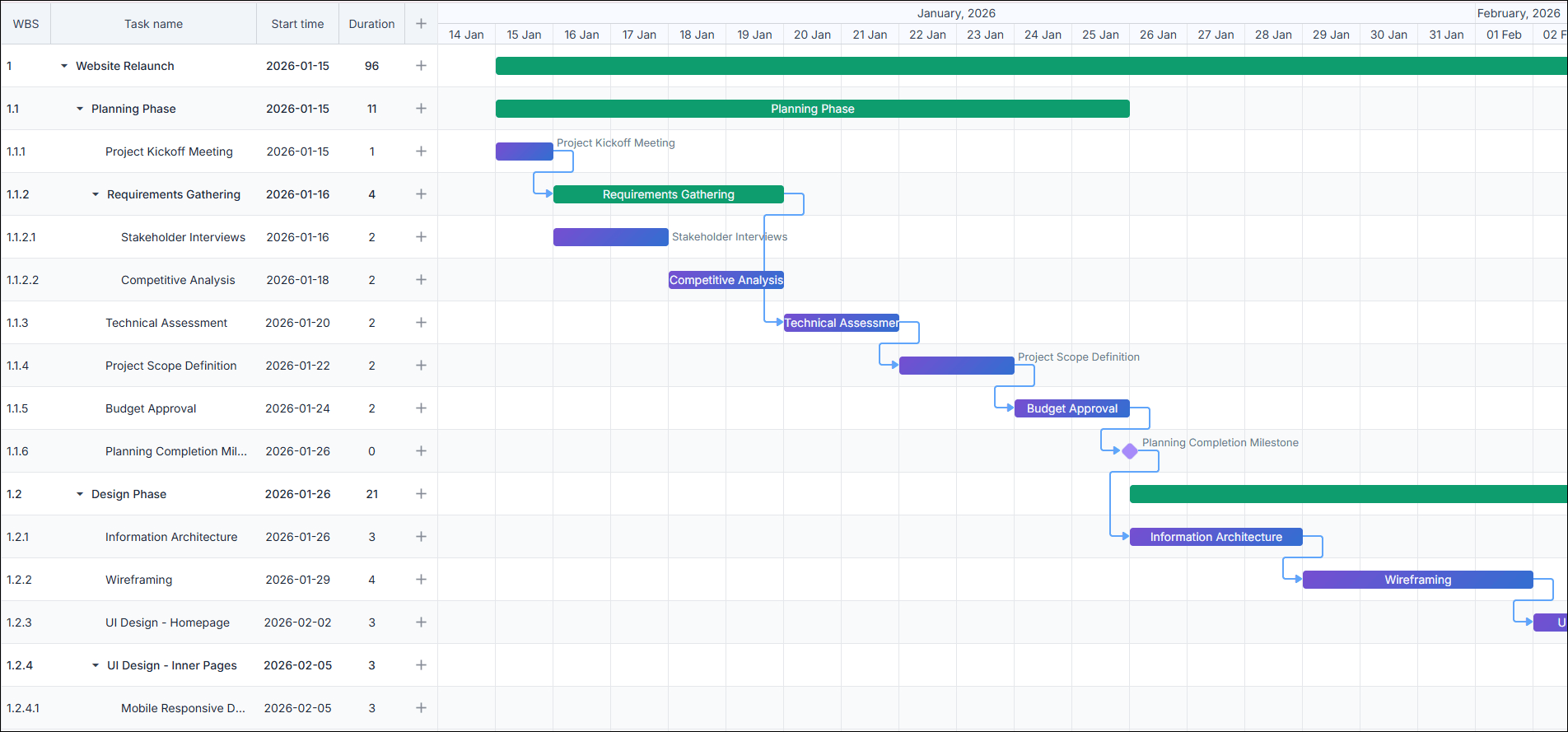
This JavaScript Gantt chart dispels many concerns associated with open-source tools. It comes with a solid feature set, ranging from typical Gantt settings to more powerful features like multiple types of task dependencies, filtering & sorting options, milestones, data export, smart rendering, and more. Various elements of the Gantt UI (tasks, edit form, scales, etc.) can be customized to meet specific project needs. The process of configuring and modifying Gantt charts is simplified by the fully documented API, integration guides, and a large collection of demos and live samples. The active DHTMLX community is a valuable source of advice when facing any Gantt-related issues. Another important point is the DHTMLX team’s commitment to supporting and improving its products, including the open-source Gantt chart.
The MIT-licensed DHTMLX Gantt can also be a valid option for teams that are actively adopting AI assistants into their development workflows. For this purpose, DHTMLX already offers the official MCP server and several AI-powered Gantt demos.
The free DHTMLX Gantt version is great for achieving common goals in project management. But when projects scale up, they certainly require extra capabilities. To prevent this potential pitfall, the DHTMLX team provides a smooth migration path from the Community Edition to the commercial Gantt version, empowered with PRO features (20+) and an official tech support plan. Learn more about the difference between these versions in the documentation.
DHTMLX Gantt vs Frappe Gantt: Detailed Feature Comparison
After reviewing both open-source Gantt libraries individually, you get a general understanding of their capabilities, but the differences become more evident when comparing them side by side. The table below includes not only DHTMLX Gantt Community Edition and Frappe Gantt, but also DHTMLX’s PRO version. Thus, you can compare the feature sets of open-source Gantt libraries, while also seeing what new opportunities become available for DHTMLX Gantt when upgrading to the PRO edition.
Official packages of both libraries can be securely downloaded from npm:
npm install frappe-gantt
Alternatively, you can access these products via GitHub repositories of DHTMLX Gantt and Frappe Gantt.
Note: The comparison below is based on the official documentation of both libraries. To ensure a fair comparison, we had to exclude any non-documented features, like the ones available in third-party forks (e.g. @workiom/frappe-gantt).
| Frappe Gantt | DHTMLX Community Edition |
DHTMLX PRO | |
| LOCALIZATION | |||
| Multi-language support |
Frappe Gantt
ISO 639-1 codes
|
DHTMLX Community Edition
50+ locales
|
DHTMLX PRO
50+ locales
|
| TASK DEPENDENCIES / LINKING | |||
| Task linking |
Frappe Gantt
Finish-to-start only
|
DHTMLX Community Edition
4 types
(FS, SS, FF, SF) |
DHTMLX PRO
4 types
(FS, SS, FF, SF) |
| Auto-move dependent tasks on drag |
Frappe Gantt
|
DHTMLX Community Edition
|
DHTMLX PRO
|
| Auto scheduling |
Frappe Gantt
|
DHTMLX Community Edition
|
DHTMLX PRO
|
| Critical path calculation |
Frappe Gantt
|
DHTMLX Community Edition
|
DHTMLX PRO
|
| Constraint control |
Frappe Gantt
|
DHTMLX Community Edition
|
DHTMLX PRO
|
| Link formatter for predecessor editor |
Frappe Gantt
|
DHTMLX Community Edition
|
DHTMLX PRO
|
| VIEW MODES & TIMELINE | |||
| Built-in view modes (Day / Week / Month / Year) |
Frappe Gantt
|
DHTMLX Community Edition
|
DHTMLX PRO
|
| Custom view modes |
Frappe Gantt
|
DHTMLX Community Edition
|
DHTMLX PRO
|
| Ability to hide time units on time scale |
Frappe Gantt
|
DHTMLX Community Edition
|
DHTMLX PRO
|
| Marking specific times in timeline |
Frappe Gantt
|
DHTMLX Community Edition
|
DHTMLX PRO
|
| TASK EDITING & INTERACTION | |||
| Drag & drop tasks |
Frappe Gantt
|
DHTMLX Community Edition
|
DHTMLX PRO
|
| Resize task bars |
Frappe Gantt
|
DHTMLX Community Edition
|
DHTMLX PRO
|
| Snap interval on drag/resize |
Frappe Gantt
|
DHTMLX Community Edition
|
DHTMLX PRO
|
| Dragging multiple tasks horizontally |
Frappe Gantt
|
DHTMLX Community Edition
|
DHTMLX PRO
|
| Multi-task selection |
Frappe Gantt
|
DHTMLX Community Edition
|
DHTMLX PRO
|
| Inline editing in grid |
Frappe Gantt
|
DHTMLX Community Edition
|
DHTMLX PRO
|
| Customizable task edit form (lightbox) |
Frappe Gantt
|
DHTMLX Community Edition
|
DHTMLX PRO
|
| Undo / redo |
Frappe Gantt
|
DHTMLX Community Edition
|
DHTMLX PRO
|
| Keyboard navigation |
Frappe Gantt
|
DHTMLX Community Edition
|
DHTMLX PRO
|
| Scrolling timeline by click and drag |
Frappe Gantt
|
DHTMLX Community Edition
|
DHTMLX PRO
|
The comparison table clearly indicates that DHTMLX Gantt is a viable Frappe Gantt alternative for projects that require a broader set of configuration options in such aspects as task dependencies, editing capabilities, task types, grid panel manipulations, Gantt layout, UI design, data export, performance optimization, and accessibility. Configuring any available feature in DHTMLX Gantt is quite straightforward thanks to detailed explanations provided in the documentation. For instance, if it is required to add milestones to the DHTMLX-based Gantt project, this documentation page provides a thorough explanation of this feature, and here is the way to specify this UI element:
tasks: [
{ id: 3, text: "Alpha release", start_date: "16-04-2025", type: "milestone", parent: 1 },
],
links: [],
};
Since Frappe Gantt does not natively support milestones, it will take time to find a proper workaround on the internet or come up with your own solution for this feature. For instance, this workaround offers the visual overlay approach. It involves adding a milestone diamond marker on top of the rendered Gantt chart built with Frappe Gantt.
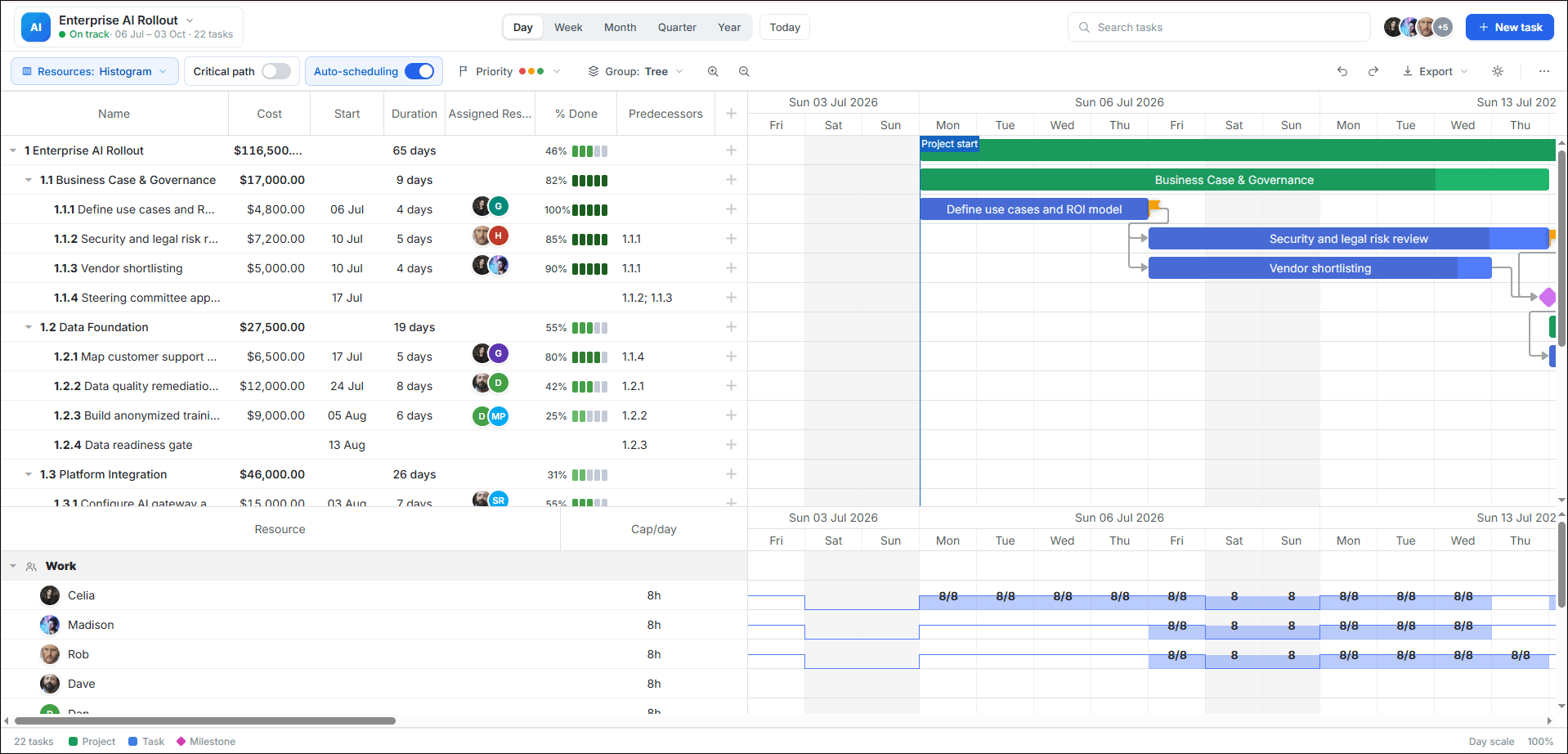
Moreover, it is easy to extend the lead of DHTMLX in these categories with advanced features like auto-scheduling, critical path, and resource management by simply migrating to the PRO version.
Now, it is the right moment to discuss the practical application of both libraries.
Where Each JavaScript Gantt Chart Library Fits Best
The disparity in feature coverage between DHTMLX Gantt Community Edition and Frappe Gantt translates into differences in their use cases. Below are the typical scenarios for both reviewed Gantts.
Choose DHTMLX Gantt Community Edition when:
- Full-featured Gantt functionality with detailed implementation guidance is required (documentation + samples).
- Enhanced performance and customization capabilities are important.
- The app is built with React, Angular, or Vue, and needs a smooth Gantt integration.
- The project is expected to evolve into a larger enterprise-grade system with advanced features.
Choose Frappe Gantt when:
- Basic project workflow visualization is needed.
- A lightweight tool that ensures a rapid Gantt implementation is a priority.
- The Gantt view plays a supplementary role rather than being the core part of the product.
- The app does not require deep project planning logic.
Final Thoughts
In conclusion, it is necessary to emphasize once again that DHTMLX Gantt Community Edition and Frappe Gantt serve different ends of the project planning spectrum rather than competing directly. Frappe Gantt provides a quick way to add basic timeline-based visualizations without the overhead of complex architectural patterns and configuration processes. DHTMLX Gantt offers a strong foundation for building robust project management UIs, with an option to extend functionality to the enterprise level by migrating to the commercial PRO version. The final choice between free JavaScript Gantt charts depends on the level of complexity and long-term requirements of a given project.