Agile JavaScript
Kanban Board for Task Management Apps
Develop full-fledged web apps with DHTMLX JavaScript Kanban library to gain complete control over the workload and manage tasks efficiently.
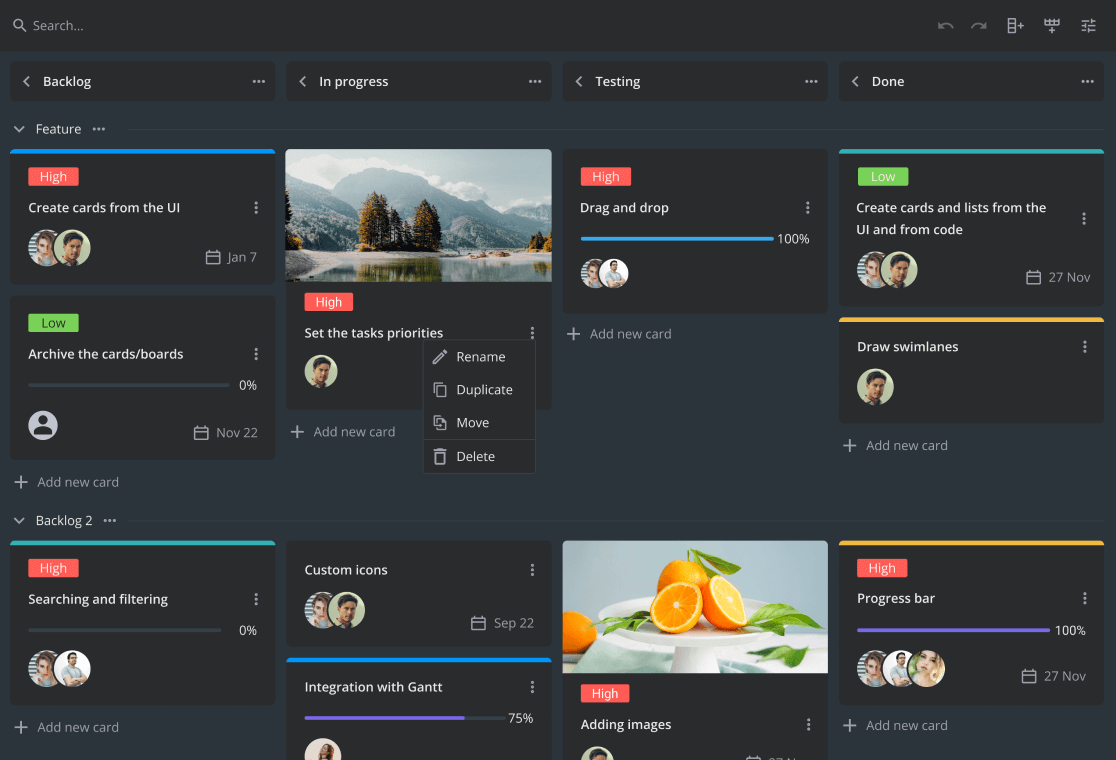
Try DHTMLX Kanban JS Demo
Open a demo on desktop


DHTMLX Kanban is a choice of web developers around the globe for creating flexible task management tools with minimum effort.





Key Features of DHTMLX JavaScript Kanban Board
Fully configurable
Touch support
Creating and editing columns and swimlanes
Drag and drop of cards and multiselection
Moving columns and rows from the UI
Searching and sorting
Creating and editing tasks
Duplicating tasks
Assigning due dates
Setting the priority of tasks
Attachments to cards
Expanding and collapsing columns
TypeScript support
Get Started with DHTMLX JS Kanban Board
Custom toolbar
If needed, you can hide the toolbar of your JavaScript Kanban component.
Otherwise, there are ample opportunities for its configuration and
customization. It is easy to rearrange controls, place a search bar
and define its behavior, modify the sorting function, and equip the
toolbar with custom controls.


Built for Agile Workflows and Works Smoothly
with AI Coding Assistants
DHTMLX Kanban is available under the GPL v2 license, making it a practical choice for open-source task boards and collaborative workflow apps. It enables fast prototyping with GitHub Copilot, Claude, and other AI coding assistants, helping developers generate a functional Kanban board that can be extended for real-world use.
Prompt
Install @dhtmlx/kanban and create a Kanban board with three columns (To Do, In Progress, Done), draggable cards, and task labels.
 React
React
 Angular
 Vue.js
 Svelte
 Salesforce
Why Choose DHTMLX JavaScript Kanban Library?
Feature-rich out of the box
Our Kanban widget is developed to meet the needs of a wide variety of web applications.
Users take control of the whole workflow on a compact Kanban board by dividing tasks
into any number of categories, setting task priority, assigning tasks to team members,
and tracking the progress of tasks with deadlines, and intuitive progress bars.
Fully customizable
You can customize each UI element of the JavaScript Kanban board to match your web
app. Our rich API encompasses numerous methods and options for manipulating columns,
rows, and cards. We have introduced CSS variables to style the toolbar and editor and
even customize a scroll bar.
Integration with DHTMLX widgets
You can use the DHTMLX Kanban js library separately or combine it with other
components such as the Gantt chart, Scheduler, or To Do List. The Kanban board
can be easily synced with these widgets and provide insight into particular stages
of the project for specific departments or teams.
Support for touch screens
All JavaScript Kanban features work on touch screens to simplify the use of the task
board during your daily routine. Users can quickly select a card with a tap, edit its
description, and move to the proper column or row with drag-n-drop. You can enable
automatic scrolling to a newly added element, so that users won't have to scroll the
board manually.
DHTMLX Kanban Library Pricing
|
Individual
Total: $389
|
Commercial
Total: $769
|
Enterprise
Total: $1499
|
Ultimate
Total: $2999
|
| License Terms | Read License Agreement | Read License Agreement | Read License Agreement | Read License Agreement |
| Developers | 1 | 5 | 20 | |
| Projects | 1 | 1 | 5 | |
| Use in SaaS (unlimited end-users) | ||||
| Perpetual distribution rights |
|
Support Plan
|
Standard | Premium | Premium | Ultimate |
| Time Period | 1 year | 1 year | 1 year | 1 year |
| Updates | Major, minor, and maintenance updates | Major, minor, and maintenance updates | Major, minor, and maintenance updates |
Major, minor, and maintenance updates
Priority queue for bug fixing
|
| Support requests | 10 | 30 | 50 | |
| Response time | 72h | 48h | 48h | 24h |
| Personal Account Manager |
Unlock up to 65% Savings with DHTMLX Bundles


Combine Kanban with Other DHTMLX Libraries

DHTMLX Kanban: Frequently Asked Questions
General
Functionality and UX Configuration
UI Customization
Scalability and Integration
Supported Platforms and Accessibility
Licensing and Support
General
What is DHTMLX Kanban?
DHTMLX Kanban is a fully customizable JavaScript component for building interactive Kanban boards. It provides a modern UI, high performance, and rich API to help you visualize and manage workflows in web applications.
What is DHTMLX Kanban used for?
DHTMLX Kanban is used to organize tasks, visualize task progress, and manage workflows using the Kanban methodology. Common DHTMLX Kanban use cases include project management tools, CRM systems, agile dashboards, and any application that requires a clear visual representation of task boards.
Is DHTMLX Kanban a JavaScript Kanban board?
DHTMLX Kanban is a pure JavaScript Kanban board component that can be seamlessly integrated with a web application of any complexity and works with popular frameworks, including React, Angular, Vue, and Svelte.
Can DHTMLX Kanban be used in enterprise applications?
DHTMLX Kanban functions as a robust enterprise Kanban board, providing extensive API capabilities, high performance, dedicated technical support, security-oriented licensing, and scalability suitable for mission-critical enterprise solutions.
Is DHTMLX Kanban available for open-source projects?
Yes, DHTMLX Kanban is available under the GPL v2 license, so you can use it in GPL-compatible open-source projects. The GPL edition is also available via npm, which makes it straightforward to install and start building and prototyping with different AI coding tools quickly.
Is DHTMLX Kanban suitable for project management?
DHTMLX Kanban works perfectly as a kanban for project management, helping teams visualize workflows, manage tasks, track progress, and collaborate efficiently in project-driven environments.
How do I initialize a DHTMLX Kanban board?
To initialize the DHTMLX Kanban board, you have to download the package with a trial or licensed version first, include the Kanban JavaScript and CSS files in your page, and create an HTML container. Then use the kanban.Kanban constructor in JavaScript, passing the container selector and a configuration object to create the board instance. You can also initialize an optional toolbar with kanban.Toolbar.
Functionality and UX Configuration
Does DHTMLX Kanban support drag-and-drop?
DHTMLX Kanban offers intuitive kanban drag and drop functionality, enabling end-users to move tasks between columns and swimlanes while keeping workflow states instantly updated.
Can users reorder cards and columns?
Users can reorder cards by dragging them to new positions within the Kanban board, including across columns and swimlanes, thanks to the built-in drag-and-drop support for cards. Columns and rows can also be rearranged.
Does DHTMLX Kanban board support swimlanes?
The JavaScript Kanban board natively supports kanban swimlanes, enabling you to group tasks by team members, projects, or any custom criteria for more advanced workflow visualization.
Can I set WIP limits in DHTMLX Kanban?
You can set custom Kanban WIP limits for cards in columns or swimlanes to control task load and keep workflows balanced.
Does DHTMLX Kanban support real-time updates?
DHTMLX Kanban supports real-time updates when connected to a multi-user backend. By combining the REST data provider with WebSockets and server-side event broadcasting, multiple users can work on the same board simultaneously and see each other’s changes instantly without reloading the page.
UI Customization
How can I customize DHTMLX Kanban appearance?
You can use extensive Kanban customization options to set up card templates, modify the Toolbar’s layout and actions, and adjust the context menu, column, and rows. You can also tailor the Kanban board’s look by using custom CSS classes.
Does DHTMLX Kanban support themes and custom CSS?
DHTMLX Kanban includes built-in themes, e.g., Material, Willow, and Willow-Dark, and it also allows extensive custom CSS styling. You can customize the appearance of specific columns, rows, and cards using custom CSS variables to make the Kanban board fit your design needs.
Can I create custom card templates in DHTMLX Kanban?
You can define custom kanban card templates to control how card content is displayed. This includes modifying fields, adding icons or labels, or embedding custom HTML content based on your business logic.
Can I update Kanban cards programmatically using the API?
Using the feature-rich Kanban JavaScript API, you can add, update, move, or delete cards programmatically. The Kanban API allows full control over board data and behavior, enabling custom logic, event handling, and real-time updates.
Scalability and Integration
Is DHTMLX Kanban suitable for large teams and datasets?
DHTMLX Kanban is designed as a scalable kanban board, capable of handling large datasets, high user loads, and complex workflows while maintaining smooth performance and responsiveness.
How do I load data into DHTMLX Kanban?
You can load data into Kanban by providing JSON data containing cards, columns, rows, and links directly to the component.
How do I integrate DHTMLX Kanban with a REST API?
The JavaScript Kanban includes a RestDataProvider service that supports complete interoperability with REST APIs for streamlined backend communication. With the DHTMLX Kanban REST API approach, you can load tasks, columns, links, and rows data from your backend and sync updates back to the server. The REST API methods and routes are described in the documentation.
Does DHTMLX Kanban support backend integration?
DHTMLX Kanban has no strict backend requirements, so you can connect the JavaScript Kanban board component to any server-side platform that supports a REST API, including Node.js, PHP, Java, .NET, Python, and more. The kanban backend integration guide is available in the documentation.
Can DHTMLX Kanban be integrated with other DHTMLX components?
DHTMLX Kanban supports smooth DHTMLX integration with Gantt, Scheduler, and To Do List components. This allows you to build complete project management tools, dashboards, and complex enterprise applications with a consistent UI and unified data flow.
Supported Platforms and Accessibility
Is DHTMLX Kanban mobile-friendly and responsive?
DHTMLX Kanban provides a mobile-friendly kanban board experience with adaptive layouts and touch interaction support, ensuring smooth and intuitive task management across phones, tablets, and desktops.
Does DHTMLX Kanban support localization?
The component provides robust kanban localization support, allowing developers to tailor UI elements to different languages with ease and meet the needs of international users.
Licensing and Support
Is DHTMLX Kanban free or commercial?
DHTMLX Kanban is a commercial JavaScript component offered under several flexible licensing options. You can choose a DHTMLX Kanban license type that fits your project’s scale, whether it’s a small app, a large SaaS platform with an unlimited number of end-users, or an enterprise-grade solution.
Is there a free trial for DHTMLX Kanban?
The DHTMLX Kanban free trial version is available for 30 days, allowing you to explore all features, test integration scenarios, and evaluate performance before making a purchasing decision.
What kind of support is available for DHTMLX Kanban?
You can rely on DHTMLX support through detailed documentation, live examples on the Code Snippet tool, community forum, and a dedicated ticket system where expert developers assist with smooth Kanban integration and customization.
Where can I find examples and documentation?
You can find official DHTMLX Kanban documentation, guides, and API references on the DHTMLX website. The docs cover everything from basic setup and initialization to advanced features and REST integration. There are also live samples and code snippets to explore, plus demos on GitHub that show how Kanban works with different frameworks, including Angular, React, Vue, and Svelte.