
We are happy to present the release of DHTMLX RichText Editor 2.1. This update introduces new opportunities to deliver more comprehensive text-editing experiences in web apps. The centerpiece of this release is a customizable trigger system that allows users to add user mentions, tags, emojis, slash-style command menus, and other contextual interactions directly in the editor. Another notable novelty is the ability to insert content (text, HTML, or Markdown) at the current cursor position or replace the selected text.
In addition, v2.1 also includes out-of-the-box markdown support, drag-and-drop image insertion and improved clipboard handling to facilitate everyday content editing.
Let us consider all new features and improvements in more detail.
Smart Triggers for Context-Aware Editing
Starting from v2.1, our RichText component allows you to go beyond standard text formatting operations and extend the editor’s functionality with the special trigger mechanism. Now, you can specify trigger characters that activate suggestion lists and custom actions. It enables end-users to promptly perform a range of contextual interactions in the document while typing. Сommon examples include the following:
- @ – mention users or workspace members,
- # – apply tags to content,
- /- invoke command menus
- :- add emojis,
- $ – insert a financial ticker or variable
To configure the behavior of the needed character, you’ll need the triggers property added to the RichText API. It includes several parameters to cover both standard and custom scenarios.
Standard Trigger-Based Insertions
Let us start with the basics. For instance, you need to add suggestion lists for user mentions, tags, and less common options, like searching for a user. To do that, you specify characters that open the required dropdowns in the trigger parameter and bind them to associated data sources in the data parameter. There are three possible forms of data sources: array, sync function, and async function. The interactive example below employs all these forms for the data field.
Try entering @, #, or +, the editor will detect the context and offer the corresponding dropdown list with predefined items. Then, you can insert the appropriate option with a mouse click or keyboard shortcuts. As a result, the selected item is inserted into the document as a structured, non-editable token. No need to open a separate dialog or menu.
Each dropdown item specified in the data parameter is shown as plain text using the label field. But you can customize the way these items are rendered in the dropdown list for different triggers. For this purpose, you pass a custom template via the new triggerTemplate property that changes the appearance of suggestion items for a particular character.
For instance, here is how to enrich the dropdown for the user mention trigger (@) with items containing avatar, username, and full name, while keeping basic text labels for the tag character:
value,
triggers: [
{ trigger: "@", data: people },
{ trigger: "#", data: tags },
],
triggerTemplate: template(obj => {
if(obj.trigger === "@"){
return `<div class="user">
<img class="user-avatar" src="${obj.data.image}">
<div class="user-nickname">${obj.data.label}</div>
<div class="user-name">${obj.data.name}</div>
</div>`;
}
else return obj.data.label;
})
});
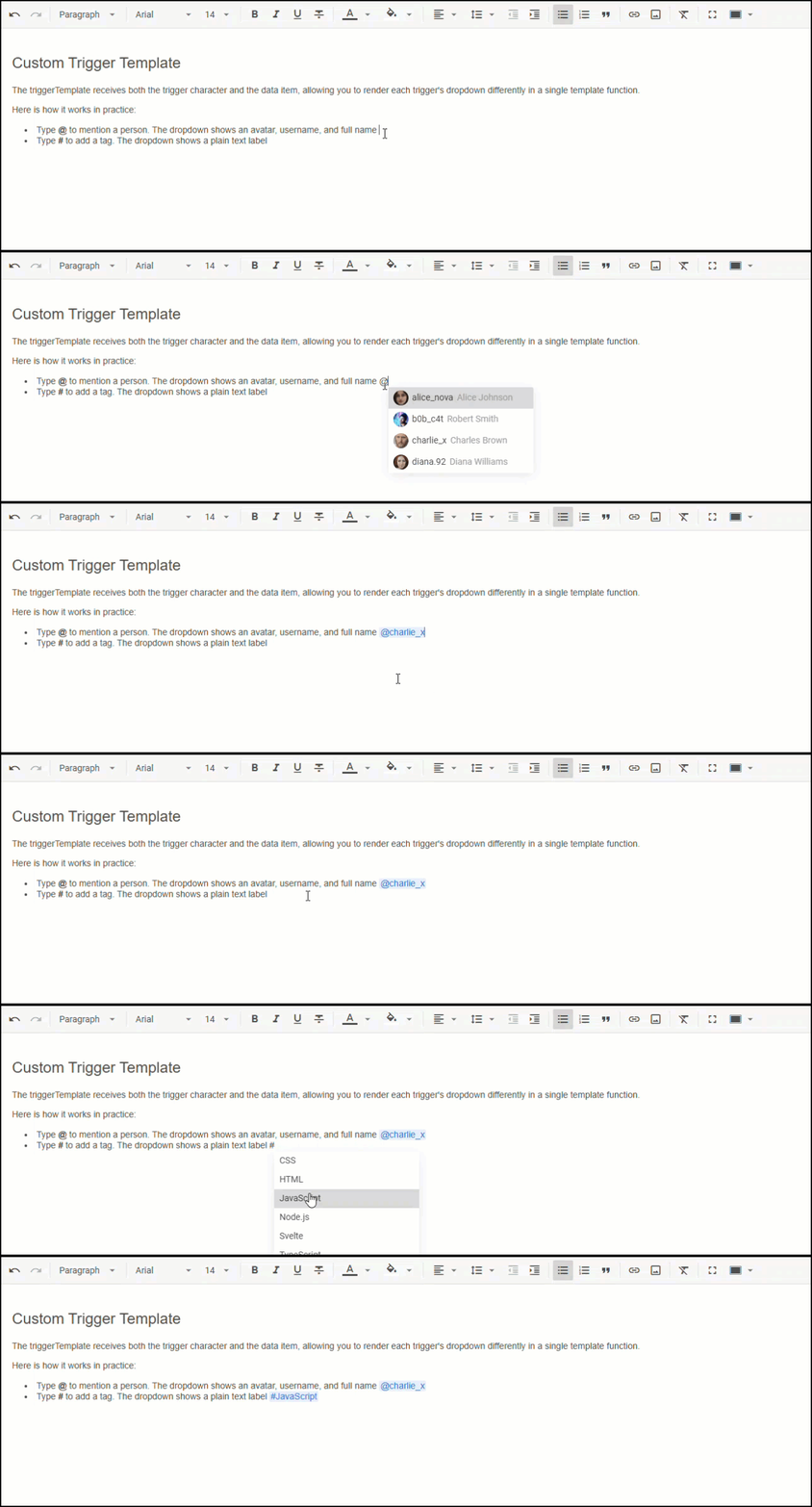
The trigger system also provides events such as show-suggest, hide-suggest, and insert-token, allowing apps to react when the dropdown is shown or hidden, or when an item is selected.
And that’s not all. The triggers property allows you to go even further and respond to trigger selections with custom actions.
Custom Trigger-Based Actions
In DHTMLX RichText, triggers are not limited to inserting structured tokens into the document. For more advanced use cases, you can specify custom logic that will be executed once a dropdown item is selected.
Under the hood, it is done with the help of the action parameter, allowing you to run your own code instead of inserting a token. For example, this custom callback function is great for creating a slash-command menu with formatting options and system commands like “Print”.
value,
triggers: [
{
trigger: "/",
data: commands,
action: data => {
setTimeout(() => widget.api.exec(data.id, data.config || {}));
},
},
]
});
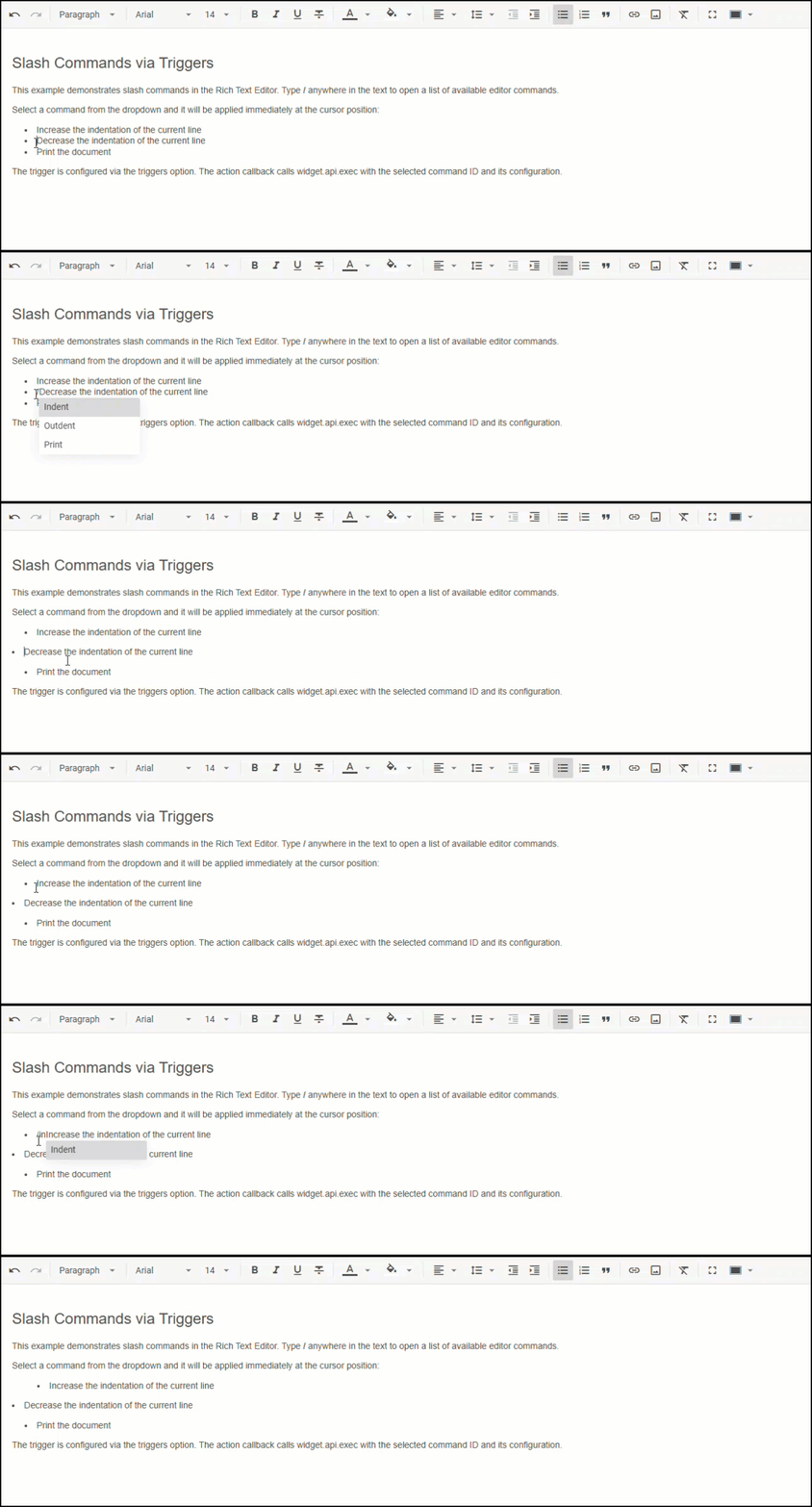
Try these formatting options and the “Print” command using the official sample.
Additionally, the action parameter can be combined with the triggerTemplate property to add visual elements to dropdown items. The most vivid example of this scenario is adding emojis grouped by categories.
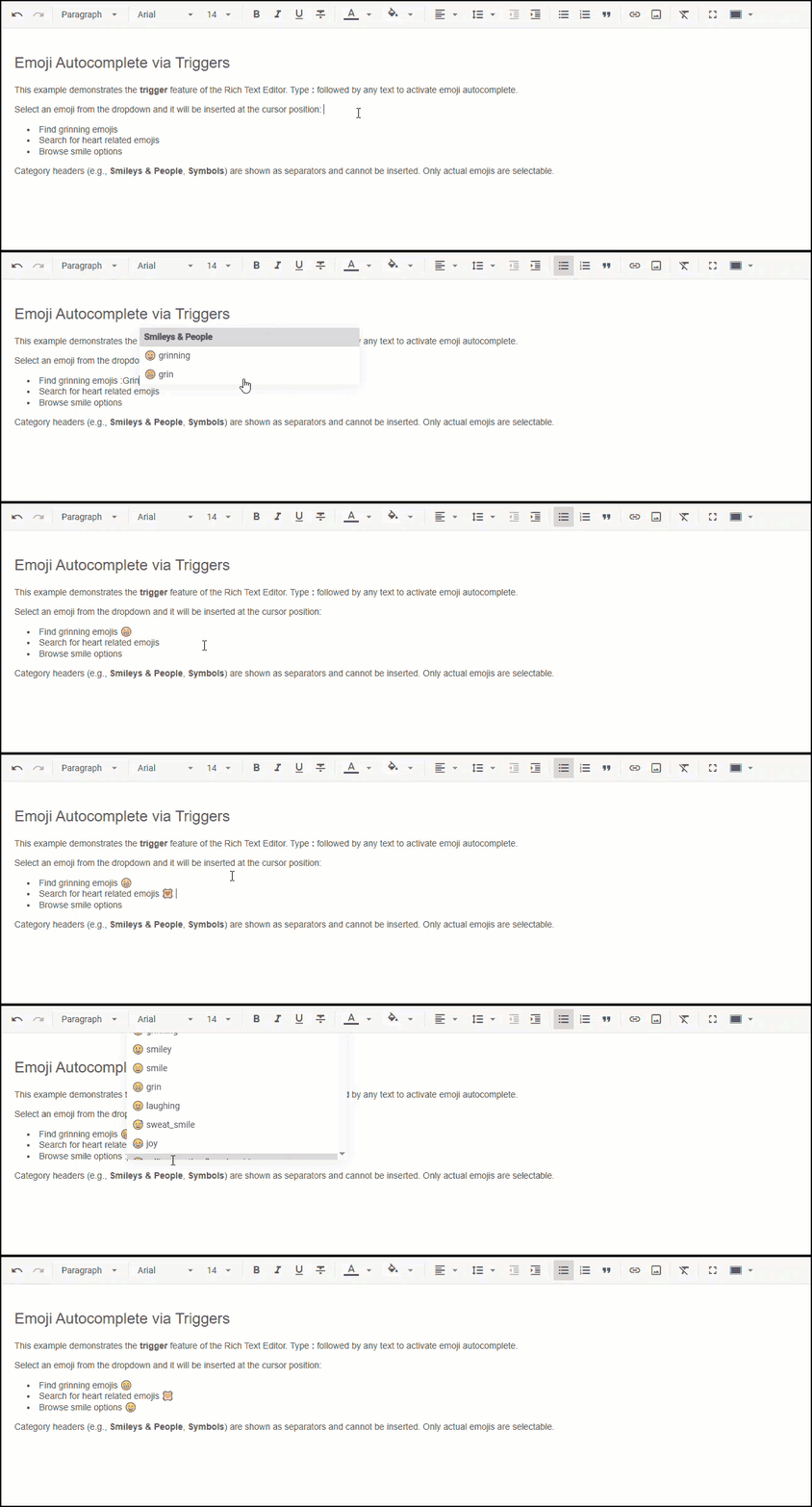
By combining triggers with custom rendering and action handling, it becomes much easier to implement dynamic, context-aware editing workflows tailored to specific project requirements.
Complete information on the trigger system’s capabilities in DHTMLX RichText Editor is provided in this guide.
More Control Over Content Insertion
The next noteworthy addition to the RichText API delivered in v2.1 is the new insertValue() method. With this novelty, you get a convenient way to embed content right in the editor at the current cursor position or replace the selected piece of text. The method supports multiple content formats, including plain text, HTML, and Markdown.
if (format === "markdown") {
widget.insertValue("**bold** and *italic*", richtext.markdown.fromMarkdown);
} else if (format === "text") {
widget.insertValue(" plain text ", richtext.text.fromText);
} else {
widget.insertValue('<a href="https://dhtmlx.com" title="DHTMLX site">DHTMLX link</a>');
}
}
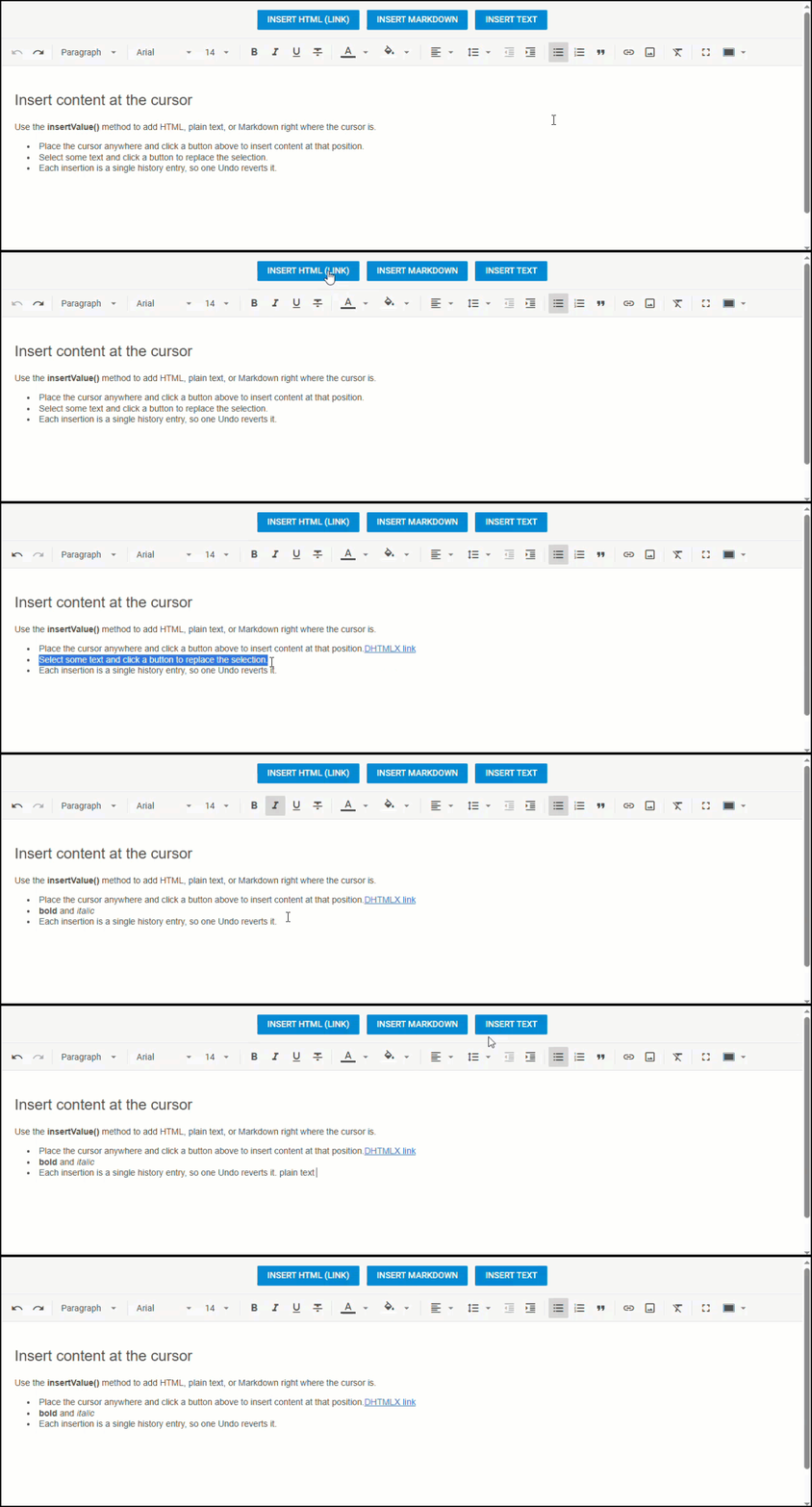
Moreover, the insertValue() method can also be applied when configuring custom actions for triggers using the action parameter. Particularly, it comes in handy when implementing the dropdown list for inserting emojis directly in the document:
triggers: [
{
trigger: ":",
data: emoji, // [{ id: "apple", label: "apple", code: "1F34E" }, ...]
action: item => editor.insertValue(`<span>${emojiFromCode(item.code)} </span>`)
}
],
// render the emoji itself (not just its label) in the dropdown
triggerTemplate: template(({ data }) => `${emojiFromCode(data.code)} ${data.label}`)
});
Together with optimized setValue() and getValue(), insertValue() is a vital part of our efforts taken in this release to ensure a smooth editing experience with the content in the Markdown format.
Other Improvements
Apart from the main features highlighted above, v2.1 brings along a few quality-of-life improvements:
- Improved image management with drag-and-drop insertions and serverless image uploads
- Enhanced clipboard support for smoother content transfer between RichText instances and external sources
Visit the “What’s New” section for the final overview of new features included in DHTMLX RichText Editor 2.1. After that, it makes sense to download a free 30-day trial version of the product and try the novelties in action. Our current clients can access v2.1 via their Client’s Area.
And last but not least, we want to remind you that RichText has recently become available under the GPL license, as well as many other DHTMLX components.