
It is always useful to have more than one way to approach challenging tasks in web development, particularly state management in React apps. It is especially true for projects that rely on project management tools like a Gantt chart. Previously, we discussed how to manage state in apps using DHTMLX React Gantt with predictable Redux Toolkit, lightweight Zustand, reactive Mobx, and explicit XState.
This time, we’ll explore Jotai and how its bottom-up approach with the atomic model fits into a highly interactive Gantt environment and React’s hooks-based workflow. As a reference point, we’ll use the react-gantt-jotai-starter demo, which demonstrates how to use Jotai with DHTMLX React Gantt.
Before delving into technical details, let us first take a quick look at how Jotai works and where it makes the most sense to use it.
Jotai State Management in React Apps
Jotai entered the React landscape in 2020 to help development teams deal with extra re-render issues with React context (useContext + useState). During that relatively short period, Jotai gained the trust of many innovative companies like Meta, TikTok, and Adobe. What makes it stand out among other state management options for React?
Jotai is indeed inspired by the atomic state model of Recoil, but is frequently compared to Zustand because both share a philosophy of minimalism, ease of use, and lack of heavy boilerplate. If you take a look at the latest editions of popular surveys (State of React, JS Rising Stars), you can notice that the development community highly appreciates both libraries and puts them close to each other in various rankings. Even the names of both libraries are translated as “state” (Jotai from Japanese and Zustand from German).
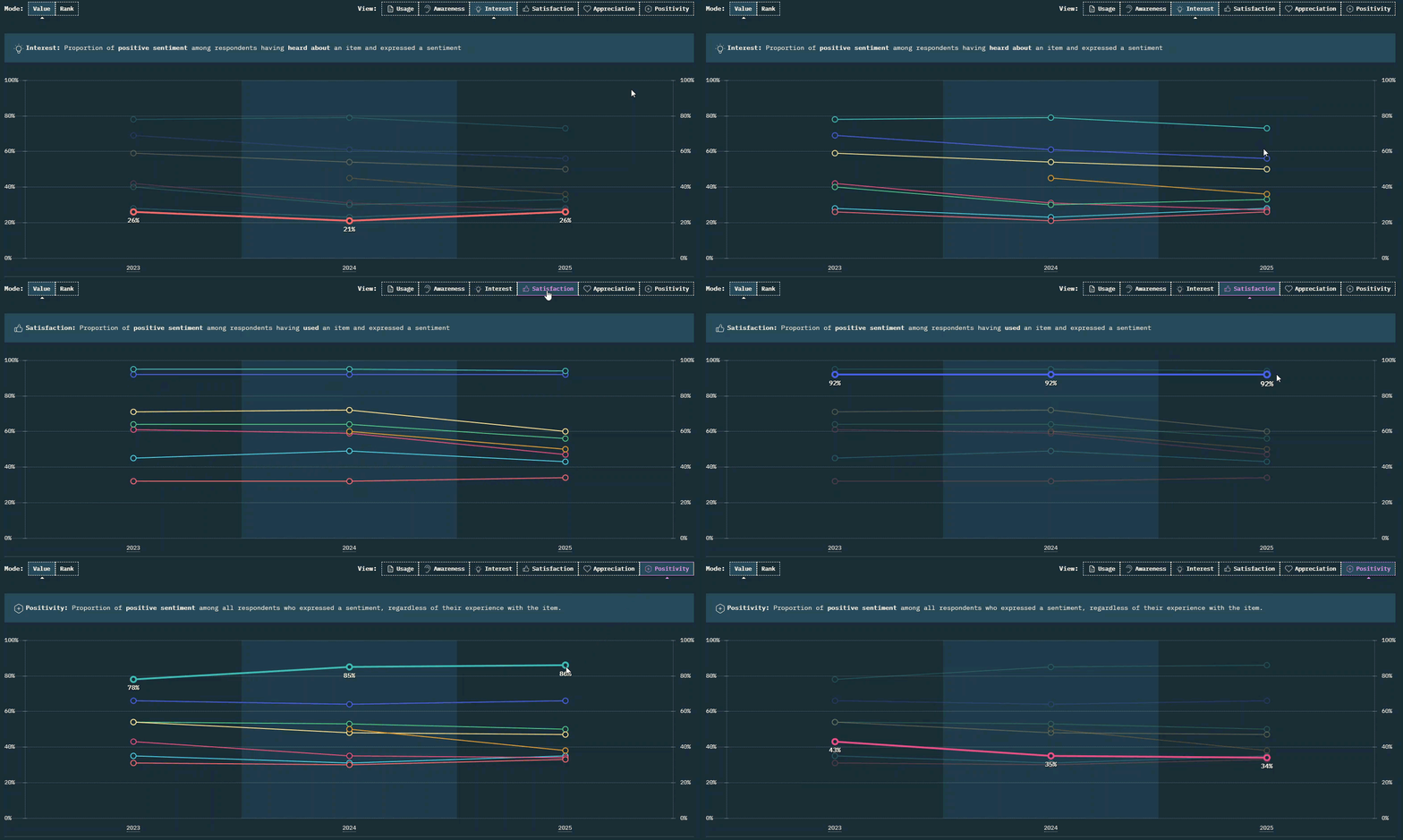
Source: State of React 2025
The difference between Jotai and Zustand becomes apparent when you examine their mental models. Zustand offers a centralized store that can be split into modular slices. Jotai takes a different route by breaking down the state into small, independent atoms that do not rely on any central structure. Thus, instead of selecting a piece of state from a store and mutating it through an action, Jotai allows you to work with individual atoms directly.
React components subscribe only to the atoms they use, so updates remain granular and don’t trigger excessive re-renders elsewhere in the UI. This approach helps eliminate the need for memoization and makes state updates more straightforward, without deviating from React’s declarative style. Jotai’s basic API is similar to useState. Still, atoms can also be combined, derived, and used to handle updates (write-only atoms), enabling you to build more complex state models when needed. Jotai is also backed by a solid package of utilities and extensions to help you out. As a result, Jotai works well in the following scenarios:
- as a viable alternative to useState+useContext,
- you need something as developer-friendly as Zustand,
- code splitting is a high priority,
- projects that require support for modern React features like Suspense and Transition,
- and even use Jotai atoms for complex UI state management in enterprise apps.
This flexibility comes with a trade-off. As the number of atoms increases, the overall structure can become harder to control than a single centralized store. At that point, clear naming and organization become crucial.
Why It is Worth Trying DHTMLX React Gantt with Jotai
A React Gantt chart built with DHTMLX is commonly a data-intensive tool, where a single user action in the UI, such as editing a task or adding a dependency link, can trigger a range of changes across interdependent tasks and the overall project timeline. Handling this kind of interaction requires a state model that can deal with frequent updates without overcomplicating things. This is where Jotai feels like a reasonable choice.
When state changes are handled through focused atoms, updates become easier to isolate. If you reschedule a task, only the pieces related to this task are affected. The rest of the UI remains untouched. In Gantt charts, where changes happen all the time, this makes it much easier to follow the state changes. You don’t have to guess what else might have changed somewhere else.
To better understand the work of Jotai atoms in the React Gantt demo, first, it is worth paying attention to how the state is structured and how updates flow from the UI into the store.
Separation of Concerns and Data Flow
All the Gantt data is placed in the Jotai store. The current state is kept inside ganttStateAtom. It is treated as the single source of truth. Updates are handled by write-only atoms, each responsible for a specific type of change, whether it’s editing a task, managing links, or adjusting zoom.
The component that renders the Gantt mostly just reads this state and passes it down as props. When something happens in the chart, it doesn’t try to process it on its own. Instead, the event is forwarded via data.save, which determines which atom should handle it.
The demo also includes a custom toolbar with undo/redo and Zoom controls that can also affect the Gantt state. Even though it sits outside the chart, its actions don’t need a separate state management algorithm. Clicking undo or changing zoom triggers the same update flow as any interaction inside the Gantt, ensuring state consistency.
All React Gantt data handling follows a similar, predictable path. A user action first reaches data.save, which hands it off to the right atom. Just before anything is modified, pushHistory saves the current state. After that, the atom updates ganttStateAtom, and the new data is passed back into the Gantt, causing it to re-render.
Now, we can proceed to the actual DHTMLX Gantt React integration with Jotai and consider atomic state management in React.
Prerequisites for Installation and Setup
If you want to run our demo, the complete setup instructions are provided in the project’s repository. There are also a few more points worth noting.
First of all, the demo uses the trial build (@dhtmlx/trial-react-gantt) of DHTMLX React Gantt, which is ideal for evaluation. If you decide to add this integration to production apps, you should replace this option with @dhx/react-gantt and update imports accordingly.
Another point is that the project runs on React 19 with Vite and TypeScript. Jotai works well with React 18 and 19 and requires no Provider wrapper by default (provider-less mode).
And there is a final CSS styling note related to Vite’s default template. You will need to clear the default App.css styles and set height: 100% on #root for the Gantt to fill the viewport correctly.
That’s it. Let’s get down to the most interesting part, namely, integration details that matter.
Implementation Walkthrough
We’ve already covered the main building blocks of state management in this demo. Now, let’s see how they are implemented in code and clarify a few important details
1. Storing Gantt data
As you already know from the above, the current Gantt state is stored in ganttStateAtom, which is specified as follows:
tasks: seedTasks,
links: seedLinks,
config: { zoom: defaultZoomLevels },
});
const maxHistory = 50;
export const pastAtom = atom<GanttState[]>([]);
export const futureAtom = atom<GanttState[]>([]);
Whenever something changes in the UI, this object gets updated, and the React Gantt re-renders based on it.
Apart from that, this piece of code also includes pastAtom and futureAtom, which are required for handling undo/redo history stacks. We limited the maximum history to 50 entries to prevent it from growing indefinitely, reducing the risk of associated memory consumption issues. We’ll cover the undo/redo mechanism in more detail a bit later.
2. Applying changes to the Gantt state
Now, when you know where the Gantt state “lives”, the next question is how it actually changes. Every update to the Gantt goes through write-only atoms. Each of them is responsible for a single type of UI mutation (creating a task, deleting a dependency link, etc.).
pushHistory(get, set, get(ganttStateAtom));
set(ganttStateAtom, {
...get(ganttStateAtom),
tasks: [...get(ganttStateAtom).tasks, { ...task, id: `DB_ID:${task.id}` }],
});
return { ...task, id: `DB_ID:${task.id}` };
});
Before anything is changed, the current state is passed into pushHistory. That’s what later allows undo and redo to work. After that, the task is appended to ganttStateAtom. The same algorithm works for other operations with tasks and links.
But how does the React component actually call them? Write-only atoms are used through Jotai’s useSetAtom hook aimed for individual updates:
const updateTask = useSetAtom(updateTaskAtom);
This way, write-only atoms don’t expose any value to read. You don’t subscribe to them. They simply take an action and apply it to the state.
Only ganttStateAtom is read via useAtom, because the React component needs the full state to pass it as props to ReactGantt.
3. Paving the way from UI actions to state updates
When a user interacts with the UI, Gantt reports what happened via data.save instead of updating anything itself. This callback is a single point where UI interactions can reach the state layer. Its main purpose is to translate user actions into calls to the corresponding state-changing atoms.
For “create” operations, data.save returns the atom result back to the Gantt to keep IDs in sync. Let us elaborate a bit on this matter. When a task is created, the atom returns (via data.save) the task object with a new, store-assigned ID instead of the temporary one generated on the Gantt side. It helps avoid the issue with mismatched IDs. Finally, the data object is wrapped in useMemo to avoid recreating it on every render.
To learn more details about the use of data.save, check the guide on state management basics with DHTMLX React Gantt.
4. Complementing React Gantt with undo/redo functionality
In our demo, the Gantt component doesn’t manage undo/redo, the state layer takes care of it. The Jotai store keeps snapshots of the entire Gantt state and switches between them when needed.
As you already know, the current Gantt state is saved before any update using pushHistory. Here is what happens next:
const past = [...get(pastAtom), state];
if (past.length > maxHistory) past.shift();
set(pastAtom, past);
set(futureAtom, []);
};
Each snapshot of the Gantt state is added to pastAtom, while futureAtom is cleared. If the list gets too long (exceeds the maxHistory value), the oldest entry is removed.
Undo and redo operations are handled by undoAtom and redoAtom. One restores the last saved state from pastAtom, the other restores a state from futureAtom. Since snapshots capture the full GanttState, undo and redo always apply to the whole chart, regardless of the type of change.
That’s it. This information should be enough to get a clear picture of the integration process implemented in our demo and confidently try it in your own scenarios. For more information on the technical part, check out a practical DHTMLX React Gantt tutorial with Jotai.
Final Thoughts
Summarizing the above, Jotai feels like a good match for a React Gantt setup. Updates stay focused, and there is no need to re-render the entire UI every time a single change takes place, which is vital for data-intensive charts. Still, there’s a limit to how far this scales. Once the state starts spreading across many parts of a larger app, a centralized approach like Redux Toolkit is a preferable option.