
When building a project planning application in React with components like a Gantt chart, state management quickly becomes a complex problem: the basic approach does not scale well for managing state transitions and keeping the UI in sync.
Using DHTMLX React Gantt and React Scheduler, we already discovered what can be accomplished with Redux Toolkit, Zustand, and MobX. Each option has its own strengths, but they all follow a somewhat similar mindset.
Today, we take a new direction and explore XState, which follows a noticeably different, machine-based approach that is particularly well-suited for managing complex logic in React Gantt applications.
By the end of this blog post, you’ll get a clear idea of how to implement XState in a React Gantt-based project planning app.
What is XState and How It Works
XState is a comprehensive tool for handling non-trivial state management and orchestration tasks in web apps written in pure JavaScript or popular front-end frameworks such as React. It’s not as commonly used as something like Redux or Zustand, but it has been around for quite a while and serves to meet more complex state management requirements.
XState is built around the idea of finite state machines (FSM). At first sight, this time-tested mathematical concept may seem vague, but it makes much more sense when applied in practice. Instead of letting the state change freely, FSM allows you to define a set of possible states and describe how the app data can move from one well-defined state to another. The crucial point is that these transitions are explicit. The image below clearly illustrates the core ideas behind state machines in XState.
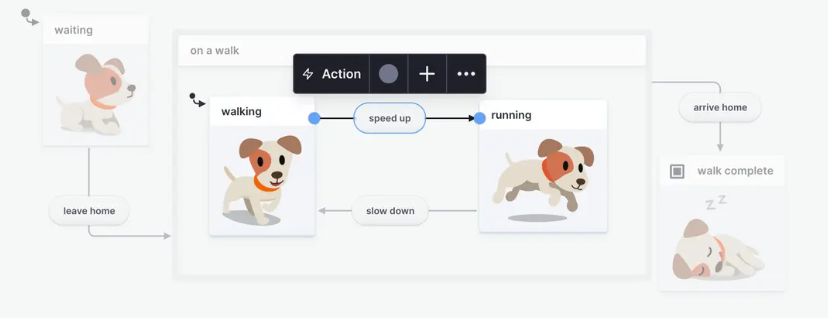
Source: XState
Changes between states are triggered by events, which are most commonly related to user interactions with the UI. State transitions in XState are accompanied by the execution of actions that update data stored in what is called the context. When things get complicated, XState adds another layer called statecharts. This extension helps organize complex state logic into a visual structure, including such aspects as hierarchies, concurrency, and communication.
Once a single state machine is not enough, XState introduces actors. These are multiple machines that can run in parallel and communicate with each other. In more complex apps, this kind of separation can actually make things easier.
What all of this gives you is a more structured way to handle application behavior. Instead of reacting to changes on the fly, you define upfront what is allowed to happen and what is not. It helps exclude invalid states from the workflow (like two conflicting states at the same time) and simplify debugging.
There’s also a broader ecosystem around XState known as the Stately platform. Designed by the creator of XState and his team, this platform provides a robust package of tools to enhance user experience and productivity with XState. For instance, it includes Stately Studio (visual editor), Stately Sky (cloud deployment), as well as numerous developer and inspection tools.
You can get acquainted with other XState concepts on the official website of the project. We turn to the question of practical differences from other libraries and use-case scenarios for XState.
When XState is a Viable Option
XState is often mentioned as a powerful option, but in everyday React work, it’s not usually the first tool developers reach for. More familiar choices like Zustand, Redux Toolkit, or MobX tend to feel easier to adopt and quicker to apply. There are fairly practical reasons for that. XState comes with a different mental model, and it often takes some time to get used to it. It is also criticized for verbosity and overengineering, especially in simpler scenarios.
Here is the comparison table that gives a clear picture of how XState differs from popular state management libraries that we’ve encountered earlier:
| Criteria | XState | Redux Toolkit/Zustand/MobX |
| Primary focus | Modeling app behavior via events and transitions | Storing data and updating it when something changes |
| How state updates are performed | Events are sent to the machine, which determines how the state changes (i.e., indirectly) | Direct state updates via functions, reducers, or mutations |
| Handling complex workflows | Built-in support for hierarchical and parallel states, coordinated updates, and asynchronous orchestration | Sequential updates via reducers, setters, or reactivity; rely on custom logic for coordination |
| Boilerplate | Requires more setup and structure from the start | Usually quicker to set up |
| Learning curve | Steep | From low to moderate |
| Tooling | Powerful tooling ecosystem fueled by the Stately platform | DevTools and middleware support |
Analyzing the above, XState feels less like a general-purpose solution and more like a niche (or specialized) tool. Instead of focusing on storing and updating data, it’s really about describing how things are allowed to behave and change over time. That approach doesn’t clash with React, but it can feel like too much for simpler use cases.
In practice, XState often ensures predictable state management in React apps, where complex UI behavior is involved, and different processes need to stay in sync. Project management apps built with DHTMLX React Gantt and React Scheduler often fall into this category, as they involve complex interactions, asynchronous data flows, and coordinated state changes.
At this point, it probably makes more sense to stop talking about concepts and actually see how this works in code. We’re not going to dive too deep into the XState architecture here, but try to give a general idea of how it behaves in a real setup.
To do that, we’ll outline the main steps required to integrate XState with DHTMLX React Gantt. The same pattern applies to our React Scheduler component as well, so focusing on one is enough to understand the overall approach.
Key Steps for Integrating DHTMLX React Gantt with XState
Although the overall integration flow remains consistent across different state management solutions, each library brings in its own peculiarities. Here, we’ll focus on the steps that are specifically related to how to manage state in DHTMLX React Gantt with XState.
If you plan to implement a similar scenario in your web project, our documentation includes the DHTMLX React Gantt + XState tutorial as well as the same integration guide for DHTMLX React Scheduler. Also, there is a working GitHub project for Gantt based on the tutorial.
Setting Up the State Machine Structure
We start with the state machine, the core element of the state management layer in XState. First, you describe the state machine structure (or what it will contain) via TypeScript interfaces:
import type { Link, GanttConfig, SerializedTask } from '@dhtmlx/trial-react-gantt';
import { seedTasks, seedLinks, defaultZoomLevels, type ZoomLevel } from './seed/Seed';
export interface Snapshot {
tasks: SerializedTask[];
links: Link[];
config: GanttConfig;
}
export interface ContextType {
tasks: SerializedTask[];
links: Link[];
config: GanttConfig;
past: Snapshot[];
future: Snapshot[];
maxHistory: number;
}
As you can see, the ContextType interface includes the machine’s full context (internal data store), including Gantt data and history tracking, while the Snapshot interface is required to control the state via the undo/redo feature.
Defining Events and Actions
The next step is to specify events that operate as signals for state changes in the Gantt chart, and the actions executed by the state machine in response to these events.
In our Gantt scenario, all user interactions (task editing, updating links, changing zoom, or using undo/redo operations) that lead to changes in the state structure are represented as discrete events:
type UndoEvent = { type: 'UNDO' };
type RedoEvent = { type: 'REDO' };
type AddTaskEvent = { type: 'ADD_TASK'; task: SerializedTask };
type UpsertTaskEvent = { type: 'UPSERT_TASK'; task: SerializedTask };
type DeleteTaskEvent = { type: 'DELETE_TASK'; id: string | number };
type AddLinkEvent = { type: 'ADD_LINK'; link: Link };
type UpsertLinkEvent = { type: 'UPSERT_LINK'; link: Link };
type DeleteLinkEvent = { type: 'DELETE_LINK'; id: string | number };
type EventType =
| SetZoomEvent
| UndoEvent
| RedoEvent
| AddTaskEvent
| UpsertTaskEvent
| DeleteTaskEvent
| AddLinkEvent
| UpsertLinkEvent
| DeleteLinkEvent;
Events cause Gantt state transitions and trigger corresponding actions that update the context. Each action defines how the state changes. For instance, here is how task-related actions are implemented:
tasks: [...ctx.tasks, { ...(event as AddTaskEvent).task, id: `DB_ID:${(event as AddTaskEvent).task.id}` }],
})),
upsertTask: assign(({ context: ctx, event }) => ({
tasks: ctx.tasks.map((task) =>
String(task.id) === String((event as UpsertTaskEvent).task.id)
? { ...task, ...(event as UpsertTaskEvent).task }
: task
),
})),
deleteTask: assign(({ context, event }) => ({
tasks: context.tasks.filter((t) => String(t.id) !== String((event as DeleteTaskEvent).id)),
})),
Actions for link updates follow the same pattern. When the context must be updated, it is required to use the assign function, which creates a new context version based on the current state and the actuated event.
Creating the Machine Configuration
Now, it is time to show how to bring it all together by creating the state machine configuration:
tasks: structuredClone(ctx.tasks),
links: structuredClone(ctx.links),
config: structuredClone(ctx.config),
});
export const ganttMachine = createMachine(
{
id: 'gantt',
types: {
context: {} as ContextType,
events: {} as EventType,
},
context: {
tasks: seedTasks,
links: seedLinks,
config: { zoom: defaultZoomLevels },
past: [],
future: [],
maxHistory: 50,
},
initial: 'ready',
states: {
ready: {
on: {
SET_ZOOM: { actions: ['pushHistory', 'setZoom'] },
UNDO: { actions: 'undo' },
REDO: { actions: 'redo' },
ADD_TASK: { actions: ['pushHistory', 'addTask'] },
UPSERT_TASK: { actions: ['pushHistory', 'upsertTask'] },
DELETE_TASK: { actions: ['pushHistory', 'deleteTask'] },
ADD_LINK: { actions: ['pushHistory', 'addLink'] },
UPSERT_LINK: { actions: ['pushHistory', 'upsertLink'] },
DELETE_LINK: { actions: ['pushHistory', 'deleteLink'] },
},
},
},
},
)
The machine operates within a single ready state where all Gantt interactions are handled. Each event is mapped to one or more actions. The context object includes the initial data for the state machine.
Unlike Redux Toolkit or Zustand, where you directly call functions like addTask() or setZoom() to update state, you define a fixed set of events and then send them to the machine. It uses the current state and the incoming event to determine the next state. This makes all transitions easier to track as the application grows.
Connecting Gantt to the State Machine
This step is vital for understanding how changes in the Gantt chart reach the XState machine. In React Gantt, all data-related changes go through the data.save callback:
() => ({
save: (entity, action, item, id) => {
if (entity === 'task') {
const task = item as SerializedTask;
if (action === 'create') {
send({ type: 'ADD_TASK', task });
} else if (action === 'update') {
send({ type: 'UPSERT_TASK', task });
} else if (action === 'delete') {
send({ type: 'DELETE_TASK', id });
}
} else if (entity === 'link') {
const link = item as Link;
if (action === 'create') {
send({ type: 'ADD_LINK', link });
} else if (action === 'update') {
send({ type: 'UPSERT_LINK', link });
} else if (action === 'delete') {
send({ type: 'DELETE_LINK', id });
}
}
},
}),
[send]
);
The callback fires whenever a task or a link is created, edited, or removed. These changes are passed to XState by sending events via the send function.
The last thing to note here is the Gantt component’s visual responsibility. It doesn’t store or modify data, but simply renders what it receives. Tasks, links, and configuration changes come in as props, and the component updates the UI when props change.
Here is the complete workflow of event-driven state management for DHTMLX React Gantt, which is applicable for React Scheduler as well:
Data-changing user interaction with the UI → captured by data.save → transformed into an event → processed by the state machine for React Gantt → context is updated via actions → Gantt UI re-renders with new props.
Conclusion
XState may not be the most straightforward option for every project, but it becomes a strong choice in scenarios with intricate logic. In applications built around UI components like React Gantt or Scheduler, where a lot of things depend on each other, this approach provides a more predictable and scalable way to manage state than more conventional solutions. If your project involves complex UI workflows with coordinated state changes, XState is often a better fit. At the same time, for simpler use cases, XState may introduce unnecessary complexity, so it should be chosen deliberately based on the needs of your application.
Related Materials
- DHTMLX React Gantt documentation
- React Gantt NPM package (trial version)
- Using Zustand for State Management in Apps with DHTMLX React Gantt and Scheduler
- Managing State in DHTMLX React Gantt Chart and Scheduler with MobX
- Using DHTMLX Gantt Chart for React with Redux Toolkit: Principles, Benefits, and Implementation Tips