
Web developers enjoy working with React largely thanks to its huge ecosystem, with a very large selection of tools for handling various tasks. The diversity of available options gives freedom of choice, but finding the right solution isn’t always easy. State management is a vivid example. When working with components like DHTMLX React Gantt or DHTMLX React Scheduler, teams often consider several options to see which one suits them best. Previously, we discussed the specifics of managing state in these DHTMLX components using Redux Toolkit and Zustand. These tools cover most of the use-case scenarios, but not all.
This time, we’d like to invite you to explore the state management capabilities of MobX. We’ll go through MobX’s general approach, its distinguishing traits, highlights of how to use MobX with React Gantt, and MobX best practices.
What is MobX and Its Approach to State Management in React
MobX is a long-established JS library designed to ensure that app data and the user interface are constantly synchronized without much wiring. At the core of MobX is the idea of transparent functional reactive programming (TFRP). In practice, this means the library keeps track of how data flows through the application and updates the interface when something changes. Developers don’t have to wire those updates manually. Another practical detail is that MobX isn’t tied to a particular framework. Teams often use it with React, but the same approach works in projects built with other frameworks as well.
Let us elaborate on the matter and highlight three core architectural concepts of MobX.
State
State is basically the data that describes what’s currently happening in the application. In a project built with DHTMLX React Gantt, for example, this usually includes tasks, project start and end dates, dependencies between tasks, and other scheduling details. Teams structure this data in different ways depending on the project. Sometimes it’s simple arrays and objects, sometimes classes. Once the data becomes observable, MobX keeps track of how it’s used in the interface and refreshes the relevant parts of the UI whenever something changes.
Actions
An action is any function or piece of code that modifies the application state. It serves as a recommended mechanism for mutating observable data after being initiated by a specific event. In React project management UIs built with DHTMLX, actions are very likely to be linked to operations such as adding a new task (appointment) or rescheduling via drag-and-drop. Wrapping state mutations into actions helps optimize the codebase structure and prevent unintended state changes.
Derivations
Not everything in an application needs to be stored directly in the state. Quite often, some values can be calculated from the data that already exists. In MobX, these derived values are called derivations. There are two types of derivations – computed values and reactions. Computed values are calculated from the current state, while reactions are automatic actions (side effects) triggered by changes in observable data.
When putting it all together, you get a common MobX workflow like in the image below:
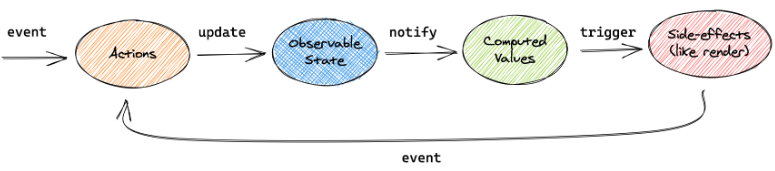
Source: MobX
Now, when you have a general idea about the architecture and operating principles of MobX, it is time to point out the main peculiarities and noteworthy features of this library.
MobX Strengths and Distinguishing Traits
In the web development world, state management is a highly competitive field, especially in the React ecosystem. MobX has been widely used in the development community since approximately 2016, but today surveys indicate it is far behind Redux Toolkit and Zustand in usage and overall popularity. But MobX still has some benefits that may compel development teams to consider it as a viable option for managing state in React-based apps.
- Mutability and Reactive Updates
Unlike Redux Toolkit and Zustand, which usually require creating new state objects (immutable updates) to trigger changes, MobX allows mutating observable state properties directly by assigning new values to them. When such a change occurs, MobX automatically identifies which parts of the UI depend on that data and updates only those elements. Such granular updates help maintain responsiveness in data-intensive interfaces.
- Object-Oriented State Modeling
Another distinctive characteristic of MobX is that it operates naturally with classes and object-oriented patterns. State is often organized as store classes with action methods and computed properties (getters) that are automatically cached. This approach can be more convenient and familiar to developers accustomed to OOP programming practices.
- Minimal Boilerplate Code
Setting up MobX is less time-consuming compared to other libraries. There is no need to write reducers, action types, or selectors, which keeps the codebase smaller and easier to navigate. In general, all you have to do is use two MobX API instruments: make the state (data) of your app observable and wrap all React components that read the data with the observer (higher order component).
- Flexible Architecture
MobX does not impose any specific architectural patterns. It supports both centralized and distributed store structures, so stores can be organized in a way that makes sense for the project. This flexibility is especially valuable for apps with comprehensive and evolving data models.
- Automatic Handling of Derived Data
This feature stems from the concept of derivations in MobX and suits well for rich UIs such as those built with DHTMLX Gantt and Scheduler components. MobX recalculates derivations automatically whenever the relevant state changes, which helps keep the state minimal and the UI up-to-date.
Now, let us compare MobX with Redux Toolkit and Zustand.
| Criteria | MobX | Zustand | Redux Toolkit |
| Coding style | OOP (class-friendly) | functional | functional |
| State management model | reactive (observable-based) | hook-based store | structured, reducer-based architecture |
| Mutability (update style) | mutable | immutable | immutable |
| Component wrapping | Observer (wrapper) | not required, direct access to the store via hook calls | Provider (wrapper) |
| Boilerplate | low | extremely low | medium |
| Performance | high (granular updates) | high (optimized subscriptions) | good (depends on selectors) |
| Scalability | high | medium/high | high |
| API clarity | high | high | moderate (highly structured) |
| DevTools (Debugging tools) | MobX DevTools | Redux DevTools (via middleware) | Redux DevTools |
Overall, MobX is a good choice for web apps that emphasize performance and contain complex, deeply nested, or interconnected data structures, where manually managing immutability and writing selectors (like in Redux or Zustand) becomes too labor-intensive. It’s also best suited for teams accustomed to a classic OOP development style.
Lastly, it is worth noting that if you like the concepts of the classic MobX but need a more structured and opinionated approach to state management, you can consider its extension called MobX-State-Tree (MST).
That concludes the theoretical part. Get ready to move to practice and see how to create and connect a MobX store with React components. For both DHTMLX React Gantt and React Scheduler, the integration process is the same, so we’ll focus on the key steps required to achieve this goal with the Gantt.
For those who are still not familiar with DHTMLX React Gantt, it is easy to fill this gap by downloading a professional evaluation version of the component via the dedicated NPM package. Or use the following installation command:
Integrating DHTMLX Gantt Component with MobX in React (Key Takeaways)
The integration of DHTMLX React components with any state management library generally follows the same pattern. That is why we’ll consider only the steps that demonstrate the peculiarities of managing state in React with MobX and skip some common steps for all integrations.
Creating MobX Store
Using MobX, you can organize the Gantt app state in store classes rather than functions or hooks. Here is how to add the store instance:
import type { Task, Link, GanttConfig, SerializedTask } from '@dhtmlx/trial-react-gantt';
import { seedTasks, seedLinks, defaultZoomLevels, type ZoomLevel } from './seed/Seed';
interface Snapshot {
tasks: SerializedTask[];
links: Link[];
config: GanttConfig;
}
export class GanttStore {
tasks: SerializedTask[] = seedTasks;
links: Link[] = seedLinks;
config: GanttConfig = {
zoom: defaultZoomLevels,
};
past: Snapshot[] = [];
future: Snapshot[] = [];
maxHistory: number = 50;
constructor() {
makeAutoObservable(this, {}, { autoBind: true });
}
}
In this code, you can see the GanttStore class, intended for all Gantt-related state and logic. The store keeps the core Gantt data structures (tasks, links, configuration settings) as class properties. The makeAutoObservable function is introduced to track the store’s properties as observable state. Thus, any changes in Gantt data will be detected automatically.
Specifying Store Actions
To modify the observable state defined in the store, you will need to specify methods that correspond to common user operations in the Gantt chart. In the context of MobX, these methods are treated as actions responsible for changing the state.
For instance, you can use the addTask() method that generates new tasks with simulated database IDs and tracks the operation:
this._saveToHistory();
const newTask = { ...task, id: `DB_ID:${task.id}` };
this.tasks.push(newTask);
return newTask;
}
When it is necessary to update a task, you’ll need the upsertTask() method, which finds the required task by ID and modifies the value:
this._saveToHistory();
const index = this.tasks.findIndex((t) => String(t.id) === String(task.id));
if (index !== -1) this.tasks[index] = { ...this.tasks[index], ...task };
}
A similar pattern is used for other operations with tasks, dependencies (links), and history tracking.
Unlike Zustand, where we use the set function to update the store, MobX allows the observable state to be modified directly.
Now, it is time to clarify how DHTMLX React Gantt communicates changes to the state layer.
Transferring Gantt UI Changes to the Store
Whenever a user edits tasks or links in the Gantt UI, you need a way to inform MobX about these changes, so they can be reflected correctly in the store. For this task, you need to apply the data.save callback:
() => ({
save: (entity, action, item, id) => {
if (entity === 'task') {
const task = item as SerializedTask;
if (action === 'create') return addTask(task);
if (action === 'update') return upsertTask(task);
if (action === 'delete') return deleteTask(id);
}
if (entity === 'link') {
const link = item as Link;
if (action === 'create') return addLink(link);
if (action === 'update') return upsertLink(link);
if (action === 'delete') return deleteLink(id);
}
},
}),
[addTask, upsertTask, deleteTask, addLink, upsertLink, deleteLink]
);
After being called by the Gantt component, this callback function sends the info about various operations that occur in the Gantt chart to the corresponding store actions. For more details about handling changes with data.save, and other useful insights on the subject of our post, check out the guide on Data Binding & State Management in React Gantt.
Gantt Component as a Reactive View
The last thing that we want to highlight in this blog post is the role of the DHTMLX React Gantt chart in the state management workflow. In fact, it becomes a visual layer that displays the up-to-date Gantt state after receiving relevant updates from the MobX store.
The React component that hosts the Gantt chart is wrapped with observer() from mobx-react-lite:
const {
tasks,
links,
config,
setZoom,
addTask,
upsertTask,
deleteTask,
addLink,
upsertLink,
deleteLink,
undo,
redo,
} = store;
useEffect(() => {
document.title = 'DHTMLX React Gantt | MobX';
}, []);
}
Instead of explicitly subscribing to store slices like in Zustand, the wrapper allows MobX to track which observable values (tasks, links, config) are used during rendering. When these values are modified, the component automatically rerenders.
State changes in the Gantt chart may not always originate from the chart itself, but these changes are managed in the same way. For instance, the Gantt project can be complemented with custom UI elements like a Toolbar including controls for undo/redo operations and zooming. These operations via the Toolbar trigger corresponding store methods (undo(), redo(), setZoom()), which operate as MobX actions and update the observable state.
Complete guides for integrating our React timeline components with MobX are provided in the official documentation:
In addition, check out the DHTMLX React Gantt MobX Demo on GitHub.
The official MobX documentation provides a range of useful tips and tricks for making the most of this state management library. For instance, you can learn how to properly use MobX-utils, custom observables, lazy observables, collection utilities, and other useful tools for enhancing MobX state management in React.
Wrapping Up
If you prefer an object-oriented way of organizing state and like the idea of keeping that state minimal, MobX is definitely worth considering. In practice, most updates are handled automatically once observables and actions are in place. This reactive model fits especially well with highly interactive components like DHTMLX React Gantt and DHTMLX React Scheduler, where many UI interactions regularly modify the same project data.
And that’s not all the options available for managing the state of DHTMLX React components. Stay tuned for more.