
Not long ago, we considered the importance of state management for complex UI widgets such as DHTMLX React Gantt and how integration with Redux Toolkit can address this challenging aspect in React apps. But in modern front-end development, state management is a complex and multifaceted process, which rarely has a one-size-fits-all solution. Redux Toolkit is a powerful tool for ensuring full control over state changes in React apps enriched with complex functionalities, but its usage is not always worth the effort.
That’s why we’ve decided to continue our series of articles on state management options for projects using DHTMLX React Gantt and React Scheduler.
In this article, we’ll look at how Zustand fits into React applications, why many teams prefer it over heavier solutions, and what to pay attention to when connecting a Zustand store to a Gantt chart or a scheduling calendar in a real project.
What is Zustand
Zustand is a lightweight state management library that suits well for React-based apps. Since its first stable release in 2019, this tool has been gaining traction across the React community thanks to its focus on simplicity, performance, and developer experience. At the time of writing, the number of weekly Zustand downloads on npm had almost reached an impressive 21 million. Zustand also topped the ranking of state management libraries in the latest edition of JavaScript Rising Stars.
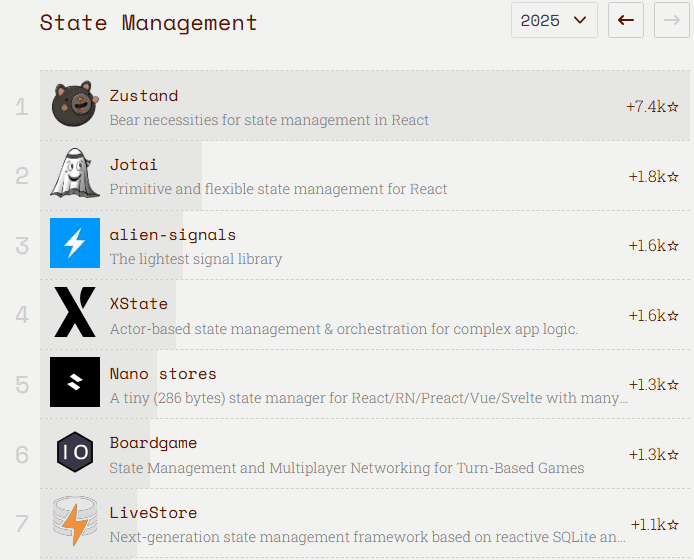
Source: JavaScript Rising Stars 2025
What is the secret of Zustand’s success? This library is notable for its flexibility, intuitive hook-based API, immutable state, simplified flux principles, and scalability. It does not impose predefined conventions or architecture and involves very little boilerplate code. With Zustand, you don’t have to worry much about such issues as zombie child problem, React concurrency, and context loss between mixed renderers.
Another distinguishing feature of Zustand is that you can use it with vanilla JavaScript and Node.js. Unlike React-oriented Redux, Zustand gives freedom to manage state across various environments. Want to know what else makes Zustand different from Redux Toolkit? Read on to find out.
Benefits of Using Zustand over Redux Toolkit
Zustand and Redux Toolkit emerged on the React landscape around the same time, but Redux Toolkit gained widespread use much faster. Higher adoption rates can be largely attributed to the fact that Redux Toolkit was introduced as the recommended way to write Redux logic, which naturally made it the default choice for many teams already using the traditional Redux library.
However, findings of the State of React 2025 survey indicate that Zustand is gaining momentum very fast. Respondents of the survey put Zustand above Redux Toolkit and other state management libraries on such criteria as Interest, Positivity, and Satisfaction.
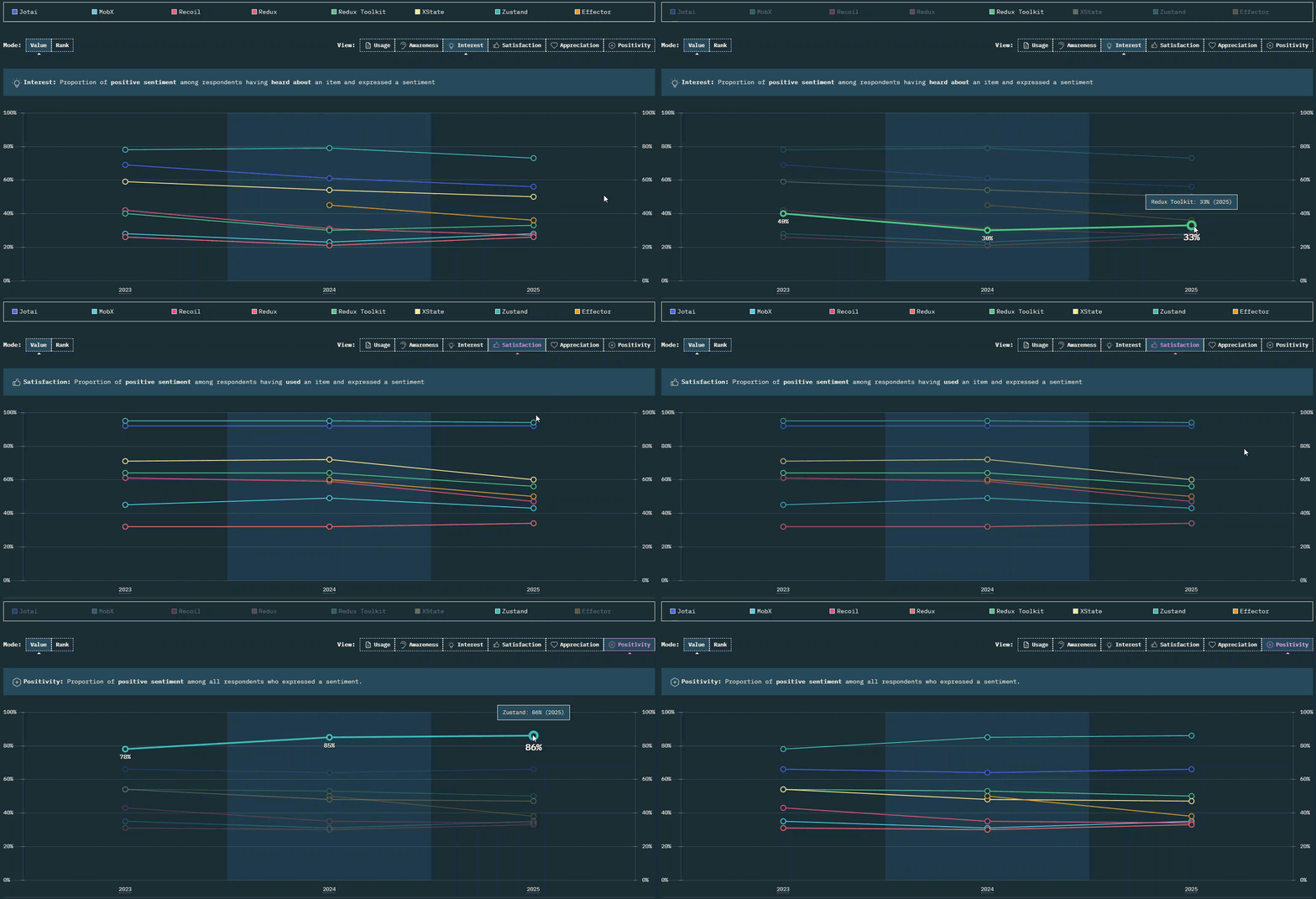 Source: State of React 2025
It is not surprising that developers opt for something simpler and lighter when they need a tool to manage complex states in React applications with advanced functionalities like Gantt and Scheduler. Zustand removes much of the ceremony around state management, while still giving developers predictable control over state transitions. One of the key distinguishing features of Zustand from Redux Toolkit is that Zustand can be used without wrapping the app in a context provider.
To give you a more complete picture of the differences between these libraries, here is a Zustand vs Redux Toolkit comparison table:
| Criteria | Zustand | Redux Toolkit |
| Core concept | Single store combining state and mutations, accessed through hooks | Structured state management built around slices, reducers, and action dispatching |
| Setup complexity | Minimal | Moderate |
| Emphasis on | Simplicity and flexibility | Predictability, traceability, and structured state updates |
| State updates via | Direct store actions | Reducers triggered by dispatched actions |
| Boilerplate | Very low | Moderate (but lower than in classic Redux) |
| Bundle size | ~ 9 kB | ~ 20 kB |
| Community size | Fast-growing | Very large |
| Documentation | Clear and concise | Comprehensive |
| Learning curve | Shallow | Moderate |
Summarizing the above, Zustand seems like a more attractive option, right? Yes, Zustand can be called a more developer-friendly tool, but it does not mean that Zustand can replace Redux Toolkit in every use case. Redux Toolkit still makes sense for projects with complex data workflows, strict middleware requirements, or deeply shared global state. But for many React scheduling apps and React project planning systems, Zustand provides just enough control over editing changes within the app while remaining lightweight and easy to maintain.
Now it is time to consider the key peculiarities of DHTMLX React Gantt and Scheduler integration with Zustand. These are the two latest additions to our pack of UI components for project management apps, designed specifically to fit in smoothly into React projects.
Since both components integrate with Zustand in a very similar way, we’ll go through the key integration stages using the example of DHTMLX React Gantt.
To simplify your acquaintance with DHTMLX React Gantt, use the dedicated NPM package to download a professional evaluation version of the component.
Highlighting the Main Aspects of Integrating DHTMLX React Gantt with Zustand
You’re probably eager to see how all of Zustand’s claimed benefits will actually impact your React Gantt project. Therefore, the practical part of this blog post primarily focuses on implementing the React Gantt state management layer and explaining how all Gantt updates flow through the Zustand store.
Defining Store Responsibilities
First of all, let us consider the main store responsibilities. The store not only keeps Gantt data but also defines how that data changes via corresponding actions.
The store structure is defined using the TypeScript type definition:
type State = {
tasks: SerializedTask[];
links: Link[];
config: GanttConfig;
past: Snapshot[];
future: Snapshot[];
maxHistory: number;
recordHistory: () => void;
undo: () => void;
redo: () => void;
setZoom: (level: ZoomLevel) => void;
addTask: (task: SerializedTask) => SerializedTask;
upsertTask: (task: SerializedTask) => void;
deleteTask: (id: string | number) => void;
addLink: (l: Link) => Link;
upsertLink: (l: Link) => void;
deleteLink: (id: string | number) => void;
};
This code vividly demonstrates that the store embraces the Gantt data, history management functionality, and user actions that cause state mutations. Thus, the store becomes the single source of truth for the chart and all related interactions.
Implementing the Store and Its Actions
After defining the store structure, it is time to create a working Zustand store. Here is how to do that:
tasks: seedTasks,
links: seedLinks,
config: { zoom: defaultZoomLevels },
past: [],
future: [],
maxHistory: 50,
... // actions will go here
At this point, you get a store with the initial state containing tasks, links, configuration, and empty history arrays. The next step is to implement a few concrete actions to illustrate how state transitions are handled.
For instance, changing the zoom level looks like this:
get().recordHistory();
set({
config: { ...get().config, zoom: { ...get().config.zoom, current: level } },
});
},
The store records the current Gantt chart state, creates a new config object with the updated zoom level, and updates the store state using set.
Updating a task follows a similar pattern:
get().recordHistory();
const tasks = get().tasks;
const index = tasks.findIndex((x) => String(x.id) === String(task.id));
if (index !== -1) {
set({
tasks: [...tasks.slice(0, index), { ...tasks[index], ...task }, ...tasks.slice(index + 1)],
});
}
},
The main objective here is to find the required task and update it with new data. Contrary to Redux Toolkit, there is no separate reducer or dispatch layer. The same object defines both data and the actions that mutate it.
The same approach is used with other Gantt settings, such as links, configuration changes (Zoom levels), and undo/redo history tracking. These features are placed in the store alongside tasks and are updated through regular store actions.
This brings us to the next key question: how do interactions in the Gantt chart become store actions? The answer is in the next section.
Connecting Gantt Updates to the Store
Now, we come to the most interesting part of the story, where we unveil how user-initiated changes in the Gantt chart are transformed into store actions. The key element here is the data.save callback, which serves as a bridge between Gantt events and actions. It comes into action when edits are performed in the Gantt chart, routing standard operations with tasks and links to the corresponding store actions.
() => ({
save: (entity, action, item, id) => {
if (entity === 'task') {
const task = item as SerializedTask;
if (action === 'create') return addTask(task);
else if (action === 'update') upsertTask(task);
else if (action === 'delete') deleteTask(id);
} else if (entity === 'link') {
const link = item as Link;
if (action === 'create') return addLink(link);
else if (action === 'update') upsertLink(link);
else if (action === 'delete') deleteLink(id);
}
},
}),
[addTask, addLink, upsertTask, upsertLink, deleteTask, deleteLink]
);
Here is how it works:
- A user modifies a task or a link in the Gantt chart
- Gantt calls data.save(…)
- The type of action is determined
- The required store action is executed
- Zustand updates state
- Updated Gantt chart re-renders
The store becomes the place where the actual data changes (mutations) occur, while the Gantt chart reflects the new state. Since all changes go through explicit store actions, tracking changes and debugging becomes more predictable.
To learn more about this crucial element of the Gantt integration with Zustand, check the “Handling changes with data.save” section in our guide.
Gantt Component as a Visual Layer
In this article, we have intentionally skipped the details about the practical implementation of the React Gantt component. Why so? This article is dedicated to storing data using Zustand. When state management logic is delegated to Zustand, the Gantt component primarily reads from the store and serves as a visual layer.
The Gantt chart rendering process becomes straightforward:
But what if you need step-by-step instructions on how to make Zustand work with our React Gantt component? Our documentation includes the official tutorial that describes all the steps required to combine DHTMLX React Gantt with Zustand within a single web application. On top of that, the tutorial also shows how to create a custom toolbar with controls for performing Zoom and undo/redo actions outside the Gantt chart UI and storing these modifications with Zustand. Based on this integration, our team also prepared a complete working project on GitHub.
Wrapping Up
When building a React app with advanced functionalities like a Gantt chart or Scheduler, it is important to ensure effective state management, but without any undue complications. That’s what Zustand does, providing an intuitive way for managing Gantt data, UI configuration, and state transitions within a single store. Should you try Zustand for enterprise React apps? Certainly, but it cannot be ruled out that Zustand may also turn out to be not the best option for every React project. That is why we’ll continue exploring other state management libraries for DHTMLX React components in future articles. Stay tuned!