
From doctor visits to weekend getaways, customers now expect to book everything in a few clicks, at any hour. That is why many service companies (e.g., healthcare providers, law firms, hotels, or car rentals) rely on online booking systems. These online tools allow users to book required services via an intuitive interface without phone calls or waiting in a queue. But despite the apparent simplicity, such systems often include more complex logic for managing schedules, resources, and availability.
That is why the delivery of feature-packed booking systems often costs teams valuable time and effort. Fortunately, it is possible to streamline the development with ready-made UI components specifically designed to deliver such solutions faster. Two common options are JavaScript schedulers and event calendars, and choosing between them usually depends on the project’s scale and complexity.
In this article, we’ll discuss why a JS scheduler is a more universal option for functional booking apps, explore the main functional requirements for such projects, and review the top JavaScript UI components currently available on the market.
Different UI Tools for Different Booking System Scenarios
Most of us regularly encounter online booking systems when scheduling services on the web. From the user’s perspective, these tools resemble a familiar calendar interface that makes it easy to see available dates and open time slots for certain services.
Calendar-based booking systems commonly include an interactive UI with several view modes (Day, Week, Month), live UI synchronization across multiple users, and integration with popular platforms like Google Calendar or Outlook Calendar. Technically, the basic needs of a traditional booking system can be met with JavaScript event calendar components. Such tools are great at visualizing events (or time slots) in relation to dates.
But many modern booking systems also include admin dashboards that require complex logic for resource allocation, recurrence rules, and conflict-prevention mechanisms. In such cases, limitations of JS UI calendars become apparent, and more advanced JavaScript schedulers come into play.
What Modern Booking Systems Actually Need
As booking platforms evolve, their technical requirements become more sophisticated. Today, successful booking systems require predictable scheduling behavior and efficient resource coordination, something that goes beyond simple event visualization. Schedulers are specifically built to meet such structural demands. The following features explain why JS schedulers are often used in booking apps.
- Resource-oriented architecture
Scheduling components are commonly based on a time-resource model, implying that appointments are assigned not only to particular dates (time slots) but also to specific entities (i.e., resources) such as doctors, rooms, cars, etc. For this purpose, schedulers usually offer dedicated view modes, such as Timeline and Units. In booking systems, these views are particularly valuable for administrators and managers who need to oversee multiple resources simultaneously and handle their availability efficiently.
- Interactive rescheduling
Booking schedules often require adjustments. Whether due to changes in user plans or resource availability, system admins should be able to quickly cancel, extend, or reschedule a booking to another time or day. Schedulers allow such rescheduling operations to be performed directly in the interface via intuitive drag-and-drop actions.
- Support for recurring series
Many services involve repeating bookings, such as weekly therapy sessions or periodic maintenance appointments. A scheduler that supports recurrence rules makes it easier to create and manage such patterns. This reduces manual effort and keeps long-term scheduling consistent.
- Availability management
In real-world scenarios, booking platforms require flexible availability patterns. Different resources may require different time conditions (flexible working hours, holidays, vacations, etc.), and those parameters may change over time. Capable UI scheduling tools allow defining necessary availability rules, minimizing custom development.
- Conflict prevention and validation
The business logic for conflict prevention and validation in booking systems is commonly specified on the backend. But even if it is done properly, users may still encounter a “phantom availability” situation, when a time slot appears open in the UI but becomes unavailable the moment they try to make a reservation. This inconvenience can be avoided by enforcing visual constraints right in the UI. And scheduler components often allow configuring such mechanisms, reducing the risk of failed bookings and user frustration.
- Performance and scalability
The booking system load may vary dramatically depending on demand, so it is important to ensure that the UI remains smooth and responsive even with a large number of active users at the same time. Schedulers usually include built-in performance optimization techniques like virtual scrolling and dynamic loading for high-density booking scenarios. They are also vital when platforms grow in scale and complexity.
Now we can proceed to the overview of top professional booking schedulers and estimate how well they meet the relevant functional requirements described above.
Overview of JavaScript Schedulers for Modern Booking Solutions
When choosing libraries for this overview, we focused not only on the ability to meet the core functional requirements for booking projects described above, but also on their standing in the web development community. That’s why our selection includes well-established and actively maintained JavaScript scheduling components from DHTMLX, Webix, Bryntum, Mobiscroll, and FullCalendar. While these products share some strengths, they also have distinguishing features that may be essential for a given project. Thus, teams are more likely to find a tool that covers their unique booking requirements.
So without further ado, let us take a closer look at each product.
DHTMLX Scheduler
DHTMLX Scheduler is an enterprise-grade JavaScript component designed to speed up the development of various scheduling apps, including custom booking systems of any complexity level. It is particularly well-suited for healthcare appointment systems, hotel and room reservations, and other resource-based booking scenarios where a fixed SaaS workflow is not enough. This JavaScript component is one of the main pillars of the DHTMLX portfolio. It incorporates all traditional DHTMLX strengths – high performance with large datasets (support for dynamic loading and smart rendering), a fully customizable interface, and a developer-friendly API architecture.
As for booking-specific capabilities, DHTMLX Scheduler also has much to offer. The first thing to note is an intuitive drag-and-drop UI with 10 view modes for displaying bookings in the desired format. Particularly noteworthy are the Timeline and Units views, which can facilitate resource management across various booking scenarios such as doctor schedules, room reservations, or equipment bookings. The Timeline view allows depicting time slots for multiple resources across the horizontal timeline and applying four visualization modes (bar, days, cell, and tree) with custom content. The Units view provides a compact, vertically oriented layout that makes it easy to review and analyze each resource’s workload.
When it comes to working with appointments in these resource-focused views, the Scheduler component allows assigning a single event (or time slot) to multiple resources and setting complex recurrence logic, thanks to support for the RFC-5545 standard. Recurrences can be modified directly in the UI or via the lightbox editor, along with many other event parameters. The Live Updates module ensures real-time synchronization and collaborative editing for multiple users.
The DHTMLX Scheduler API also includes entities that help prevent double bookings in a single time slot and validate user input. The implementation of the booking system design is significantly facilitated by the use of customizable themes, including high-contrast ones.
As basic examples of DHTMLX Scheduler use in booking scenarios, we invite you to review Hotel Reservation and Car Rental Calendar demos. For a more vivid representation, here is the Scheduler-based Manager profile in the Doctor Appointment booking system (demo):
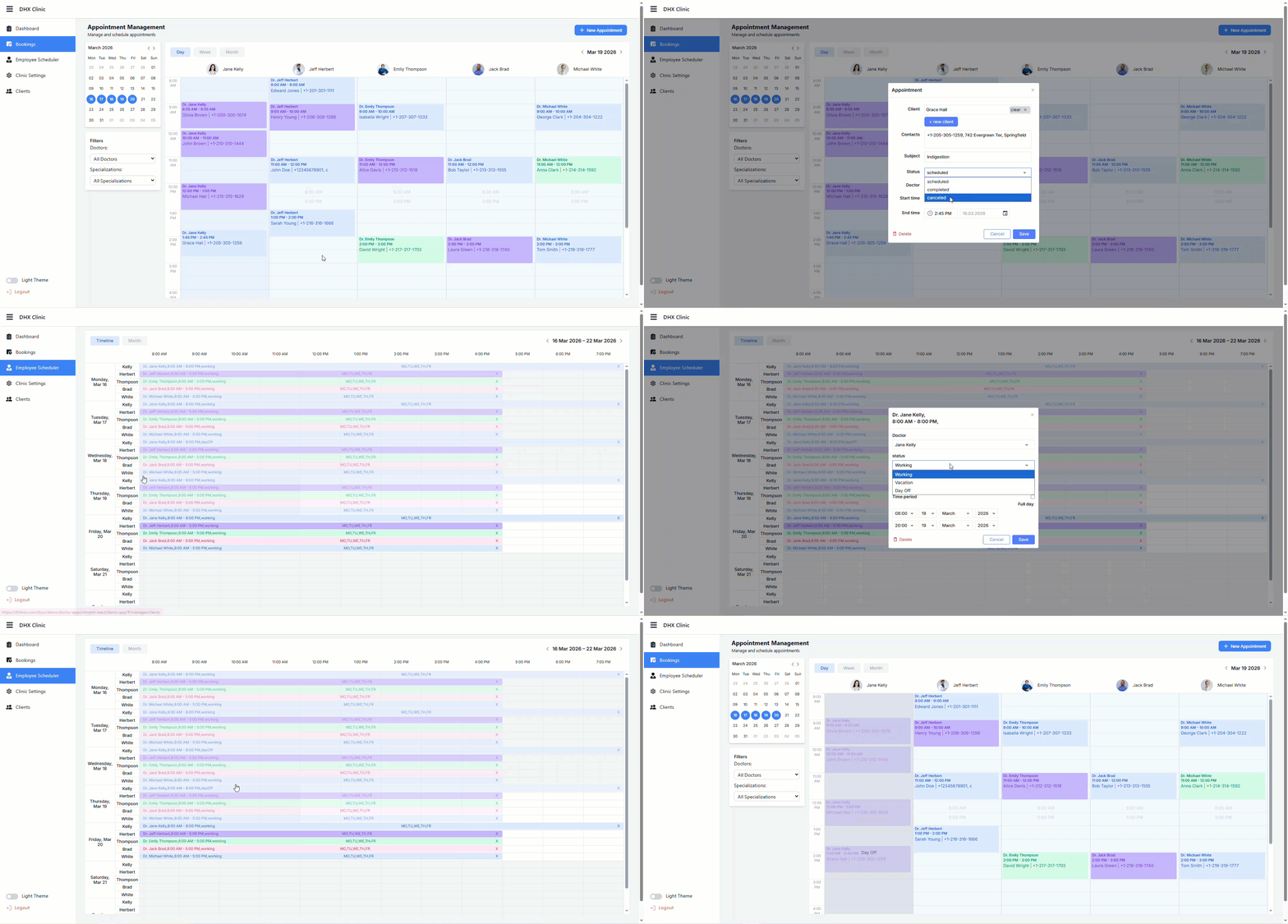
With a RESTful API on the backend and the DataProcessor module handling client-side synchronization, DHTMLX Scheduler can be easily connected to a wide range of server technologies. The same approach also streamlines integration with other DHTMLX components, such as the Booking widget, making it easier to build cohesive booking solutions much faster. In a typical architecture, DHTMLX Scheduler acts as the scheduling engine and source of truth for availability and appointments scheduling in JavaScript, while the Booking widget exposes this availability to end users through a ready-made booking UI.
Let us take a closer look at the key benefits of the appointment booking widget and how it complements the Scheduler component in a real project.
How JavaScript Booking Widget Fits into a Project
While the Scheduler component is commonly used to build versatile control panels focused on resource management, primarily by administrators and managers, customers typically interact with a simplified interface in the form of a real-time availability calendar.
At first sight, this part of the booking system may seem simple to implement. But in practice, it usually takes considerable time and a lot of written code to deliver this functionality from scratch. The DHTMLX Booking widget helps dev teams to achieve this goal with minimal time costs. It provides a predefined UI structure for making online appointments and multiple other benefits, including:
- configurable time slots,
- adjustable reservation form,
- broad filtering opportunities,
- templates for card customization,
- responsive design.
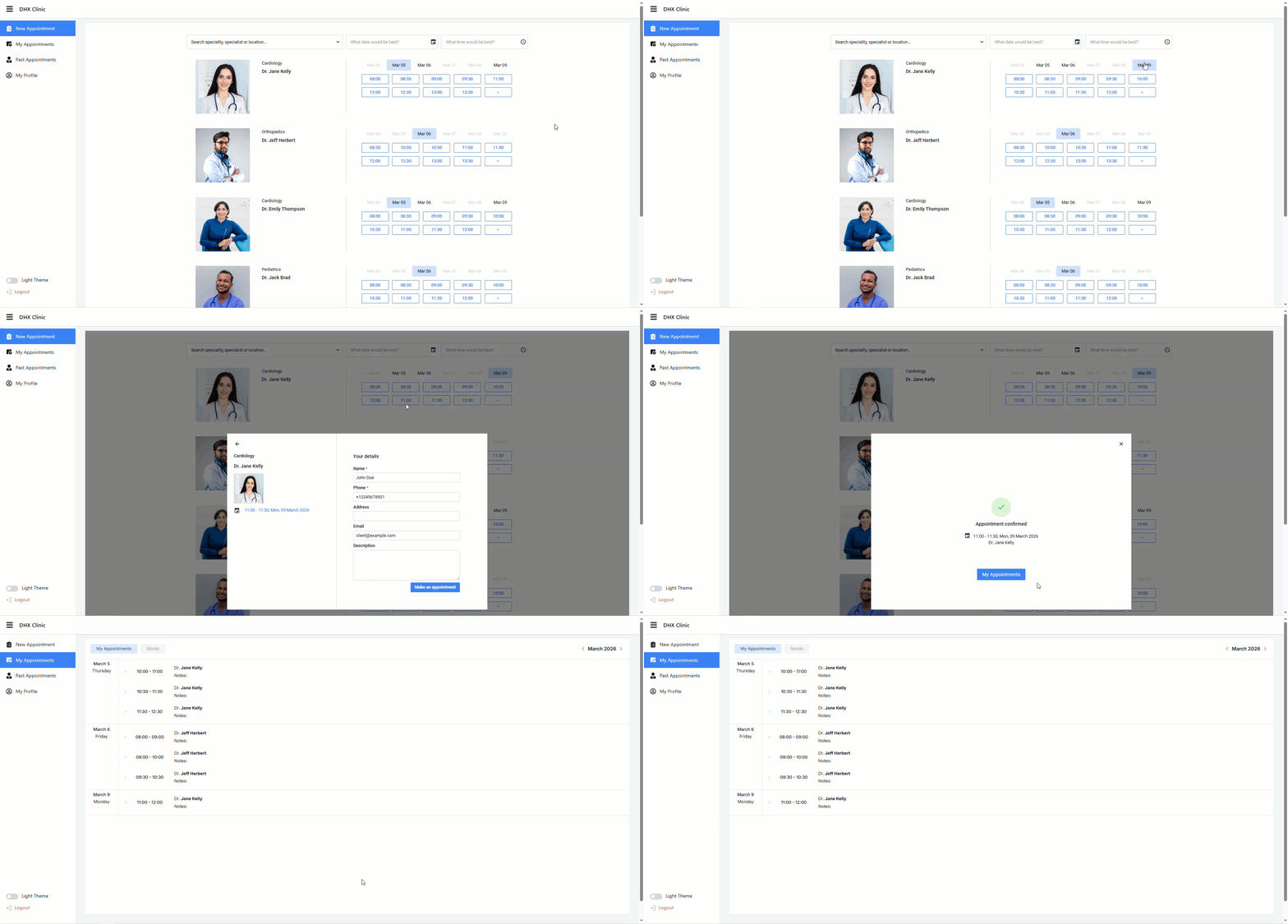
All of this runs on top of the same Scheduler data and business rules, enabling teams to combine a ready-made booking UI with a deeply configurable scheduling engine. This pattern lets developers launch the patient-facing booking interface quickly using the JavaScript Booking widget, while still controlling all scheduling rules and backend integrations through DHTMLX Scheduler and their own server-side logic.
The bright example of empowering the Scheduler component with the Booking widget is the DHTMLX Doctor Appointment demo. For similar scenarios, you can use detailed tutorials on combining these JavaScript components on the frontend and backend.
Most Suitable for:
With DHTMLX Scheduler and the optional Booking add-on, you get a powerful instrument for fast implementation of full-scale service booking platforms with clear resource control, multiple availability views, and a user-friendly availability calendar, without locking yourself into a fixed SaaS-like flow. This combination is especially attractive for teams that need an enterprise-grade scheduling engine for administrators and doctors, plus a ready-to-use booking experience for patients, without building every screen from scratch.
Licensing and Pricing Options:
- Individual ($599) for 1 developer and 1 project
- Commercial ($1299) for 5 developers and 1 project
- Enterprise ($2899) for 20 developers and 5 projects
- Ultimate ($5799) for an unlimited number of developers and projects
All licenses are perpetual and can be used for noncommercial and commercial projects. The component is also available for SaaS projects without limits on end-users of SaaS apps based on DHTMLX. For the Commercial license, the price for the SaaS option is provided upon request, while the Enterprise and Ultimate packages already include it. To empower DHTMLX Scheduler with the Booking widget, you only need to pay an extra $29. For startups, the Scheduler is offered with a 70% discount.
Webix Scheduler
Webix offers Scheduler as part of its PRO package. Within Webix’s classification system, the component is defined as a complex widget because it pulls together into a single UI calendars, lists, and forms – elements involved in constructing booking modules. Actually, Scheduler is a compact Webix Jet application wrapped in a Webix view, so you can use it like any other widget or treat it as a full Jet app. This allows developers to choose between minimal setup and deep customization through JetApp, JetView, and JetService APIs. Since Webix takes a framework-like approach to application development, you can build entire projects with the Webix Jet micro‑framework and seamlessly adapt the Scheduler to fully align with your booking-system workflows.
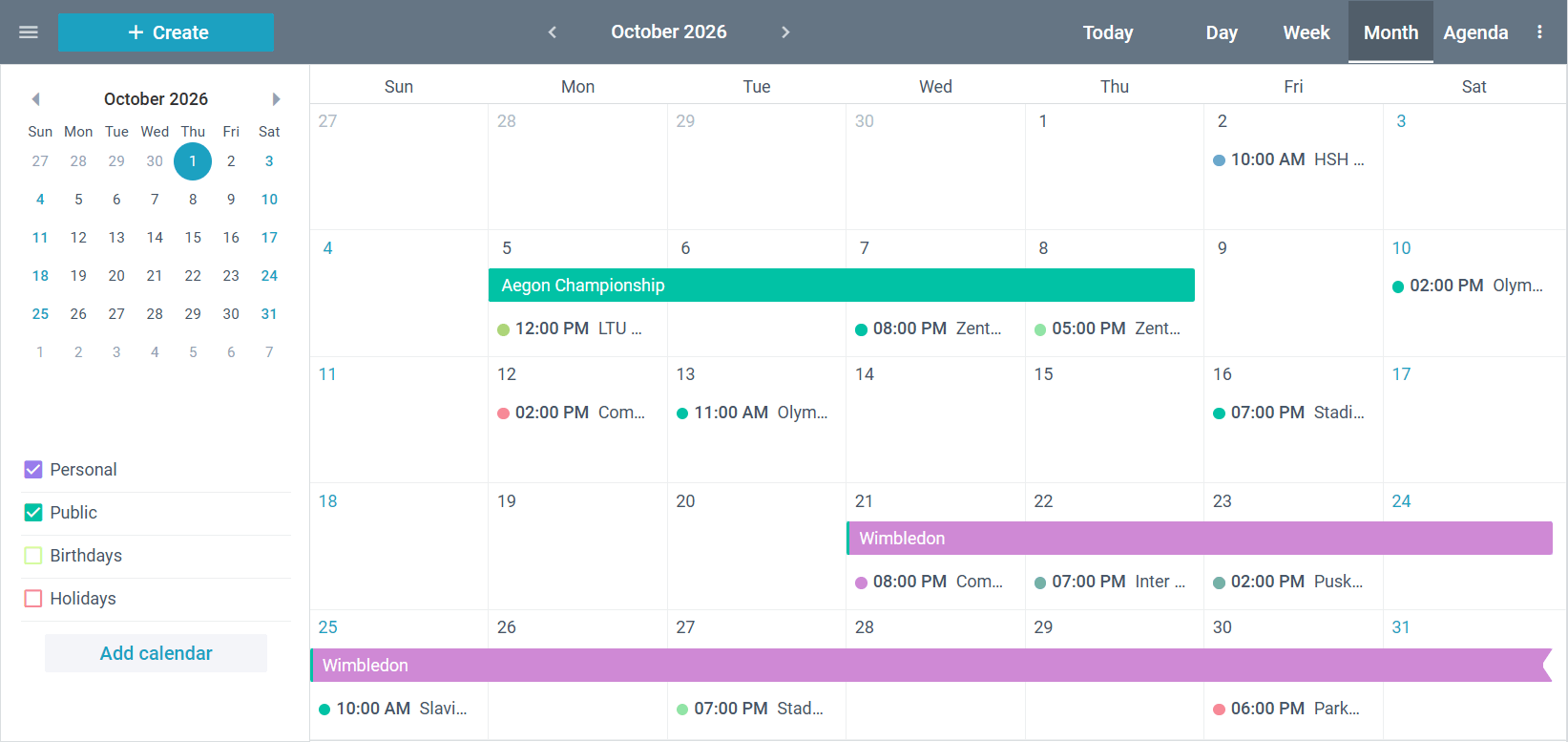
Webix Scheduler ships with a rich set of features for efficient management of time-based data. It supports several display modes (Day, Week, Month, Year, Agenda), allowing users to switch between different schedule layouts. The component has a flexible grid in its core, which helps organize event sets in a structured way and work with them simultaneously. Users can create single or recurring events, preview and edit them directly within the interface, and handle event groups. Events can also be assigned to sections that represent real-world resources – each resource will be displayed in its own column or row, so users can quickly understand availability and avoid conflicts. All of this helps maintain a clear structure in your planning or booking project, especially in multi-user or multi-resource scenarios.
Most Suitable for:
Webix Scheduler can be a good addition for booking apps that require easy setup, customization, and a common feature set for this kind of software. Typical use cases include apps for reserving and registering equipment rentals and booking systems for hotels, guest houses, and apartments.
Pricing and Licensing Options:
- Company (from $2,499) for unlimited developers and 1 project
- DevTeam (from $3,999) for 5 developers and unlimited projects
- Unlim (from $9,499) for unlimited developers and projects
These commercial offerings for Webix Scheduler are available under perpetual license terms. All three packages allow using the component in SaaS projects.
Bryntum Scheduler
Bryntum Scheduler is a JavaScript scheduling component that facilitates the delivery of scheduling UIs on the web. Being a part of the Bryntum UI ecosystem, it inherits many characteristics of the Grid component, thereby combining timeline visualization with data management capabilities. This structural peculiarity can be useful in booking systems where managing time slots and keeping booking records organized are equally important.
The component uses animated DOM transitions to show interface changes, making frequent updates to time slots and resources easier to follow.
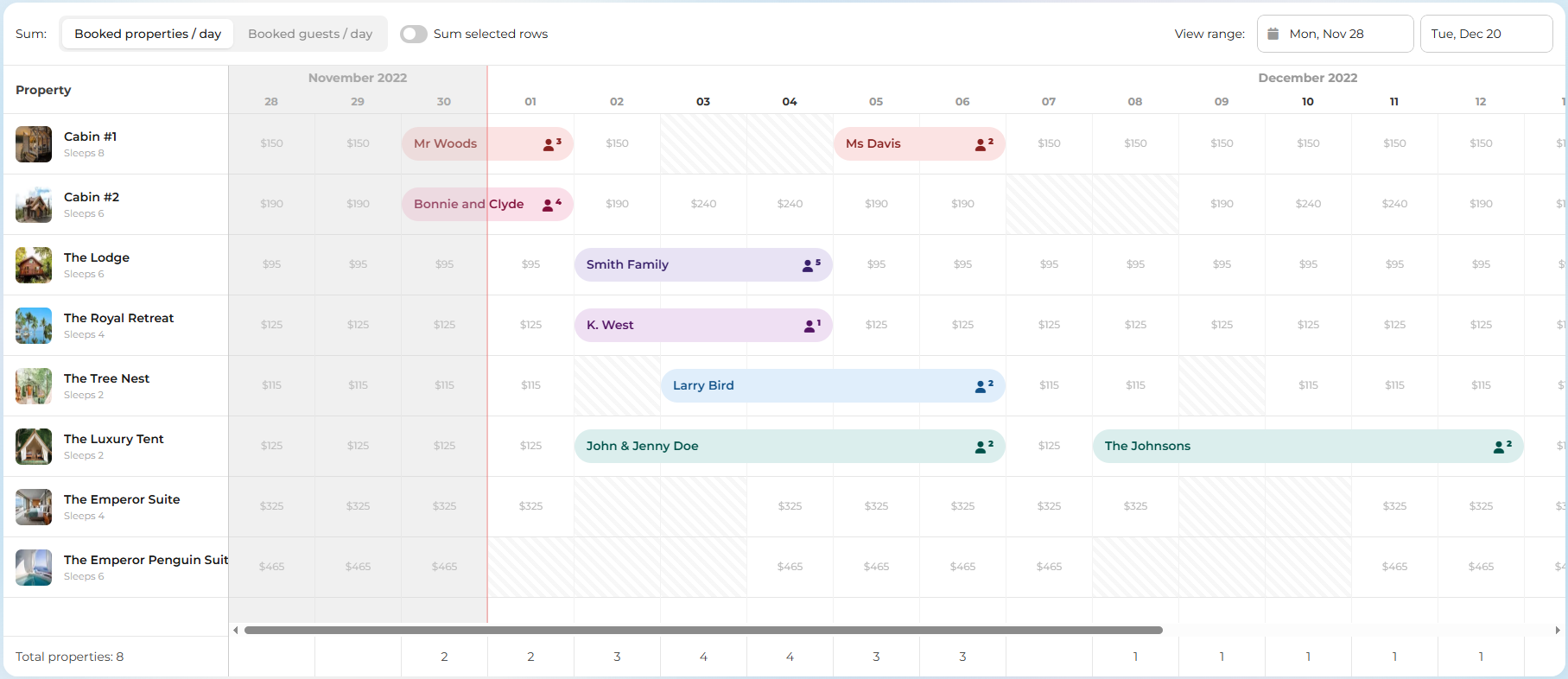
This Scheduler gives a lot of control over how time is represented. Here, you get a configurable time scale with up to 3 header rows, ranging from milliseconds to years. In booking scenarios, this makes it equally comfortable for short appointment scheduling and long-running reservations. In addition, the component includes built-in time zone support to maintain consistency when users operate from different regions.
The product also provides task-like relationships between events and event synchronization typically found in project management tools, such as Gantt charts. Group summaries, capacity limits, and event & capacity summaries reduce the risk of overbooking by displaying totals and highlighting resource constraints in the app’s UI. Additionally, it allows adding the undo/redo feature, ensuring more confident edits to bookings and allocations. However, many of these project management-oriented features go beyond the needs of a typical clinic or appointment booking system and can increase the overall configuration and maintenance effort.
Although this scheduling tool doesn’t provide a ready-made booking widget or patient-facing appointment UI out of the box, it allows creating custom widgets for reservation forms, filtering panels, and other elements of such solutions.
Most Suitable for:
Overall, Bryntum Scheduler can be a suitable choice for building booking systems demanding complex planning logic and tight integration between timeline and grid-based data views. It is particularly attractive when the booking module is part of a broader, highly customized scheduling platform and the team is ready to invest in a fully custom front-end experience, rather than when the primary goal is to deliver a clinic booking calendar or service booking app quickly.
Licensing and Pricing Options:
The EUL license is intended for noncommercial, internal applications and includes two options:
- Small Team ($850 per developer)
- Large Teams ($6000 for 10 developers)
When the Scheduler is considered for commercial products and SaaS apps to be redistributed for a fee, it is required to purchase a subscription-based OEM license, the price of which is available only upon request.
Mobiscroll
Mobiscroll is another noteworthy JavaScript library for building booking solutions. It is delivered as a toolkit with Scheduler, Calendar, Timeline, and Agenda views designed for various scheduling and calendaring scenarios. The Mobiscroll team places strong emphasis on mobile-first design, template-driven customization, and intuitive interaction patterns.
The Scheduler view allows creating time-based grid layouts, where events (or time slots) are rendered vertically in daily, weekly, or monthly ranges. It also supports drag-and-drop editing, various event types (all-day, multi-day, recurring), resource handling, multiple time zones, and different calendar systems (Gregorian, Jalali, and Hijri). To enhance the UI’s readability and usability, it is possible to specify the width of columns, set custom range views, limit the number of shown concurrent events, restrict the selection of dates, times, or ranges, and add buffer times before and after appointments (e.g., cleaning, maintenance work, etc.).
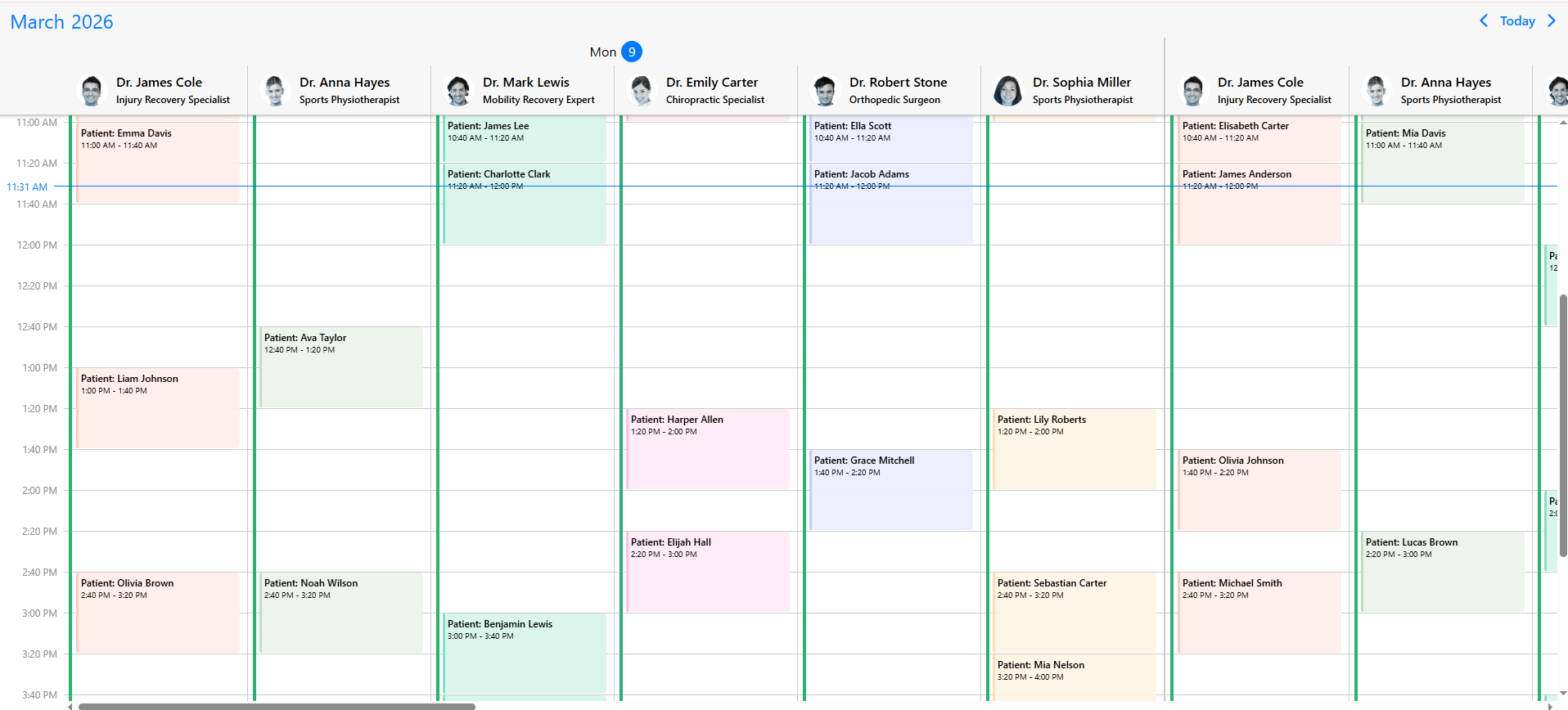
For scenarios with multiple resources, including booking apps, the Mobiscroll scheduler view offers opportunities to dynamically adjust resource column widths based on content, add an event to multiple resources, and hide unavailable resources to keep the interface focused on active schedules. To meet more complex resource-related requirements in booking apps using Mobiscroll, it is better to add the Timeline view, which arranges resources vertically and time horizontally. It provides a few useful features, including resource detail panels, resource-group summaries, resource comparisons, dynamic sorting, and contextual tooltips.
In addition to the primary views, the Mobiscroll Toolkit also includes predefined date and time pickers, dropdown selectors, pop-ups, and form components. This range of UI elements can be useful when implementing custom booking functionality.
Most suitable for:
Mobiscroll calendar views are well-suited for booking applications where mobile usability and touch-based interactions are priorities.
Licensing and Pricing Options:
If an app is built for internal usage, there are three perpetual options:
- Scheduling&Calendaring (€945) for 1 developer and 1 project
- Complete (€1855) for 1 developer and 1 project
- Complete Company (€8355) for 1 developer and multiple projects
To use Mobiscroll for B2B SaaS, PaaS, on-premise software, and white-label projects, it is needed to request a subscription-based license.
FullCalendar
Any discussion of JavaScript UI components for booking systems would be incomplete without mentioning FullCalendar. Originally conceived as a part of the website-building startup, it has evolved into a well-known scheduling ecosystem with both open-source and commercial extensions. Unlike more functional JS libraries described above, FullCalendar relies on a straightforward API, a flexible configuration model, and overall usability. It enables teams to speed up the development of lightweight booking UIs with familiar calendar views.
Since its inception in the open-source community, FullCalendar has become an integral part of many web projects, with its familiar calendar layout helping users quickly interact with appointments and schedules over time. The library’s strength lies in its robust community and large ecosystem. According to the project’s GitHub page, it currently has 131 contributors and 129k users. Developers actively discuss FullCalendar usage patterns on Stack Overflow, where the number of questions related to the library has reached approximately 10,000.
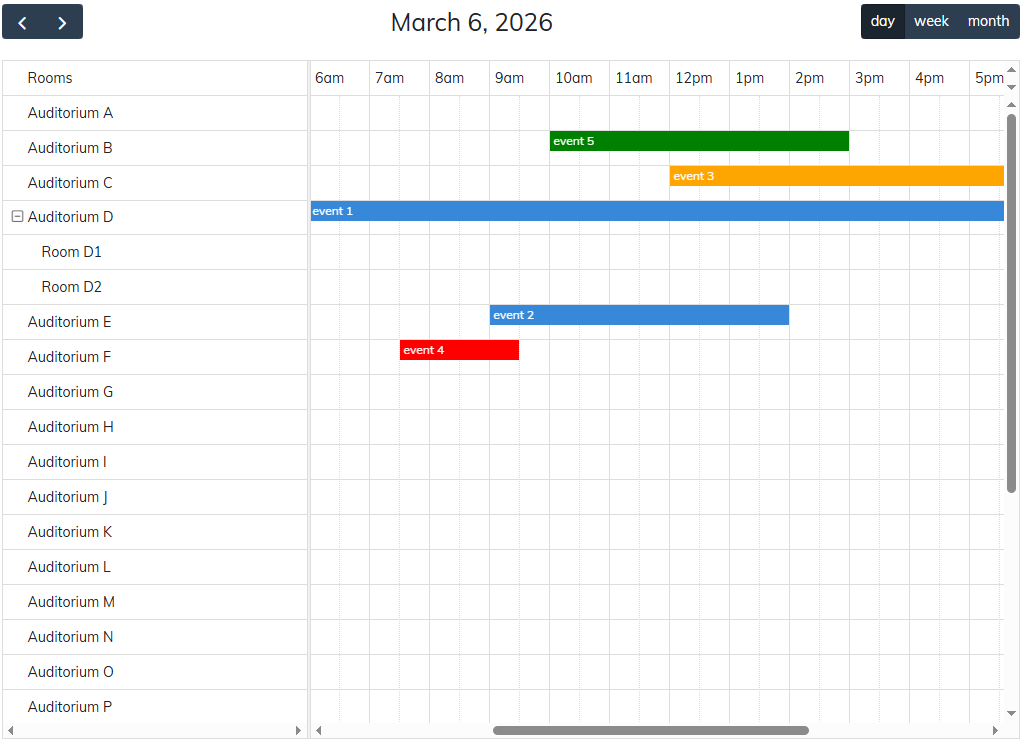
The modular architecture allows starting with a basic configuration and gradually extending the system with additional features via official or community-made plugins as app requirements grow. The library supports time zones, recurring events, themes, optimized printing, and other useful features. With over 300 available settings, FullCalendar makes it easy to configure a calendar-based booking system as desired. Using commercial plugins, it is possible to add resource-oriented views (Timeline and Vertical Resource views) and other resource handling capabilities.
Most Suitable for:
FullCalendar works best for small to medium booking systems that rely on familiar calendar interactions and do not require advanced resource planning capabilities.
Licensing and Pricing Options
The standard version of the library is free to use and distributed under the MIT license. FullCalendar Premium can also be used for free in open-source projects compliant with the GPLv3 license and by NGOs in non-commercial apps. To get access to FullCalendar Premium’s API for commercial use, it is necessary to obtain one of the following commercial licenses:
- Premium (from $480 per developer)
- OEM (upon request)
After reviewing these libraries individually, it can be helpful to look at them side by side. That is exactly what we’re going to do in the next section.
Comparison Table of JavaScript Schedulers
By now, you should have a sense of how the described JS scheduler components differ in terms of functionality. The table below summarizes the key points and highlights additional criteria also considered when evaluating additions to a web technology stack.
| Criteria | DHTMLX | Webix | Bryntum | Mobiscroll | FullCalendar |
| Resource-focused views | Timeline, Units | Timeline, Units | Timeline | Scheduler, Timeline | Timeline, Vertical Resource plugins (for paid version only) |
| Recurrence support | Yes | Yes | Yes | Yes | Yes |
| Custom forms & validation | Yes | Yes | Yes | Yes | Yes |
| Real-time updates | Live Updates module | Possible via API/backend integration | Possible via API/backend integration | Possible via API/backend integration | Possible via API/backend integration |
| Ready‑made booking widget | Yes | No | No | No | No |
| Integration with top frameworks (React, Vue, Angular) | Yes | Yes | Yes | Yes | Yes |
| Official tech support | Yes | Yes | Yes | Yes | Yes (for paid version only) |
| MCP for AI-assisted development | Yes | No | Yes | No | No |
| Free trial version | Yes | Yes | Yes | Yes | Yes (for paid version only) |
| Open-source version | GPL v2.0 | No | No | No | MIT & GPLv3 |
| Commercial license model | Perpetual | Perpetual | Perpetual for EUL, subscription for OEM | Perpetual for internal projects, subscription for SaaS, PaaS, on-premise, etc. | Perpetual |
Now you have enough information to form a holistic understanding of the best JavaScript Scheduler libraries presented in this blog post. However, before making a final decision on which product to choose for implementing a booking system, it is highly recommended to test each option in real-world conditions. Practical testing often reveals integration and usability details that documentation alone does not show. That’s why trying a library in a real project environment is vital for effective decision-making.
You can start with the 30-day trial of DHTMLX Scheduler and the Booking widget, and then get acquainted with the other JavaScript booking system libraries discussed above to see which one integrates most naturally with your stack.
Conclusion
In summary, modern booking systems require not only an intuitive, calendar-like UI but also extensive scheduling capabilities. That’s where JavaScript Scheduler components help simplify the work. Tools like those discussed above speed up the implementation of such tricky aspects as resource management, recurring bookings, and scheduling constraints. To further optimize the development process, it would be helpful to have the option to integrate the Booking widget with the Scheduler, as offered by the DHTMLX enterprise scheduling solution. However, the choice ultimately depends on the needs and priorities of a particular project and on which scheduling tool best matches them. So test cautiously, and choose wisely!