
One observational study of Claude.ai data says that AI can speed up some tasks by 80%. And this comes as no surprise: LLMs and AI systems are already capable of dramatically accelerating specific stages of the development lifecycle, from research and design to coding, refactoring, and code verification. But how can we effectively work with AI, and what is the role of developers in this process? There are already so many diverse opinions on these questions that it’s difficult to fit them all into the traditional “Best Practices” list. Therefore, rather than offering yet another list of recommendations, it makes more sense to look at AI-assisted development as a layered engineering approach, where each stage addresses a specific category of questions related to AI usage.
Drawing upon observations from recent years and the practical experience of the DHTMLX team, we want to present the way to effective AI-assisted software development.
Why AI-Assisted Development Requires a Comprehensive Approach
Today, web developers often choose to use generative AI tools like GitHub Copilot, Claude, or ChatGPT for daily coding routines. When more automation is required, teams are shifting towards agentic AI. Powered by LLMs, agentic AI systems can independently handle complex tasks consisting of multiple interconnected steps with minimal human involvement.
If you take a look at the open-source landscape known as the brightest catalyst of what’s happening in the development world, it is easy to notice a huge increase in repositories related to AI projects and AI infrastructure.
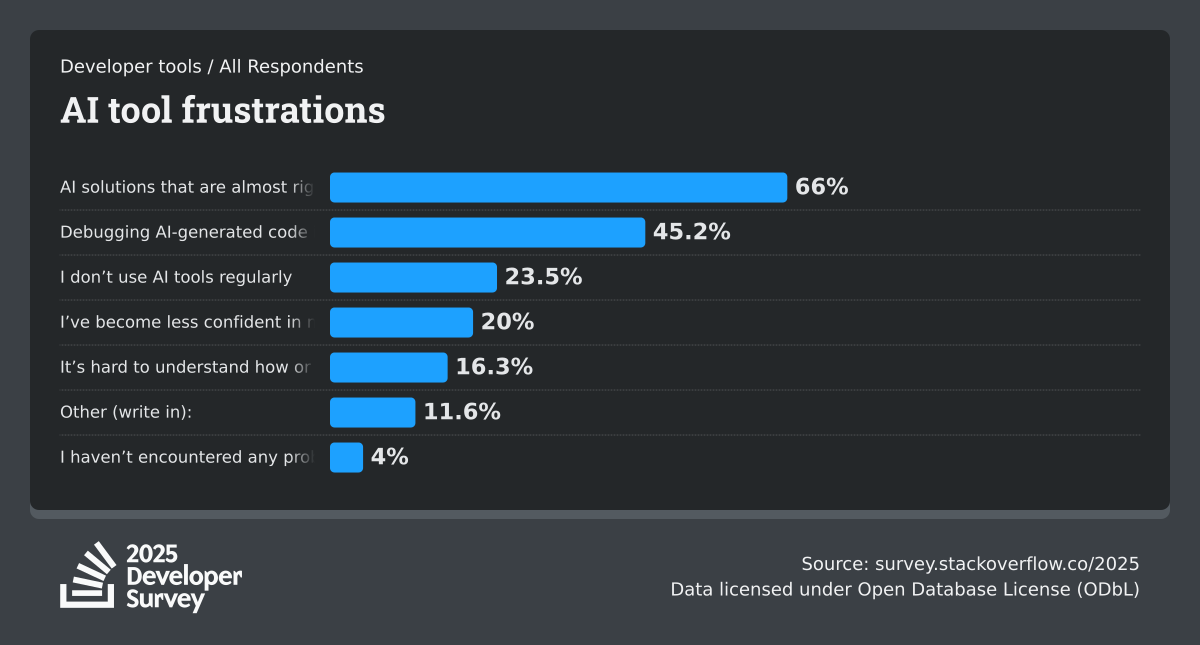
At the same time, it is necessary to keep in mind that AI is at the beginning of its formation in many ways. Well-known industry surveys emphasize significant pain points of AI assistants, including API hallucinations, context overload, data privacy, and security concerns. StackOverflow’s Developer Survey says that developers often become frustrated about “almost right, but not quite” code from AI, which often leads to time-consuming debugging.
But reality dictates its own terms: the ability to incorporate and use AI tools in the development lifecycle becomes a competitive edge across the development community. Moreover, the biggest AI concern related to hallucinations and inaccuracies in code can be significantly reduced by adopting a proper approach to working with AI systems. That’s exactly what we want to achieve in this article.
In practice, effective AI-assisted development does not depend on a single prompt, but usually involves several interconnected stages (or layers):
- Execution
- Control
- Verification
- Evolution
Now, let us consider each stage in more detail.
1) Execution (How AI Generates Output)
At the execution stage, you lay the groundwork for the AI-powered workflow or how ideas transform into working code via collaboration between developers and AI assistants. The reliability of AI-generated output depends on several important factors.
First of all, it is necessary to carefully outline the project structure, key requirements, constraints, testing expectations, etc. This way, you can create a structured document that will serve as a shared reference point for devs and AI.
Next, you need to ensure that LLM has sufficient context (e.g., relevant API docs, known pitfalls, examples of desired patterns) to perform well on given tasks. It is reasonable to divide complex tasks into smaller, more manageable pieces since large inputs often lead to AI-generated responses of lower quality.
Also, do not forget that different LLM models can handle the same tasks with varying degrees of success. So it is normal to switch between models to find the optimal solution for achieving specified objectives.
At DHTMLX, we are already moving towards creating an AI-friendly development workflow around our JavaScript UI components. You can already benefit from the official DHTMLX MCP server, agent skills for DHTMLX Gantt and Scheduler (and more are coming), and multiple AI demos.
All these measures can contribute to more accurate and context-aware development with AI, but they are likely to be ineffective when applied in isolation from other steps examined below.
2) Control (Why Developers Must Keep AI Aligned)
When you get the working code, remember that it is only halfway to the main goal. In reality, the AI output should align with the project’s architecture, coding standards, and long-term goals. That’s where developers’ control instructions can be helpful.
AI tools may have in “mind” a lot of ideas on how to implement the required functionality, which may conflict with project requirements. Therefore, it is important to provide a clear implementation reasoning, i.e., LLM must clearly understand why your approach is better than any other alternative.
Another vital thing to consider is that AI tools operate via temporary context windows. The problem here is that your LLM does not remember the entire codebase and can create API elements that already exist under different names. That is why it is highly recommended to perform checks for semantic duplicates before committing any AI-generated code.
It is also common to customize the AI behavior with engineering instructions, behavioral constraints, reusable prompt templates, and descriptions of appropriate coding style. This extra information will help AI tools generate more predictable output across different sessions and increase the chances of successful integration of AI suggestions in your project. One more safeguard measure with AI is frequently committing successful changes (even if they are small), thereby creating operational checkpoints to revert things when something goes wrong. Taking into account context window limitations, commits can also be used to conveniently inform LLMs about the latest changes in the codebase.
Without close supervision from the team’s side, AI-generated output often becomes the source of various issues and a maintenance burden. But even when handled properly, there is still one more essential stage before AI responses become safe for production.
3) Validation (How AI Output Reliability is Confirmed)
AI assistants do a pretty good job with testing the code they generate, and you may even find the test results very convincing. The main issue here is that tests produced by LLMs often cover only common use case scenarios. But, as always, the devil is in the details. This is where dev team reviews become critical. Developers and QA engineers still have to prepare scenarios for edge cases, failure injections, invalid inputs, race conditions, and adversarial testing. Also, it is necessary to devote some time to tests in production environments.
In many cases, AI implementations fail not because of evident errors, but because nobody tested the scenarios that the model did not anticipate. Extending test coverage with non-trivial scenarios helps catch bugs before they become very expensive to fix.
4) Evolution (Why AI Workflows Require Constant Adjustments)
Following the recommendations above, you can make your AI assistant a real game-changer, but the question is for how long? Unfortunately, it doesn’t work on the principle “set it and forget it”. The long-term stability and effectiveness of AI-assisted development can be achieved only when the development team remains constantly engaged in its improvement.
The growing role of AI in the development process is undeniable. In fact, it becomes an important part of the engineering infrastructure. Therefore, it is natural for teams to refine instructions, constraints, validation procedures, and automation patterns for AI. Modern AI tools do not automatically retain any project-specific lessons from past mistakes, so it is a must to regularly expand the AI’s knowledge base with clear guidance (like agent skills) on how to act in situations that previously caused issues. Teams can use AI not only for building apps, but also for eliminating bottlenecks in the development workflow itself.
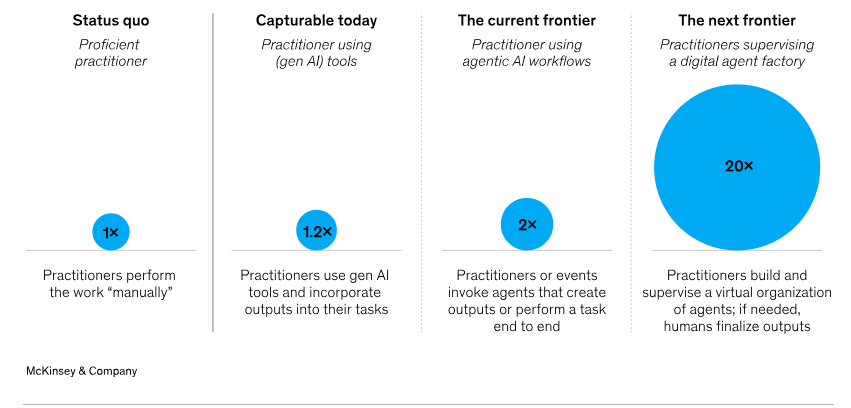
It is also clear that the industry is moving toward increasingly agent-driven workflows, which gradually increases the level of development automation. This makes a deeper study of new AI advancements in the development process even more important.
And finally, developers should pay attention to their own training and upskilling in the field. Ongoing education equips developers to use AI responsibly and adapt to evolving technologies. The DHTMLX team takes a sensible and balanced approach to AI technologies, studying and trying all promising novelties in the field, while clearly realizing that AI does not offer a recipe for care-free coding.
Final Thoughts
What unites all building blocks for the AI-assisted development discussed in this article? All of them are based on the human-in-the-loop principle. Despite the rapid progress of AI, developers still have the final say in how AI systems are executed, controlled, verified, and evolved over time.
At least for now, AI is most valuable as a development accelerator rather than a fully autonomous coding system. Developers who constantly improve and expand their abilities to combine AI capabilities with traditional development practices will likely benefit the most from the ongoing technological transformation in the coming years.
At DHTMLX, we see this transformation as a great opportunity to increase the efficiency of the development process rather than a replacement for human expertise. By providing advanced UI components with well-documented APIs, an official MCP server, and specialized agent skills, we strive to create the right conditions for AI-powered development.