
DHTMLX Gantt for React is a powerful solution for teams building enterprise-grade project management apps in React. This React-focused component is a natural fit for any modern React development stack, thanks to its high compatibility with popular technologies from the framework’s ecosystem. One of them is Next.js, extending React with performance-oriented features that are valuable for data-intensive Gantt projects.
In this article, we’ll delve into Next.js in more detail, explore how it contributes to the high demand for React, and examine the best-fit scenarios for combining Next.js with DHTMLX React Gantt chart for project management on the web.
Basic Knowledge of Next.js
Modern web development requires efficient tools that can handle a variety of tasks on both the client and server sides. That is why major frontend frameworks are often combined with meta frameworks that take care of complex, non-UI aspects of web development. In the case of React, there are several such frameworks, but Next.js stands out as the most widely adopted. Built by Vercel in 2016, this tool quickly became a go-to option for full-stack web development with React.
How does this work in practice? React helps teams create comprehensive UIs, while Next.js provides abstractions for additional features and optimizations out of the box. As a result, meta-frameworks like Next.js provide a comprehensive environment for application development, enabling teams to focus on product logic and faster implementation.
Role of Next.js in React Popularity
Despite harsh competition in the frontend landscape, React remains a top choice for many development teams. Significant novelties and improvements introduced in recent releases, including the React compiler, Server Components, and Actions, have undoubtedly reinforced React’s position.
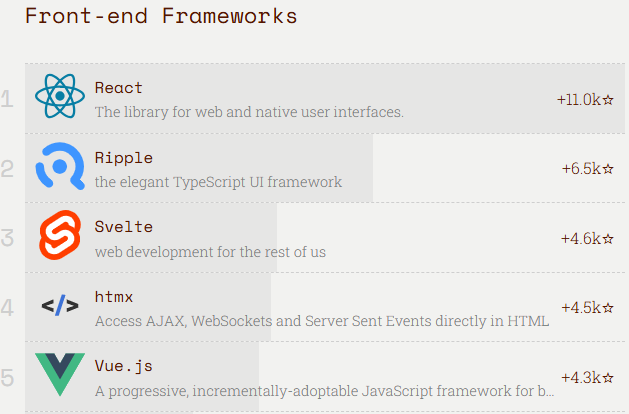
Source: 2025 JavaScript Rising Stars
However, building full-scale project management apps with React alone often requires additional setup efforts. That’s where Next.js comes into play.
Next.js complements React’s rich UI-focused capabilities with major features required for delivering production-ready applications. The key strength of Next.js lies in the availability of several rendering techniques (SSR, SSG, and hybrid) that ensure faster initial load times and SEO capabilities. The application performance is further enhanced with useful built-in features like code splitting, image optimization, data pre-fetching, and caching mechanisms. Also, there is a built-in routing system designed to simplify app navigation. Apart from that, Next.js comes with advanced tooling with Turbopack, middleware, DevTools MCP, and other utilities, improving the overall developer experience.
Next.js has quickly evolved from a promising tool to a default starting point for many React teams. So, it is not surprising that popular surveys like the latest Developer Survey from Capterra include both React and Next.js in lists of the most popular and desired web frameworks and technologies.
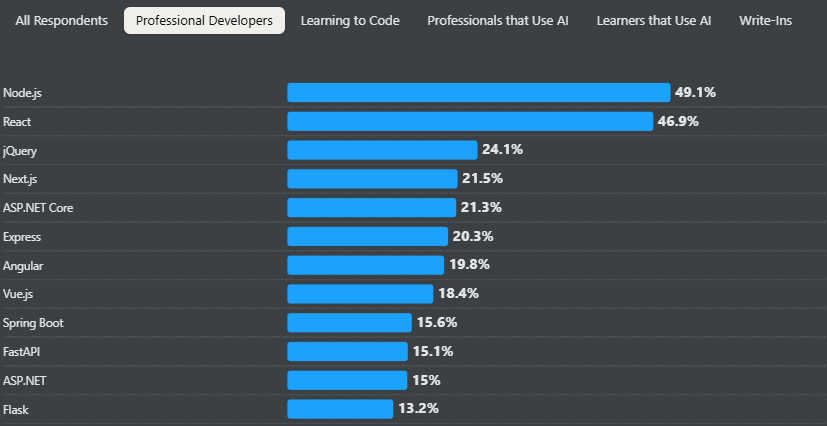
Source: 2025 Stack Overflow Developer Survey
As Next.js gains traction across development communities, utilizing React-focused libraries and UI components like a client-side Gantt chart in Next.js can be a valid solution.
When to Use DHTMLX Gantt with Next.js
DHTMLX Gantt for React is designed to handle large datasets and complex scheduling logic. This UI component is used in data-heavy React project management systems, planning tools, enterprise dashboards, and large SaaS platforms, where performance and scalability are essential. Smart rendering and dynamic loading techniques help ensure a fast, responsive user experience in projects with thousands of tasks.
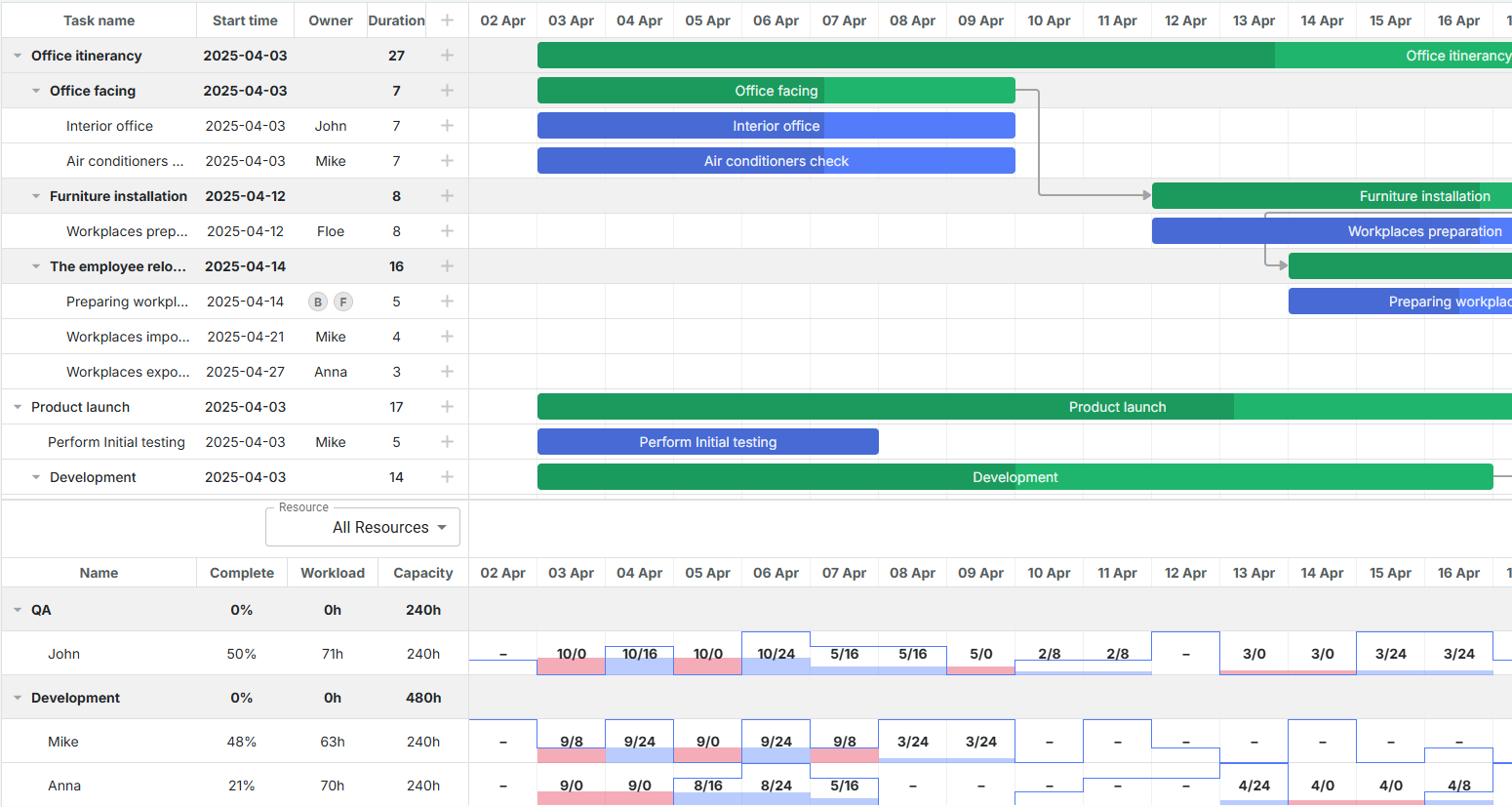
React Gantt chart with resource histogram
React Gantt also allows using a range of features required for advanced scheduling scenarios by accessing the API of our time-tested JavaScript Gantt chart library. The most notable of them are auto-scheduling, resource assignments, critical path calculation, constraints, task grouping & splitting. In practice, these features enable project managers to run large projects with maximum efficiency. But at the same time, these capabilities increase the rendering load, data processing complexity, and the need for effective state management in Gantt.
While state management can be addressed by combining our React Gantt chart with the Redux Toolkit, the other mentioned challenges can be solved with Next.js. This SSR framework provides performance optimizations, routing, and simplified data orchestration. By integrating DHTMLX Gantt in Next.js, teams can deliver a clear application structure with predictable rendering behavior and scalable architecture. And the great news is that DHTMLX React Gantt is fully compatible with Next.js, so developers can benefit from it in React projects without resorting to non-standard workarounds.
Quick Steps For DHTMLX React Gantt Integration with Next.js
For developers with basic experience in React and Next.js, the integration is straightforward and should not require much time. But let us run through the key steps to make DHTMLX Gantt for React work in the Next.js environment.
First of all, it is necessary to install Node.js. After that, you can proceed to creating a new Next.js project. For this purpose, use the npx create-next-app@latest command, which sets up the project structure and installs all necessary dependencies.
The rest of the integration is focused on adding DHTMLX Gantt for React to the project and rendering a working Gantt chart, and includes the following steps:
- Install the React package (installation guide)
- Prepare demo data for tasks and links
- Create the Gantt component
- Add the Gantt chart to a page
- Run the app
Since DHTMLX Gantt for React is a UI component that relies on refs, callbacks, and hooks for handling various tasks in the browser, it must be rendered inside the Client component. This is required because Next.js uses Server Components by default, which do not have access to the browser environment. The official DHTMLX Gantt tutorial provides a more detailed explanation and code samples on the subject.
That’s all you need to do to create a minimal setup required to get started. A ready-to-use DHTMLX Gantt React example based on this tutorial is available in the GitHub repository as a starter app for your project.
Final Words
Building a modern enterprise-grade web application in React requires a blend of a predictable architecture, robust performance, and rich UI functionalities. The use of DHTMLX Gantt React with Next.js helps achieve this goal with minimal time and effort. While Next.js provides a well-structured and scalable React environment, DHTMLX Gantt for React brings in everything needed for advanced project planning and workflow visualization. Using the official DHTMLX Gantt integration guide with Next.js, teams can quickly move from prototypes to real-world solutions for effective project management.