
Updated on January 20, 2026
If you’re developing a project management application based on the Salesforce Lightning platform, you probably use the Lightning Web Components (LWC), which significantly simplify and accelerate the process of building responsive applications for any device. But any modern project management app can hardly be good enough for achieving complex business objectives without a Gantt chart functionality. And the good news is that you can easily integrate the DHTMLX Gantt chart with Salesforce Lightning components into your app.
In this post, we’d like to share with you a code example on GitHub and two video guides on how to create a Salesforce task scheduling solution with our Gantt component.
Why Use Lightning Web Components for Creating Your Salesforce App?
Salesforce has become widely recognized in the software industry as a global leader in cloud-based CRM technologies, but the company is also known for its innovative solutions for front-end development, such as Lightning Web Components (LWC). This modern JavaScript programming model helps to create high-performing Salesforce apps that run on modern web browsers using the latest web/W3C standards and the newest JavaScript features.
In essence, LWCs are custom elements built using HTML and ES6+ standards. Introduced at the end of 2018 as a more advanced alternative to the older model named Aura components, LWC has become a great possibility for millions of JS developers around the globe to write code on the Lightning Platform in a much easier way. The thing is that developers don’t need to learn any new frameworks to work with LWC, but can use standard tools (HTML, CSS, JS), thus the whole development process becomes much simpler and faster.
The Salesforce team constantly enhances its application development solution. Latest Salesforce releases include a range of novelties focused on improving developers’ experience with LWC:
- Lightning Out 2.0
It is a handy framework that enables developers to securely reuse custom Lightning Web Components outside the Salesforce platform i.e., external websites and applications, in a fast and secure way using Lightning Web Runtime (LWR).
- Local Dev for LWC
Salesforce has significantly improved local LWC development by introducing a real-time preview for individual components. It contributes to faster iteration and effective issue detection during the development process, which is especially useful when working with advanced UI components, such as Gantt charts.
- LWCs as Local Flow Actions
The possibility of using LWCs as local actions enables the execution of client-side logic in Salesforce screen flows, improving interactivity and overall user experience.
- Expanded GraphQL support for LWC
Salesforce now provides enhanced GraphQL support for LWCs, ensuring more flexible and efficient data retrieval.
Using DHTMLX Gantt for Implementation of Gantt Chart Functionality
DHTMLX Gantt is a comprehensive JavaScript library that enables developers to build Gantt charts of any complexity level, complemented with numerous useful features (critical path, resource management, auto-scheduling, etc.) and make use of advanced customization capabilities. But most importantly, our component allows creating an interactive Gantt in Salesforce without any compatibility issues.
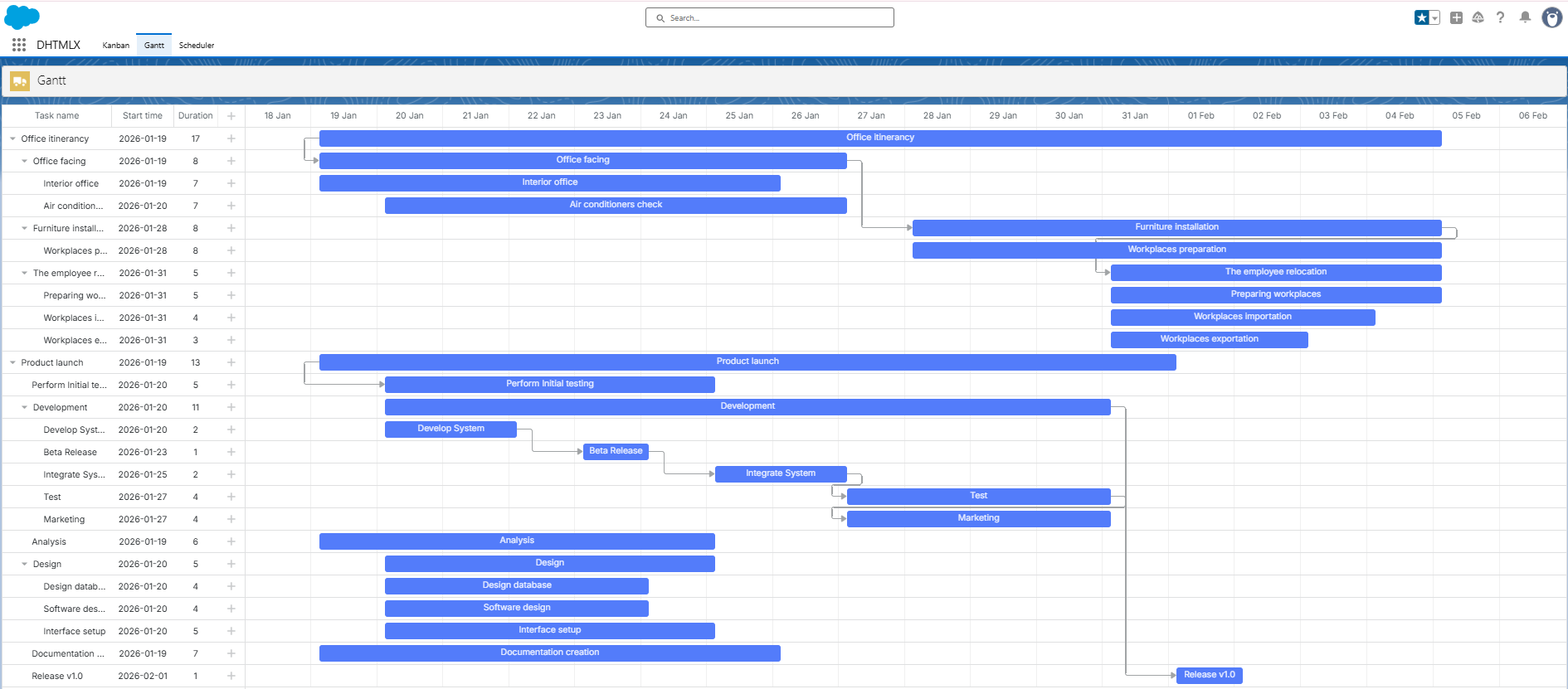
This online demo (Login: user, Password: demo) vividly demonstrates that DHTMLX Gantt, as well as our Scheduler and Kanban components, can be embedded into Salesforce apps. The source code of this demo is available on GitHub.
Video Guide on Adding DHTMLX Gantt into Salesforce LWC
When it comes to implementing a Salesforce Gantt chart with DHTMLX, you have nothing to worry about, as our detailed video guide explains each step of the process.
Before starting, you should install the Salesforce CLI for convenient coding. We also recommend installing the Salesforce Extension Pack to Visual Studio Code, which enables you to work with development orgs.
Alternatively, you can also make use of the guide provided in the Gantt documentation for achieving the same goal. The DHTMLX Gantt with Salesforce LWC guide includes detailed explanatory notes with code and images on all stages of implementing a DHTMLX-based Lightning Gantt chart. In addition, the tutorial offers helpful commentaries on two important topics, such as application security and troubleshooting.
In our GitHub repository, you can find a ready-made DHTMLX Gantt demo for SalesForce with the complete source code.
DHTMLX Gantt Integration with LWC (Installation Guide)
One more significant aspect of Salesforce task visualization with Gantt is making necessary adjustments in Salesforce settings for running the project. This procedure is highlighted in another step-by-step video tutorial.
Please note that the given tutorial requires an additional step. You will need to create a custom lightning tab with Gantt. You can see how it is done in this part from the first video guide or check out this step in the GitHub repository.
Apart from the Salesforce CLI, you’ll also need to enable the Developer Hub, which serves for creating and managing scratch orgs. After that, just follow the instructions, and very soon you will get Salesforce project timeline visualization via a Gantt chart.
So you get everything you need for building your own Salesforce application with DHTMLX Gantt. What’s next? Visit our GitHub repository, where you can find the full source code of our LWC Gantt Salesforce project and follow the steps of our video guide.
The video guides provided above are a good starting point for trying DHTMLX Gantt in Salesforce, but you can go further with your LWC project management ideas and complement a basic Gantt chart with a resource panel.