
Gantt charts are often implemented in modern project management apps to handle projects of any scale and complexity. The collaborative nature of this tool creates opportunities for all members of the project team to be actively engaged in workflows and get a bird’s-eye view of the project progress, reducing the need for frequent status meetings. But how not to get lost in a large number of tasks created by different people? The answer is to complement a Gantt chart with the AI-powered semantic search. That’s exactly what we did in our new DHTMLX Gantt demo.
In this blog post, we’ll consider the practical benefits of the semantic search concept compared to traditional search options, why we chose the local approach, and useful implementation tips for real-life scenarios.
Moving Beyond Keywords with Semantic Search
Traditional search can be effective only when users remember the exact summary title or ID of the required task since it relies on keyword matches. In real projects, that’s rarely the case. Projects built with the JavaScript Gantt chart often include thousands of tasks, and it is next to impossible to remember the name of each task. Of course, it is possible to assume the correct task title logically, but you never know how different users will label a specific piece of work. Traditional search methods are rigid; they match strings of characters rather than intents. For instance, if you try to find “Performance Issue”, the common search algorithm is very likely to ignore a task named “Optimize Authentication Query Latency” because the text patterns do not align.
In our new Gantt demo, we address this limitation by incorporating a semantic search that relies on the meaning of a user query rather than on a textual description. The concept of semantic search is used in the RAG technique, which is the cornerstone of the DHTMLX MCP Server. The example below shows how semantic search works from the user’s perspective:
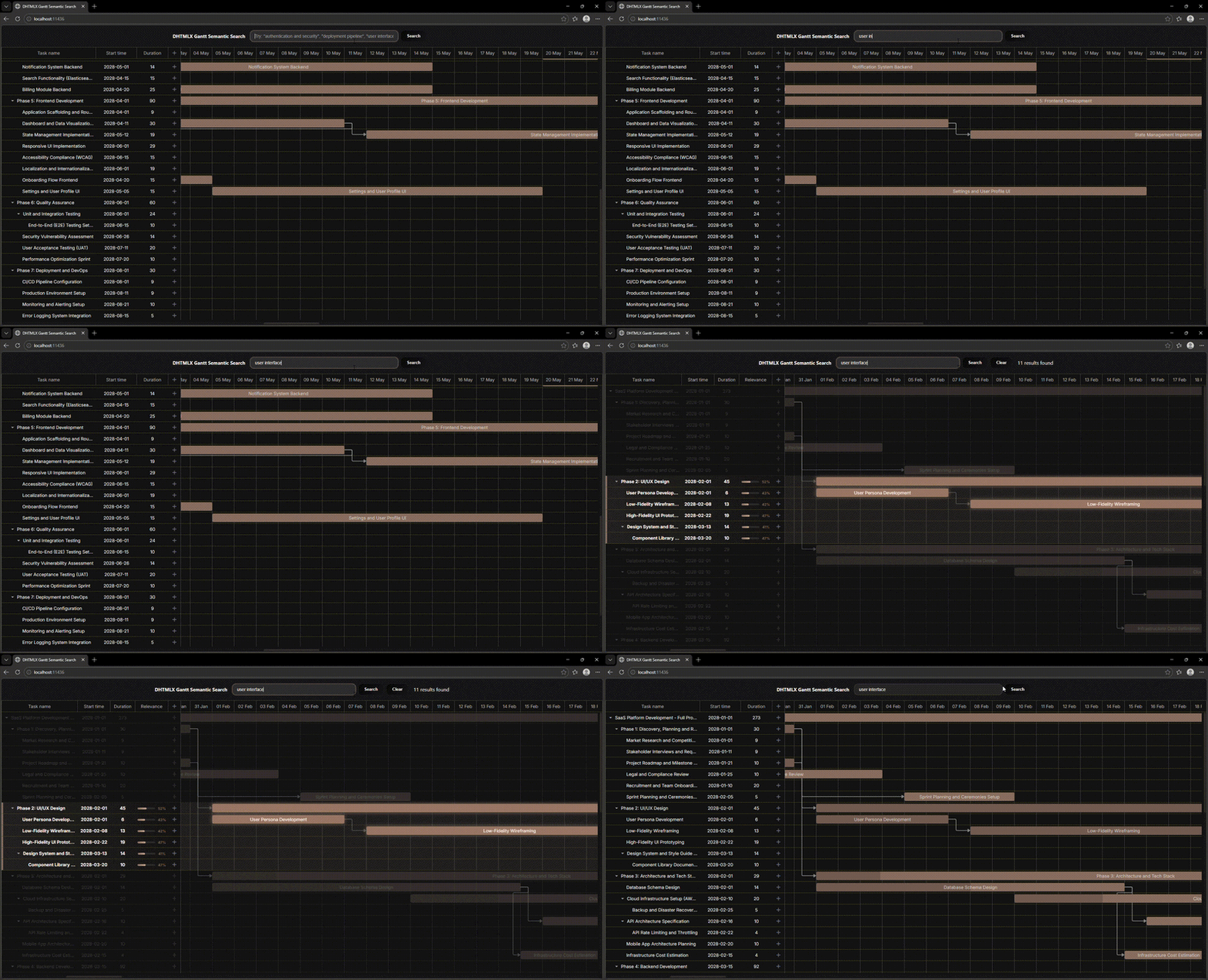
Now, we can proceed to highlighting the core technical aspects of this solution.
ABCs of Semantic Search in DHTMLX Gantt
First, let us note the difference in how humans and machines perceive textual information. For instance, words “fast” and “quick” are interchangeable synonyms for us, while basic search algorithms identify them as distinct, unrelated items.
Semantic search bridges this gap by converting textual information into numerical vectors (embeddings). These are generated by specialized AI models that capture the meaning of words and phrases and present them as coordinates. Texts with similar meanings are indicated with similar numbers, so their embeddings end up being geometrically close to each other. For instance, the vector for “Server Outage” will be close to “System Downtime”, or the vector for “Bug Fix” will be close to “Error Resolution”.
In our demo, both search inputs and project tasks are represented as embeddings and compared in meaning using a specific metric named cosine similarity.
Here is the complete search cycle:
- a user inputs a query in the search bar,
- the input string is sent to the AI embedding model,
- the model generates the query embedding (vector),
- the system iterates through the stored task vectors, calculating the cosine similarity,
- the closest matches ranked by relevance are highlighted in the Gantt UI.
Note: stored task embeddings and query embeddings must come from a single model, otherwise search results will be incorrect.
In our scenario, we used a local AI embedding model, and it is worth explaining why.
Reasons for Choosing Local AI Embedding Model
In general, there are two ways you can go about choosing an appropriate embedding approach: either use external cloud providers like OpenAI, Cohere, etc., or opt for fully local models. With hosted APIs, you get a more powerful solution, but you should be aware of potential pitfalls associated with this approach, such as latency and, most importantly, data privacy concerns. That is why we preferred the local option.
To run the embedding model locally, you can employ tools like Ollama, Triton Inference Server, or even your custom solution based on llama.cpp or vLLM. Since our demo was designed for demonstration purposes, we decided to go with Ollama. It is one of the simplest ways to run a local embedding model, which helps ensure the following:
- Proprietary project details never leave the user’s environment (data privacy).
- Without network round-trips, the search operates at near-zero latency, which is critical for responsive Gantt interactions.
Check out the full implementation guide for AI semantic search in the DHTMLX Gantt documentation. You can also find this demo project on GitHub.
Now, we want to share a few recommendations that will be helpful in real-case scenarios.
Bringing Semantic Search to a New Level
Our demo project vividly demonstrates the benefits of this feature, but production deployment is likely to require some enhancements. Let us consider possible options.
Data Pre-Processing
Tasks in Gantt charts built with DHTMLX may contain multiple fields: title, description, assignee, priority, etc. If you embed only the task title, you limit the search scope.
What can be done: concatenate relevant fields into a single string before embedding. For example: “Description: Frontend Mockups. Assigned to John. Priority: “High”. This provides the model with full context, allowing end-users to search for “John’s tasks” effectively.
Since task names and descriptions are relatively short, concatenating all related task data into a single embedding should work well. But if project tasks contain much more information, it is necessary to make this data searchable as well. It requires a different approach, such as chunking strategies.
Scalability Issue
Generating embeddings is computationally heavier than simple string indexing. If you have a Gantt chart with 5,000 tasks, generating vectors for all of them on page load would freeze the UI.
What can be done: apply database indexing. Implementing different chunking strategies, tasks are divided into several (up to hundreds) chunks. Comparing a query embedding against each stored chunk embedding can be a viable option even for a few thousand tasks. For larger datasets, there are several techniques to get optimal latency. For instance, you can try the approximate nearest neighbor (ANN) search.
Similarity Threshold
The results of cosine similarity computations typically range from -1 to 1. If you set the threshold too high (e.g., 0.95) or too low (e.g., 0.15), the results are likely to be unreliable. So, what value counts as a “match”?
What can be done: calibrate the threshold according to your domain and embedding model. From our experience with technical documentation and project tasks, a threshold between 0.4 and 0.6 often yields the best results with local models like all-minilm, qwen3-embedding, or embeddinggemma. We recommend exposing this threshold as a configuration option, thereby enabling end-users to adjust the sensitivity of their search. Alternatively, you may consider choosing the top-N relevant search results by score, avoiding the threshold parameter.
Search Enhancement
Relying on a single, often-biased, embedding model may lead to various issues, such as low retrieval accuracy, semantic noise, arbitrary similarity scores, and more.
What can be done: boost retrieval accuracy by combining a semantic search with a traditional, keyword-based search (based on the BM25 algorithm) or several embedding models (e.g., OpenAI + Cohere). In both cases, search results are merged using the RRF (reciprocal rank fusion) algorithm.
Final Words
Summing up, we can say with confidence that the use of AI embedding models certainly contributes to better user experience in apps with searchable data structures. Thanks to the semantic search, end-users no longer need to remember the exact wording. All they have to do is to describe the concept or intent to find desired items. We showed how this pattern works with DHTMLX Gantt, but it is also applicable in scenarios with other JavaScript UI components from our product line. Download a free 30-day trial version of any product, and give it a try.