
Updated on February 12, 2026
It is common wisdom that success is built on a series of right choices. In web development, it often comes down to choosing the right tools for your technology stack, which often becomes a real challenge. The complexity of such a choice is clearly visible in the segment of project management software, where dev teams often struggle to pick proper, complex JavaScript Gantt chart components for covering various planning and scheduling needs. In recent years, one of the most intense competitions in this field has been DHTMLX Gantt vs Bryntum Gantt.
In this article, we will compare these two popular web components for adding Gantt charts to project management solutions. Both components have a long history in the market of JS tools. Let us consider how they differ and see why DHTMLX is a great alternative to Bryntum.
DHTMLX is 10 Times Faster and Lighter than Bryntum
When it comes to managing large projects with thousands of tasks, the performance of your Gantt chart plays a crucial role. In this section, we’ll consider the main performance metrics of both Gantt components under review. In order not to be unfounded on this important matter, we tested the use of RAM with different numbers of tasks, FPS characteristics, and tasks loading capabilities of both libraries.
RAM usage
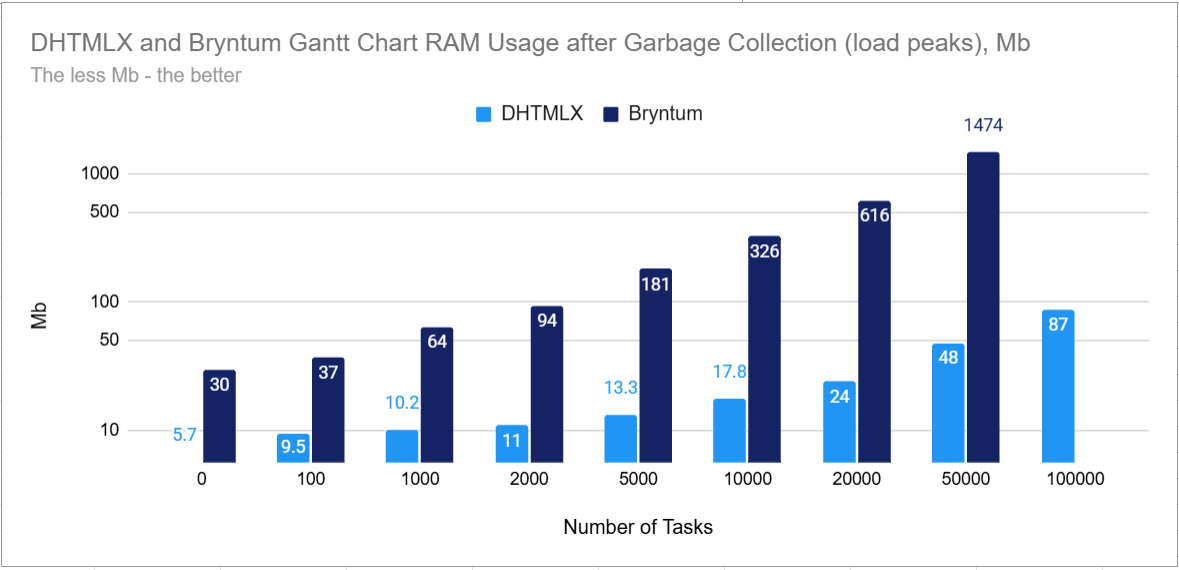 Note: Bryntum Gantt wasn’t able to load 100,000 tasks on the computer used for testing
In the chart above, you can see the measured amount of memory required for both components to work with a different number of tasks (from 0 tasks to 100,000 tasks). It is important to check this parameter when estimating the performance of data-intensive UI components. Excessive memory consumption slows down the running app and causes inconvenience for end-users.
DHTMLX Gantt shows more rational memory usage even with small amounts of data, but end-users will hardly notice the difference with such loads. The situation may change drastically when talking about thousands of tasks. DHTMLX takes 18 times less memory than Bryntum (17,8 Mb compared to 326 Mb) with 10,000 tasks. When increasing the number of tasks tenfold, the gap continues to grow: DHTMLX consumes 87 Mb, while Bryntum Gantt cannot handle this amount of data. However, in most use cases, datasets will not exceed 1000 rows. We can take this number as the basepoint. Here, DHTMLX has 6x less memory consumption than Bryntum.
FPS (Scrolling Gantt charts)
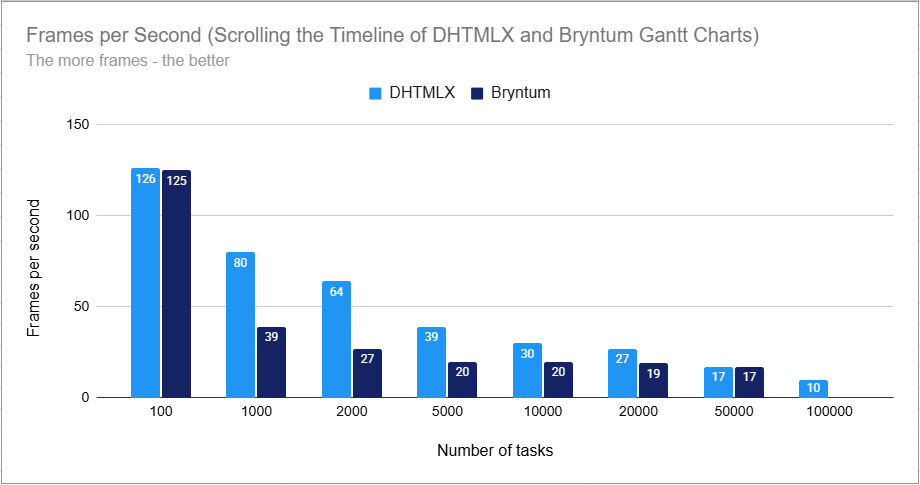
Note: The graph shows median values. Bryntum Gantt wasn’t able to load 100,000 tasks on the computer used for testing
The FPS parameter measures frame rendering speed, which means how fast the component is running and whether this affects the operation speed of the rest of the page. If the FPS value is below 30, it becomes less and less convenient to work with Gantt.
In the range from 100 to 1000 tasks, both components are quite good, but DHTMLX has much higher resilience/margin of safety with such datasets. When scrolling through 2,000-10,000 tasks, DHTMLX Gantt functions perfectly well, while Bryntum starts slowing down. Under heavy loads from 20,000 to 100,000, both components are struggling, but DHTMLX Gantt turns out to be more load-resistant, withstanding the load of 100,000 tasks.
Tasks loading
Finally, we have to take into account the time required for loading and rendering tasks into Gantt charts built with both libraries (without the use of auto-scheduling). It is probably the most vivid performance characteristic since initial rendering time is a critical metric. It allows you to understand how fast Gantt components can handle various loads and decide whether it will be acceptable for a given project.
In average charts, Gantt data should be loaded in less than 3 seconds, except for cases when the data contains a lot of information (additional fields). But even then, the loading process should not take more than 30 seconds.
With DHTMLX, you can show 1000 tasks at 111 ms, which leaves a lot of time for loading other elements. In the case of Bryntum, you have a tighter time budget. Starting from 2000 rows, the time of Bryntum Gantt is below the acceptable threshold, where DHTMLX stays in the green zone even at 10,000 tasks.
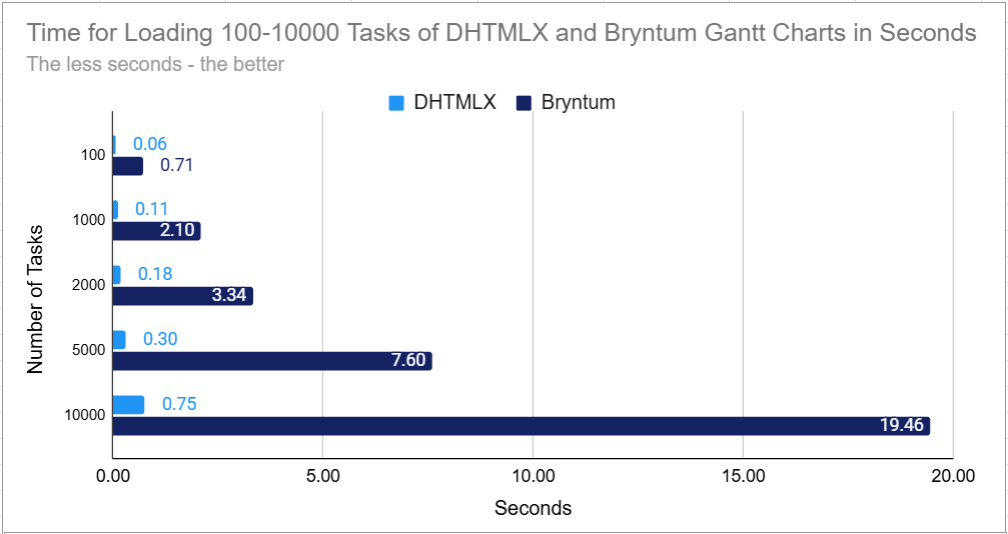
Moreover, we performed tests that vividly illustrate the loading speed capabilities of both Gantt components under heavy loads.
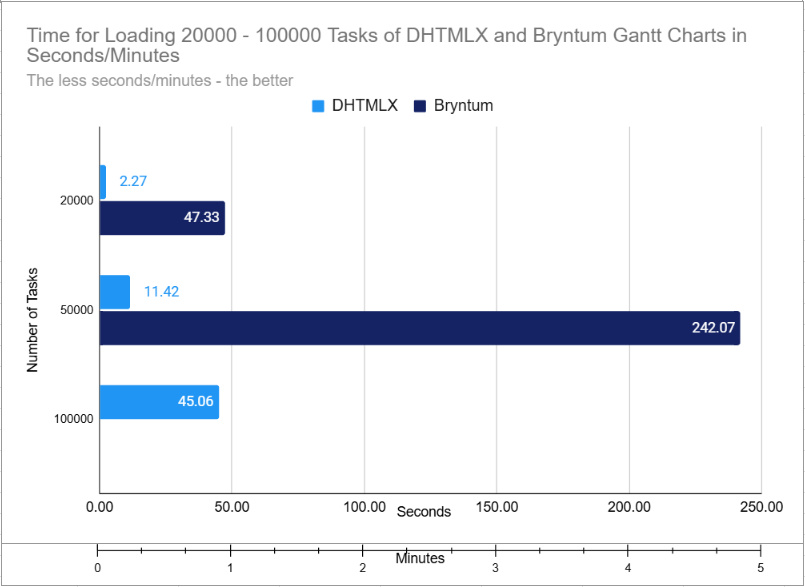 Note: Bryntum Gantt wasn’t able to load 100,000 tasks on the computer used for testing
As shown in the resulting graph with big charts, DHTMLX Gantt is even more performant. For instance, it takes almost 5 minutes for Bryntum Gantt to load 50,000 tasks, which is a considerable amount of time. Thus, to be in the perfomant area, you’d better limit the data to 20,000 tasks working with DHTMLX and to 2,000 tasks with Bryntum. It turns out to be a 10x difference between the components.
To check the test results on your own, you can try the following snippets:
Bear in mind that the results of these tests heavily depend on the resources of the computer being used. For performance testing of both Gantt components, we used a computer with the following technical characteristics:
- Windows 10, Intel(R) Core(TM) i3-7100U CPU @ 2.40GHz, 8GiB
Customization and Configuration Options
In general, both libraries have all the essential features that are expected from a Gantt chart. You can examine the availability of Gantt features for DHTMLX and Bryntum products in the comparison table at the end of the article. In this section, we would like to focus on technicalities that allow developers to complement their app with required features and adjust the chart to any project requirements.
Let us start with APIs and first focus on the configuration capabilities of both components.
DHTMLX allows you to modify the appearance of almost any UI element using the HTML template system. Templates define the content and CSS classes of many DHTMLX Gantt elements. These templates are listed in the API and are declared as simple functions. They do not require a deep understanding of the component’s architecture. Moreover, there are plenty of ready-made code snippets at the disposal of the DHTMLX tech support team, which allow copying and pasting the code to make the needed feature work instantly. Currently, there are 650+ Gantt snippets (and 200 more samples), but this number is constantly growing.
Bryntum Gantt offers similar capabilities for changing the content of elements, but this JavaScript component uses a different approach. Bryntum widgets follow a stricter component structure, with content settings distributed among APIs of widgets that are part of the Gantt. It allows you to reuse the knowledge gained in working with other Bryntum widgets, but also makes the configuration process more complex. Thus, in order to configure visible elements of the Gantt chart, you need to study the documentation of several related widgets.
For instance, if you need to create a column with non-standard formatting in the Gantt grid, you need to declare a new class inherited from Bryntum Column in Bryntum Gantt, register it in the Gantt, and only after that the column can be added to the grid:
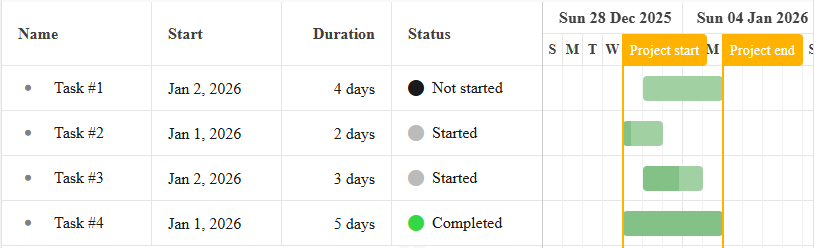
class StatusColumn extends Column {
static $name = 'StatusColumn';
static type = 'statuscolumn';
static get isGanttColumn() {
return true;
}
static get defaults() {
return {
field: 'status',
text: 'Status',
editor: false,
readOnly: true, // For FillHandle etc.
cellCls: 'b-status-column-cell',
htmlEncode: false,
width: 120,
filterable: {
filterField: {
type: 'combo',
items: ['Not Started', 'Started', 'Completed', 'Late']
}
}
};
}
renderer({ record }) {
const status = record.status;
return status ? [{ tag: 'i', className: `fa fa-circle ${status}` }, status] : '';
}
}
ColumnStore.registerColumnType(StatusColumn);
class Task extends TaskModel {
get isLate() {
return !this.isCompleted && this.deadlineDate && Date.now() > this.deadlineDate;
}
get status() {
let status = 'Not started';
if (this.isCompleted) {
status = 'Completed';
} else if (this.isLate) {
status = 'Late';
} else if (this.isStarted) {
status = 'Started';
}
return status;
}
}
const project = new ProjectModel({
taskModelClass: Task,
});
window.gantt = new Gantt({
project,
appendTo: 'container',
columns: [
{ type: 'name', width: 60 },
{ type: 'startdate' },
{ type: 'duration', width: 110 },
{ type: 'statuscolumn', width: 150 },
],
});
DHTMLX Gantt solves the same task by simply adding a template function to the cell:
{ name: "text", tree: true, width: 120, resize: true, editor: { type: "text", map_to: "text" } },
{ name: "start_date", align: "center", width: 100, resize: true, editor: { type: "date", map_to: "start_date" } },
{ name: "duration", align: "center", width: 40, resize: true, editor: { type: "number", map_to: "duration", min: 0, max: 100 } },
{
name: "status", label: "Status", width: 100, resize: true, template: function (task) {
let status = "Not Started";
let greenColor = 1;
if (task.progress == 1) {
status = "Completed";
greenColor = 3;
}
else if (task.progress > 0) {
status = "Started";
greenColor = 2;
}
const color = `rgb(100,${100 * greenColor},100)`;
const styles = `font-size: 40px; color: ${color}; vertical-align: middle;`
const icon = `<span style="${styles}">•</span> `
const text = `<span>${status}</span>`;
return icon + text;
}
},
{ name: "add", width: 30 }
];
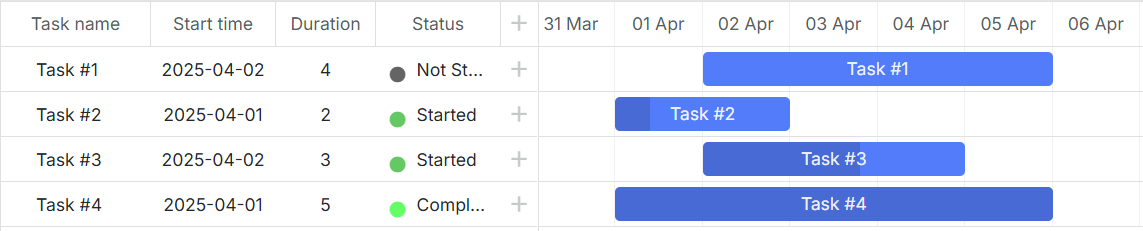
In addition, DHTMLX has the ability to easily add various UI elements directly to the Gantt timeline with a reference to schedule dates and tasks. Using the API, it is possible to add baselines as well as any indicators and markers that may be needed.
In Bryntum Gantt, similar functionality is implemented with two separate features – Baselines and Indicators.
Different approaches of both libraries to the feature implementation manifest themselves differently. Bryntum Gantt provides an API that allows you to add typical elements to the chart. The API of DHTMLX gives you full control over the added element, which allows you to deliver extra features that are not included in the library’s package but are required for the project.
All in all, we can say that DHTMLX has a high-level API with just one Gantt object, making it much easier for web developers to get started with the library on a practical level. Bryntum Gantt has a larger but more complex API with an intricate architecture. As a result, DHTMLX has an easier learning curve than Bryntum.
Using the DHTMLX Gantt component, it is easy to perform non-standard customization, as it directly uses HTML/JavaScript. Customization options of Bryntum Gantt are also quite extensive, but they require deep knowledge of Bryntum architecture and the different widgets used in the Gantt.
In general, Bryntum Gantt, built upon a modular architecture of diverse Bryntum widgets, poses a sharper learning curve due to its intricate structure. However, its advantage shines through for teams already acquainted with Bryntum widgets, as this prior knowledge can be instrumental for a swift mastery of Bryntum Gantt. On the other hand, DHTMLX library provides a more centralized functionality, simplifying integration and enabling faster prototyping, testing, and development for projects of any scale, from agile startups to large enterprise applications.
Samples, Demos, and Guides
Using a commercial JS library, web developers always count on auxiliary materials that simplify the implementation of Gantt features. DHTMLX and Bryntum offer considerable packages of live samples (850+ for DHTMLX Gantt vs 150+ for Bryntum Gantt) that help to get a clear idea of how a particular feature should work and significantly shorten the learning curve.
Both Gantt charts boast that they can be easily integrated into apps based on the most popular frameworks (React, Angular, Vue.js) and provide detailed integration guides and demos. All in all, the official DHTMLX documentation contains 18 guides on the integration of Gantt with different client-side and server-side technologies. The number of official guides at Bryntum is fewer (11).
In addition to the guides available in the documentation, the DHTMLX technical support team has many demos showing how to use Gantt with different technologies (for example, with Svelte, Ionic, Electron, or Java + Spring), which they provide on demand. We assume that Bryntum Gantt also has some code examples at their disposal, which are not available publicly but on request.
Licensing and Pricing
Pricing is probably the final decisive factor when it comes to investing in commercial JavaScript tools.
Those who consider Bryntum Gantt for their projects should be ready to spend at least $2820 for a team of 3 developers, and be aware that this is the price for a license for internal and non-commercial use only. For commercial and SaaS apps, Bryntum offers OEM licenses upon request.
DHTMLX offers a more flexible and budget-friendly licensing model. For early-stage teams, the Startup license starts at $569 for up to 3 developers and one SaaS product for one year, making it an attractive entry point for MVPs and young companies. For growing teams, the Commercial license at $1399 for up to 5 developers and one project provides perpetual distribution rights with premium support, significantly more affordable than an equivalent Bryntum setup. For larger organizations requiring multi-product deployment, the Enterprise license includes usage in SaaS applications with perpetual rights and extended support, offering enterprises a clear and compliant path for cloud-based solutions.
Importantly, DHTMLX doesn’t limit the number of end-users of SaaS apps built with the library, while one has to pay more for Bryntum Gantt to scale up and cover additional end-users.
Unlike Bryntum, DHTMLX is also available under an open-source license (GNU GPL v2). It has a reduced number of features compared to the paid edition. However, it still provides developers with a feature-packed Gantt well-suited for many non-commercial projects.
Trial Period and Support
Trial periods slightly differ in time. Bryntum offers 45 days for a free evaluation of their library. DHTMLX gives a period of 30 days, but if it turns out to be insufficient, it can be prolonged for one more month.
The main channel of technical support at Bryntum for both trial users and customers is the forum. The response time varies from up to a day to 2-3 business days, depending on the level of support (standard or premium). However, it is also possible to reach tech specialists via email.
DHTMLX provides individual email support. Trial users can count on receiving answers within 1-3 business days. DHTMLX customers get help within 24, 48, or 72 hours, depending on their support plan. Very often, the DHTMLX support team answers even within a couple of hours. Each email request has a guarantee of getting a response. Besides, users are free to use the community forum, where developers leave questions and share knowledge.
Comparison Table
As a cherry on top of the cake, here is a detailed comparison table with ten sections covering various parameters that may be important for web developers when choosing the right tool for their products. Comparison items vary from general characteristics and features to peculiarities of both products. As of the time of writing, the latest DHTMLX Gantt version is 9.1.1, and Bryntum Gantt is 7.1.1.
| DHTMLX Gantt | Bryntum Gantt | |
| Trial period |
DHTMLX Gantt
30 days
|
Bryntum Gantt
45 days
|
| Primary tech support channel |
DHTMLX Gantt
Email
|
Bryntum Gantt
Forum
|
| Additional tech support channels |
DHTMLX Gantt
Forum
|
Bryntum Gantt
Email
|
| Response time |
DHTMLX Gantt
24-72 h
|
Bryntum Gantt
24-72 h
|
| Starting price |
DHTMLX Gantt
$699
|
Bryntum Gantt
$1,100
|
| Unlimited end-users of apps based on Gantt |
DHTMLX Gantt
|
Bryntum Gantt
|
| Reviews |
DHTMLX Gantt
4.7 stars based on 49 reviews on G2
4.6 stars based on 77 reviews on Capterra 8.8 score based on 30 reviews on TrustRadius |
Bryntum Gantt
4.5 stars based on 3 reviews on G2
4,8 stars based on 24 reviews on Capterra 0 reviews on Trustradius |
| Product Characteristics | ||
| Source code included |
DHTMLX Gantt
|
Bryntum Gantt
|
| NPM access |
DHTMLX Gantt
|
Bryntum Gantt
|
| Open-source version |
DHTMLX Gantt
|
Bryntum Gantt
|
| Archived Package Size |
DHTMLX Gantt
1.8 Mb
|
Bryntum Gantt
368 Mb
|
| Full Package Size |
DHTMLX Gantt
9.2 Mb
|
Bryntum Gantt
542.1 Mb
|
| Code examples |
DHTMLX Gantt
850+
|
Bryntum Gantt
150+
|
| Integration guides |
DHTMLX Gantt
18
|
Bryntum Gantt
11
|
| General Features | ||
| Locales |
DHTMLX Gantt
33
|
Bryntum Gantt
45
|
| Skins |
DHTMLX Gantt
8 total
(8 unique) |
Bryntum Gantt
12 total
(4 unique) |
|
Work on modern platforms (React, Angular, Vue, etc) |
DHTMLX Gantt
|
Bryntum Gantt
|
|
Work in all modern browsers: Firefox, Safari, Chrome, All Chromium browsers (Opera, Vivaldi, Brave, Edge) |
DHTMLX Gantt
|
Bryntum Gantt
|
| Work in Internet Explorer |
DHTMLX Gantt
|
Bryntum Gantt
|
|
Support for touch devices: iOS, Android |
DHTMLX Gantt
|
Bryntum Gantt
|
| Responsive UI |
DHTMLX Gantt
|
Bryntum Gantt
|
| Drag-n-drop | ||
| Drag tasks |
DHTMLX Gantt
|
Bryntum Gantt
|
| Resize tasks |
DHTMLX Gantt
(start date, end date) |
Bryntum Gantt
(only end date) |
| Drag project tasks with their children |
DHTMLX Gantt
|
Bryntum Gantt
|
| Drag timeline with the mouse |
DHTMLX Gantt
|
Bryntum Gantt
|
| Drag custom elements inside Gantt |
DHTMLX Gantt
|
Bryntum Gantt
|
| Assign resources to tasks by dragging avatars from the resource panel |
DHTMLX Gantt
|
Bryntum Gantt
|
| Tasks | ||
| Display task progress |
DHTMLX Gantt
|
Bryntum Gantt
|
| Projects, Milestones |
DHTMLX Gantt
|
Bryntum Gantt
|
| Automatic detection of task types |
DHTMLX Gantt
|
Bryntum Gantt
|
| Custom task types |
DHTMLX Gantt
|
Bryntum Gantt
|
| Text around task bars |
DHTMLX Gantt
|
Bryntum Gantt
|
| Multiple task selection |
DHTMLX Gantt
|
Bryntum Gantt
|
|
Several tasks on the same line (Split tasks) |
DHTMLX Gantt
|
Bryntum Gantt
|
| Grid | ||
| Configuration of columns in the grid |
DHTMLX Gantt
|
Bryntum Gantt
|
|
Predefined set of grid columns ("Add new column" column) |
DHTMLX Gantt
|
Bryntum Gantt
|
| Resize Grid and individual columns |
DHTMLX Gantt
|
Bryntum Gantt
|
| Hide Grid columns |
DHTMLX Gantt
|
Bryntum Gantt
|
| Vertically reorder tasks in the Grid |
DHTMLX Gantt
|
Bryntum Gantt
|
| Inline editing |
DHTMLX Gantt
|
Bryntum Gantt
|
| Filter in the Grid header |
DHTMLX Gantt
|
Bryntum Gantt
|
| Import/Export | ||
| Export to PDF, PNG |
DHTMLX Gantt
|
Bryntum Gantt
|
| Export to Excel |
DHTMLX Gantt
|
Bryntum Gantt
|
| Export to MS Project |
DHTMLX Gantt
|
Bryntum Gantt
|
| Export to Primavera P6 |
DHTMLX Gantt
|
Bryntum Gantt
|
| Import Excel |
DHTMLX Gantt
|
Bryntum Gantt
|
| Import from MSP |
DHTMLX Gantt
|
Bryntum Gantt
|
| Import from Primavera |
DHTMLX Gantt
|
Bryntum Gantt
|
| Timeline | ||
| Customize scales in the timeline |
DHTMLX Gantt
|
Bryntum Gantt
|
| Zoom, Zoom-to-Fit |
DHTMLX Gantt
|
Bryntum Gantt
|
| Infinite Scroll |
DHTMLX Gantt
|
Bryntum Gantt
|
| Highlight weekends in the timeline |
DHTMLX Gantt
|
Bryntum Gantt
|
| Hide days (or cells) in the timeline |
DHTMLX Gantt
|
Bryntum Gantt
|
| Fill scale cells (Fill ticks) |
DHTMLX Gantt
|
Bryntum Gantt
|
| Fixed with of the timeline cells |
DHTMLX Gantt
|
Bryntum Gantt
|
| Editors/Edit Forms | ||
| Task editor |
DHTMLX Gantt
|
Bryntum Gantt
|
| Link editor |
DHTMLX Gantt
|
Bryntum Gantt
|
| Calendar editor |
DHTMLX Gantt
|
Bryntum Gantt
|
| Resource editor |
DHTMLX Gantt
|
Bryntum Gantt
|
| Cost Rate Editor |
DHTMLX Gantt
|
Bryntum Gantt
|
| Tabs in the lightbox |
DHTMLX Gantt
|
Bryntum Gantt
|
| Visualy assign caledars |
DHTMLX Gantt
|
Bryntum Gantt
|
| Other | ||
| Resource load chart |
DHTMLX Gantt
|
Bryntum Gantt
|
| Histogram chart |
DHTMLX Gantt
|
Bryntum Gantt
|
| Show React elements inside Gantt |
DHTMLX Gantt
|
Bryntum Gantt
|
| Rounded corners of links |
DHTMLX Gantt
|
Bryntum Gantt
|
| Link rendering customization |
DHTMLX Gantt
|
Bryntum Gantt
|
| Quick Info |
DHTMLX Gantt
|
Bryntum Gantt
|
| Overlay |
DHTMLX Gantt
|
Bryntum Gantt
|
Conclusion
Bryntum looks like a full-featured framework that demands significant investment in time, effort, and budget, while DHTMLX combines comprehensive functionality with a lightweight architecture designed to deliver results quickly. According to the test results, DHTMLX consumes six times less memory and performs ten times faster than Bryntum, making it a mature and highly scalable solution for performance-critical applications. Whether you’re building a startup MVP, a corporate project management tool, or a complex enterprise system, DHTMLX provides the speed, efficiency, and proven reliability needed to accelerate development and prototyping. In terms of pricing, DHTMLX offers attractive options for startups, growing teams, and large organizations alike, as well as an open-source edition for non-commercial projects.