
Updated on April 22, 2026
Wrong software choices happen more often than teams expect. Capterra’s 2025 Tech Trends Report shows that a surprisingly large share of software buyers regret their decisions (around 58% in 2024, 54% in 2025). At the same time, companies continue to increase their software budgets, raising the stakes for every purchasing decision that is often made in a short time.
When it comes to choosing a JavaScript UI library, rushed decisions based on a shallow analysis often lead to months of extra work to address performance issues, customization needs, or architectural limitations.
In this blog post, we’ll discuss the most common mistakes when choosing a JS library that emerge during the library search and how to spot them before committing to a solution.
Before You Even Open a Browser Tab
Prerequisites for making a false step with JavaScript UI libraries may occur before the actual selection process. That is why you need to take a few preparatory steps.
Define Your Project Scope Before Comparing Features
In cases where project requirements are ill-defined and poorly analyzed, you are more likely to experience difficulties in identifying all functionalities and parameters required for the UI of your app. To be more specific, it is important to take into consideration a wide range of requirements related to the following:
- functional capabilities,
- user experience,
- performance,
- scalability,
- security,
- compatibility with various technologies,
- customizability,
- and much more.
Insufficient clarity in project requirements may lead to selecting a JavaScript UI library that either lacks essential features or includes unnecessary ones, also known as “gold plating”. According to Capterra, the majority of successful software adopters create an implementation plan for a smoother rollout, thereby reducing the risk of disruptions.
Set a Realistic Budget
Apart from that, you should also conduct proper market research and have a clear financing strategy before considering particular JavaScript UI libraries for a web project. Commercial JavaScript libraries are not a one-time investment. Project owners and managers often focus too much on licensing costs, missing other costs associated with learning and long-term use of JavaScript libraries. We’ll discuss these questions in more detail below, but the key point here is that the cost of such tools goes beyond the initial price tag.
Now, let us proceed to the actual mistakes that are often made during the selection process of JavaScript UI libraries.
Mistake #1 — Trusting Marketing Over Evidence
Good marketing can effectively promote even not-so-great products on the market using various gimmicks. Eye-catching advertising campaigns, bold and unsubstantiated product praises, too attractive offerings – all these and many other tricks may persuade you to make rash decisions. But hold on for a moment and get more unbiased information about vendors and their product portfolio.
Vendor Info on G2, Capterra, and Stack Overflow
Make sure that you are dealing with a reputable vendor. The most obvious way to do that is to check out the company’s website and read reviews on special platforms (G2, Capterra, GetApp, Software Advice). This is a natural step when looking for reliable information during JavaScript UI library comparisons.

Source: G2
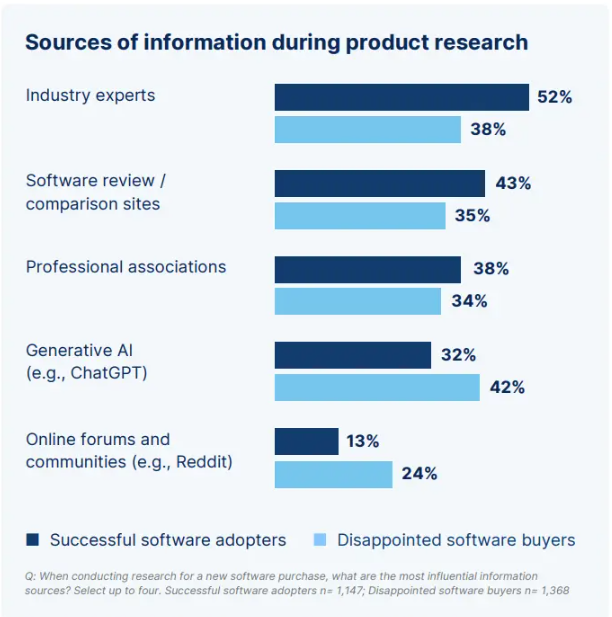
The Capterra survey proves this point. It says that regretful software buyers are twice as likely to rely on social media when creating shortlists, while successful buyers are at least more likely to choose recommendations of industry experts and software review/comparison sites.
Source: Capterra’s 2026 Software Buying Trends Report
Red Flags in Vendor Messaging
At some companies, marketing positioning often outruns the actual maturity level of products. Marketing claims can be convincing, but it is necessary to look for real facts. You must raise a red flag when the library under consideration has no publicly available release history required for estimating how actively the project is updated and maintained.
Another warning sign is the lack of interactive samples and demos that should vividly demonstrate how UI components and their features work in practice. Finally, it is also very suspicious when vigorously promoted libraries are not supported by detailed testimonials and case studies from real users.
Mistake #2 — Choosing by Feature Count, Not Feature Fit
Functional capabilities required for your app are probably one of the key reasons why you embark on this library search journey in the first place. Most modern JavaScript UI libraries provide comprehensive feature sets; therefore, a simple feature availability check is not enough.
More Features Don’t Mean a Better Library
A rich feature set is a good motivation for selecting a particular JavaScript UI library. But as it is said, quantity does not equal quality. You should not forget the project’s actual needs and be deluded by the number of available features.
How to Match Features to Your Actual Use Case
You should give priority to the features that are essential for your project. It is also important to ensure that all functional capabilities are well-documented and preferably complemented with live samples and demo apps so that you can get started with a given library much faster.
The Hidden Cost of Features You’ll Never Use
A large feature set is generally a positive characteristic of a JavaScript library, but it may have trade-offs that are not immediately noticeable. The problem may lie in how these features are packaged and used.
While many modern libraries offer modular architecture with full tree-shaking support or adhere to the core-and-extensions model. Others take the opposite route and bundle many features in a single package, making it problematic to exclude excessive features for a given project. The unused features become an anchor that often weighs down bundle size and performance metrics, such as Core Web Vitals.
To avoid this, it is important to find out if a library allows reshaping the feature set according to your project’s needs.
Mistake #3 — Skipping Hands-On Testing
On paper, many products may look like a good investment, but in practice, things can be different. Therefore, it is better not to opt for products that are not thoroughly tested before the final choice.
What a Proper Evaluation Should Cover
Simply reading the documentation and clicking through live samples and demos won’t give you a clear picture of how a library will behave in a real project. That is why major vendors offer free trial versions of their products, enabling potential customers to see how these libraries work in scenarios close to your project. The list of mandatory tests commonly includes:
– performance benchmarks with real data,
– customization scenarios,
– integrability in the current tech stack.
Edge Cases Worth Testing Before You Commit
After covering common tests, it is worth trying a few less obvious scenarios, which are rarely found in demos provided by vendors. For instance, you can start from performance tests under high loads because such tests often reveal insufficient optimization for large datasets. On desktops, the UI may render perfectly well, but tests on mobile devices often expose serious layout issues. All decent JavaScript UI libraries provide accessibility and localization (including RTL mode) features, and their demand in software is higher than ever, so it is better to pay attention to them during the testing phase as well. Such edge cases are easy to miss early on, but they’re often the reason teams run into problems later.
Mistake #4 — Underestimating the Learning Curve
As mentioned at the beginning, you must be prepared for additional expenses associated with adding a new JavaScript UI library to your technology stack. The learning curve is one such category of costs. It is the route from the initial acquaintance with the library to productive coding, which will certainly take time. The plateau stage of the learning curve often takes longer than expected before productivity improves.
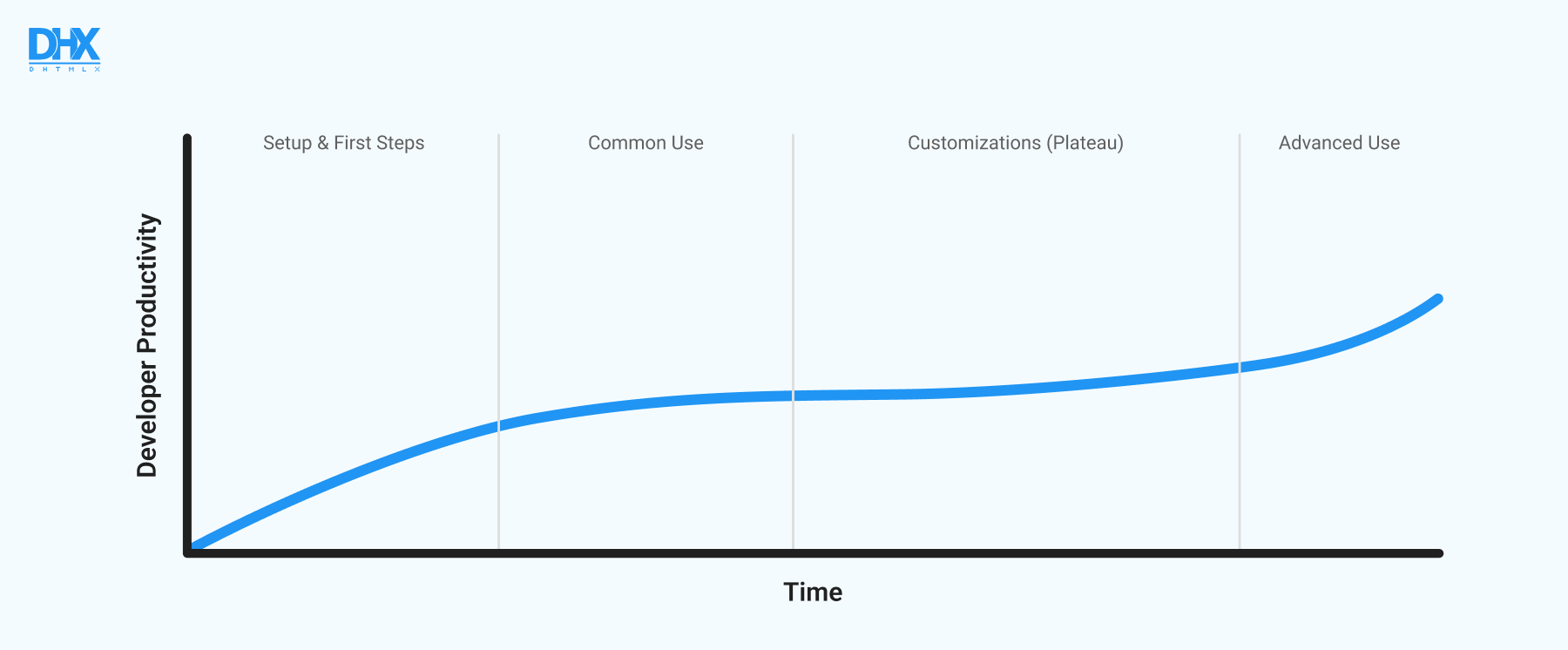
This is exactly where teams can lose much valuable time. And we all know that developers’ time is money. Therefore, it is desirable to minimize the learning curve, thereby reducing costs and accelerating the development process.
Documentation Quality as a Decision Factor
It is great when JavaScript UI libraries come with detailed documentation and rich support materials. In well-documented JS libraries, you don’t have to guess what this method or that property is responsible for, since all API entities are complemented with text explanations, code snippets, and examples.
The comprehensive documentation should also offer step-by-step setup guides, integrations with frontend and backend technologies, FAQ sections, and best practices. Apart from that, the documentation must be well-structured and easy to navigate.
All in all, if you can quickly find answers to all the questions in the product documentation without consulting external resources, it significantly simplifies the learning curve.
Live Demos and Sandboxes: Why They Matter
The theoretical coverage in the documentation is certainly important, but its value diminishes without access to sandboxes. These are interactive playgrounds (like the DHTMLX snippet tool) that enable you to play around with configurations, customization capabilities, and styling patterns without setting up a real project.
Mistake #5 — Ignoring Long-Term Support
Even if you find a JavaScript library that perfectly matches your project requirements, you are still likely to deal with some challenges during the implementation stage. That’s where the quality of tech support comes into play. Poor tech support, or lack of thereof, will force you to fix issues by yourself or find solutions on the internet, thereby slowing down the development process.
Support Channels That Actually Matter
Timely and effective tech support guarantees a quicker solution to immediate issues and ensures your web project’s long-term success and sustainability. You can estimate the level of tech support from a specific vendor by exploring various sources that may contain useful information on the subject:
- available support channels (email, ticket system, forum, etc.),
- customer reviews and case studies (or testimonials),
- user forums,
- Q&A websites (like Stack Overflow).
How to Read License Terms for Support Commitments
Commitments related to tech support are commonly outlined in licensing terms. Taking into account the importance of tech support, it is better to spend time exploring and understanding all the nuances on the subject than regret it later. Vendors usually offer different support plans (Standard, Premium, etc.) depending on the selected license type. The higher the tier of the support plan, the more favorable conditions it offers for response times, number of requests, access to updates, priority handling, etc. It is worth paying special attention to support renewal terms after the license expires.
Mistake #6 — Misreading Pricing Policies
General licensing and pricing terms must be maximally clear and transparent for potential customers. Otherwise, you risk facing various unpleasant problems such as additional payments, hidden fees, application restrictions, legal complications, and more.
Per-Developer vs. Per-Deployment: What Does the Difference Cost You
These licensing models scale in very different ways, affecting both the customer’s cost structure as they expand and the vendor’s increase in revenue. With a per-developer license, you pay for each developer who will be granted the right to use the library, but can deploy the app without extra fees. The per-deployment model ties costs to deployment or usage, meaning the price grows with the expansion of your infrastructure, environment, or the number of product instances deployed. These models can also be mixed or offered in parallel.
On top of that, vendors combine these models with either perpetual or subscription-based licensing, which further changes how costs accumulate over time.
Three License Clauses That May Surprise Teams After Purchase
Prices advertised on the product’s website may not include any clauses or add-on fees buried in the license’s terms and conditions. Sometimes there is a royalty clause hiding in there, which implies extra payments when apps built with the library are distributed on a commercial basis.
Another unpleasant surprise can lie in wait for you in strict redistribution rules, especially around how the library can be packaged inside your solution. Also, if you plan to integrate a library in a cloud-based app like SaaS, carefully review the terms of deployment in a cloud setup, as they may differ a lot among vendors.
What “Total Cost of Ownership” Actually Means for a UI Library
If you don’t want to experience a great deal of stress and regret when the selected library turns out more expensive than expected, you should understand the total cost of ownership (TCO) of the desired product.
In reality, the flow of expenses on a JavaScript library doesn’t stop once you purchase a license. When purchasing a library for a long-term undertaking, you certainly expect to maintain access to the latest library updates and ongoing tech support, which implies renewal costs. Maintenance efforts, migrations due to breaking changes, and the integration of add-ons (like an export module) are not free either. Don’t forget about the spending related to the learning curve when new developers join the team.
If you decide to integrate a particular JavaScript library deep into your system and become too dependent on the vendor’s products and infrastructure (i.e., get into vendor lock-in), it also poses financial risks. This kind of dependency can really cost, if you decide to switch to products of another vendor, because such migrations require significant rework.
Mistake #7 — Overreliance on AI-Generated Recommendations
We cannot deny the fact that AI chatbots like ChatGPT, Gemini, and Perplexity are becoming valuable consultants on a wide range of topics, including developer tools selection. Considering the astonishing pace at which AI tools are evolving, it is not surprising that their suggestions on JavaScript UI libraries generally seem logical and justified. But on closer examination, it becomes clear that AI tools are still not flawless.
Why AI Recommendations Can Be Misleading
If you come up with a few absolutely different prompts, hoping to monitor a huge JavaScript landscape of UI tools from different angles, the list of suggestions is very likely to be similar each time. AI chatbots lean toward popular or widely discussed options. Their answers are generic, meaning they lack the details (context) about a specific project to figure out which tool best fits your purpose. So the answers end up being kind of average. Sometimes that’s fine, sometimes it’s exactly why things go wrong later.
So, it is not surprising that successful software adopters who participated in the Capterra 2026 Software Buying Trends survey look to industry advice and product reviews over generative AI for product research.
AI Tools are Useful at a Starting Point, Not for Making a Final Choice
It still makes sense to use AI tools at the early stages of your search. They help save much time when collecting the general information, getting quick overviews, and creating shortlists. But after that, you have to check things yourself. Run a demo, explore the docs, play around with code in the sandbox. Thus, you’ll get more valuable information than any prompt will ever produce.
Quick Evaluation Checklist Before You Decide
As you can see, there are plenty of things that should be considered before choosing the right JS tool. To make sure that you won’t forget anything when making a final decision, here is a quick checklist that brings together the main points:
- Does this library match the needs of your project?
- Have you performed any tests with production-like data and tried edge case scenarios?
- When you open the documentation, can you quickly find what you need?
- Are there live samples or a sandbox where you can try things without setting everything up from scratch?
- Does the project look actively updated and maintained?
- How quickly can you get technical assistance when something goes wrong?
- Do the licensing terms comply with the way you plan to use the library?
- Are there any constraints or pitfalls that might become a problem later?
- If at some point you decide to migrate to another library, how complicated would that be?
If you can confidently answer most of these, you’ve likely covered the main risks discussed above. If not, it might be worth considering doubtful aspects in more detail before moving forward.
Conclusion: JavaScript Libraries You Won’t Regret Choosing
In practice, the search for a JavaScript UI library basically comes down to picking the one that fits project requirements without creating problems later, rather than finding the best JavaScript UI library. A bit of extra time spent on research and evaluation usually pays off by saving you from time-consuming reworks, hidden costs, or limitations that may show up in production.
If you are considering any of the DHTMLX libraries for an enterprise-grade app, we encourage you to get acquainted with multiple resources on our website. There are plenty of official live samples for each DHTMLX component and the snippet tool that broaden your perspective on all available features presented in the documentation. If any solution appeals to you, you should certainly go further and try it in real-case scenarios by downloading a free 30-day trial version of any product.
Still have doubts or questions? Feel free to write to us, and we will respond in the shortest possible time.