
Updated on September 22, 2026
Success is often built on a series of right choices. In web development, it often comes down to choosing the right tools for your technology stack, which often becomes a real challenge. The complexity of such a choice is clearly visible in the segment of project management software, where dev teams often struggle to pick proper, complex JavaScript Gantt chart components for covering various planning and scheduling needs. In recent years, one of the most intense competitions in this field has been DHTMLX Gantt vs Bryntum Gantt.
In this article, we will compare these two popular web components for adding Gantt charts to project management solutions. Both components have a long history in the market of JS tools. Let us consider how they differ and see why DHTMLX is a great alternative to Bryntum.
DHTMLX Loads 100,000 Tasks in 1 Second While Bryntum Takes Nearly a Minute
When it comes to managing large projects with thousands of tasks, the performance of your Gantt chart plays a crucial role. In this section, we’ll consider the results of the latest Gantt performance benchmark. It includes test scenarios for key performance metrics: browser memory consumption, scrolling, task loading, and editing. Across workloads from 1,000 to 100,000 tasks, we can note the same recurring pattern: DHTMLX Gantt loads and responds to user edits faster and retains less JavaScript heap than Bryntum Gantt, with DHTMLX’s advantage becoming more pronounced as task count grows.
The benchmark compares DHTMLX v10.0.3 and Bryntum Gantt v7.3.6, along with three other JavaScript Gantt components. Apart from five different dataset sizes (1,000, 5,000, 10,000, 50,000, and 100,000 tasks), test configurations also include two data structures (a flat dependency chain and a four-level project tree) and auto-scheduling mode (enabled/disabled). Below, we pay special attention to scenarios with 100,000-project-tree tasks and auto-scheduling on/off, which are the most illustrative of how both Gantt components handle extreme, enterprise-level workloads in memory usage, scrolling, loading, and editing.
JavaScript Heap Usage
This is a metric worth paying attention to whenever you’re evaluating data-heavy UI components. Excessive memory consumption slows down the running app and causes inconvenience for end-users. The benchmark measures retained heap after loading and a forced garbage collection pass. It doesn’t include DOM memory, and it isn’t a measure of total browser RAM or download package size.
DHTMLX Gantt shows more rational memory usage even with small amounts of data, but end-users will hardly notice the difference with such loads. The situation may change drastically when talking about thousands of tasks.
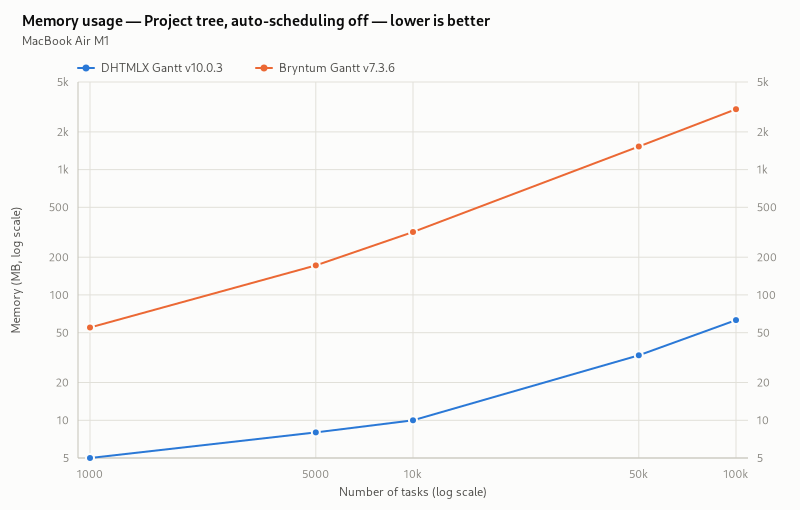
On the 100,000-task project tree with auto-scheduling disabled, DHTMLX retains 63 MB of JavaScript heap versus Bryntum’s 3,033 MB (about 98% less for DHTMLX).
Turn auto-scheduling on for the same 100,000-task project tree, and DHTMLX needs 181 MB versus Bryntum’s 3,130 MB. The overall advantage of DHTMLX over Bryntum remains significant in both scheduling modes.
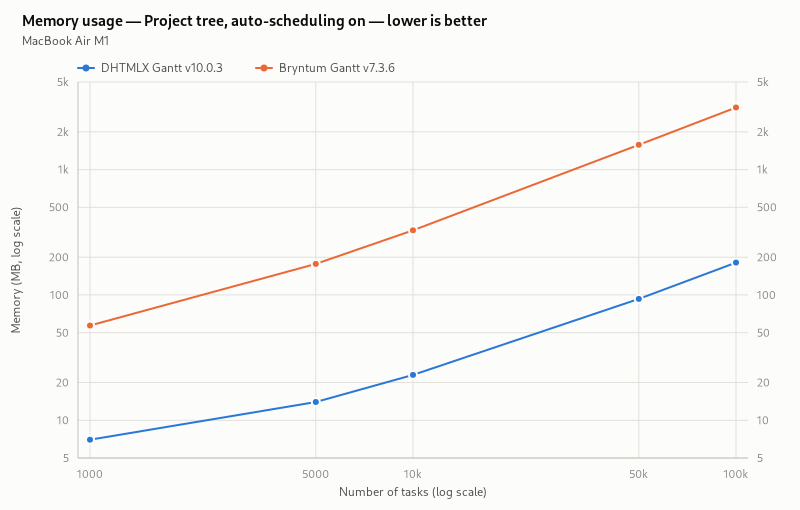
In practice, it means that DHTMLX leaves more memory resources for the other functionalities included in the app.
FPS (Scrolling Gantt charts)
The FPS parameter measures how smoothly frames render while scrolling. Across the scripted scroll test (project trees from 1,000 to 100,000 tasks, auto-scheduling both on and off), DHTMLX holds a steady 60 FPS, while Bryntum lands in the 58-60 FPS range. With both components reaching or staying close to 60 FPS, which is the limit of the reference display, their scrolling performance is essentially comparable.
Tasks Loading and Editing
Finally, we come to the most interesting part of the performance benchmark analysis, where we can answer two questions on Gantt performance that matter most in real-world applications.
First is the question of load time: how long it takes to load and render tasks in each Gantt chart, with and without auto-scheduling. This is what tells you whether a component can keep up with your data volume, and whether that speed will actually work for your project.
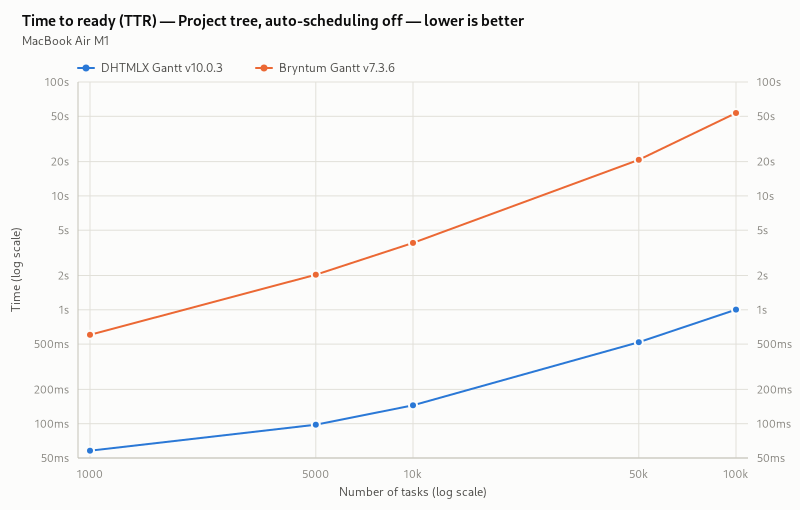
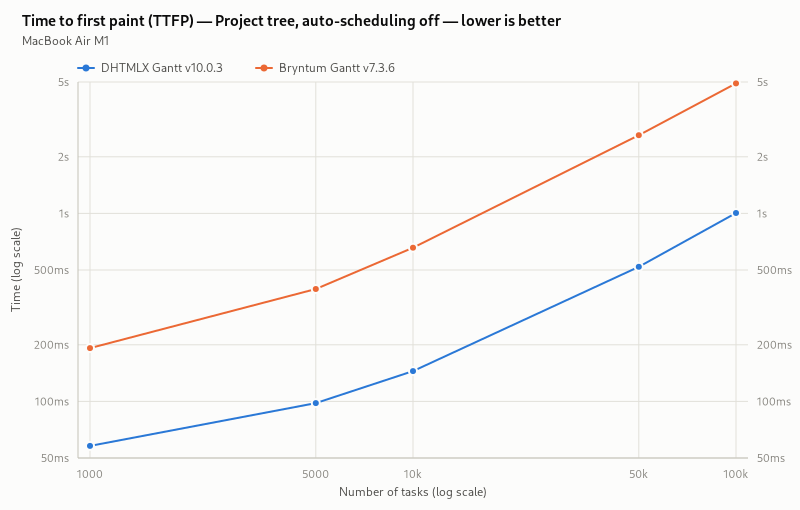
The benchmark’s main loading metric is Time to Ready (TTR). It ends once the Gantt chart becomes fully operational. Time to First Paint (TTFP) is different: it ends the moment the first frame with rows appears on the screen.
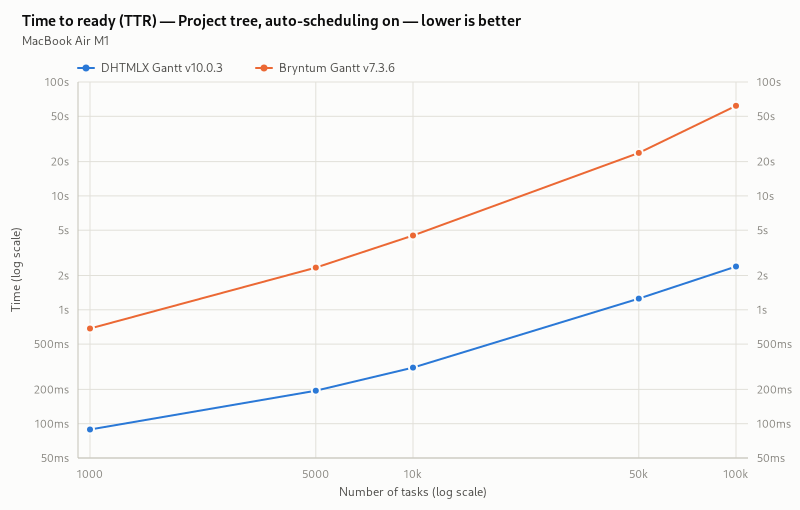
At 100,000 tasks with auto-scheduling disabled, DHTMLX completes the TTR test in 1 second, compared with 53.5 seconds for Bryntum. The chart below places this largest workload result alongside the four smaller project-tree sizes for context.
The TTFP test shows a slightly different picture under the same conditions. DHTMLX still needs only 1 second to start displaying a Gantt chart with a 100,000-task project tree and auto-scheduling off, versus Bryntum’s 4.9 seconds. Although Bryntum reaches the TTFP milestone much earlier than its TTR result, it doesn’t change the fact that you still have to wait almost a minute before the chart becomes fully interactive.
With DHTMLX Gantt, the wait time for users in TTR tests remains short at 100,000 project-tree-tasks even when the auto-scheduling mode is enabled: it reaches the ready state in 2.4 seconds, while Bryntum Gantt needs 61.8 seconds.
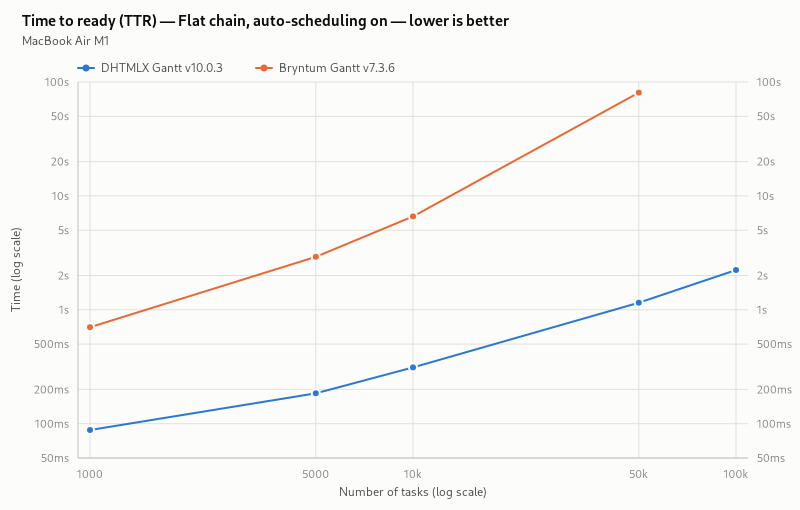
The flat-chain workload makes a separate point: task count alone doesn’t predict performance. With auto-scheduling enabled at 100,000 tasks, DHTMLX posts a TTR of 2.2 seconds, while Bryntum exceeds the five-minute loading limit entirely.
Once the Gantt chart is fully loaded and operational, the next question that matters is how fast it responds to user actions. That’s where the role of auto-scheduling is especially noticeable, since it has to adjust the rest of the schedule affected by user-initiated edits. So it is reasonable to concentrate on testing scenarios where auto-scheduling is enabled.
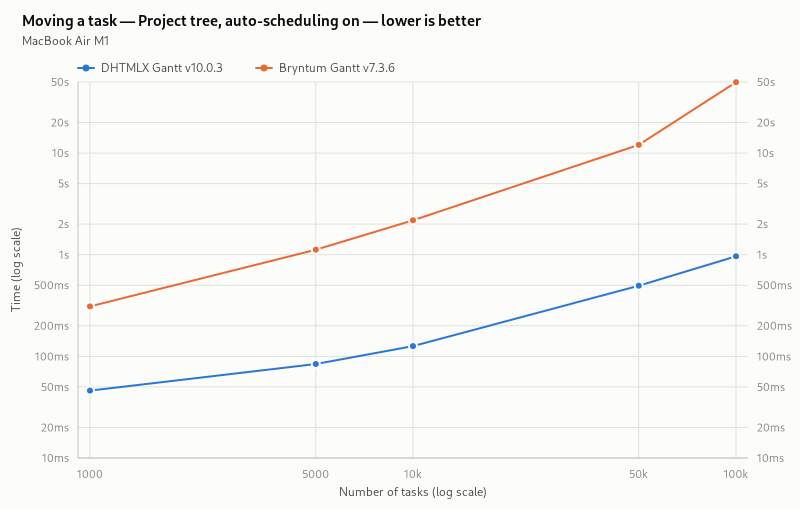
Let’s start with a basic task rescheduling with drag-and-drop. On the 100,000-task project tree with auto-scheduling enabled, DHTMLX processes a single-task move and updates the chart in just 1 second, while Bryntum requires 49.7 seconds for the same operation.
What happens when both Gantt components with the same configurations (100,000-task project tree with auto-scheduling enabled) are subjected to a bulk edit comprising 100 task updates, 100 deletions, and 100 insertions? Not much change for DHTMLX Gantt, which completes the test in 1.1 seconds. Bryntum’s browser tab crashes in all three runs of that test.
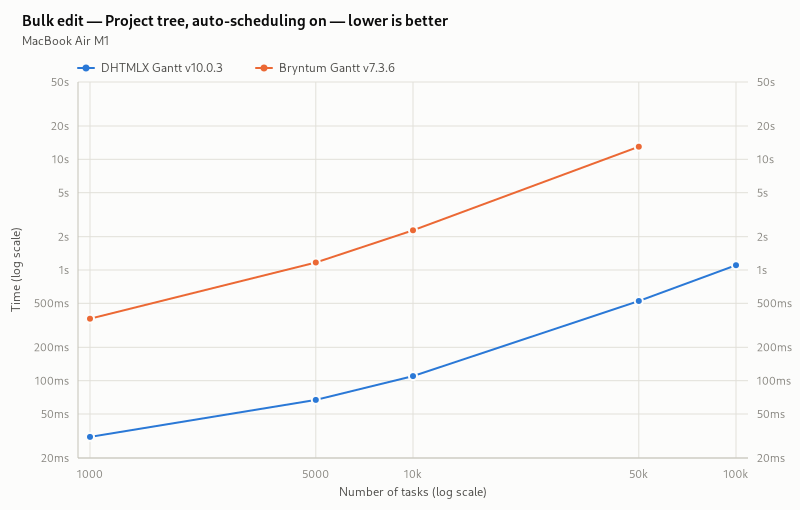
Taken together, the loading and editing results show that DHTMLX Gantt keeps the Gantt UI responsive when working with large workloads of up to 100, 000 tasks and auto-scheduling enabled, from the moment of the initial load to user edits in the schedule.
Bear in mind that the results of these tests heavily depend on the resources of the computer being used. For performance testing of both Gantt components, we used a computer with the following technical characteristics:
- MacBook Air M1, 16 GB RAM, darwin 24.6.0, Chromium 151.0.7922.34, a 60 Hz display, and a 1600 × 900 viewport.
Visit the official benchmark repository to learn more about methodology, configuration, and a detailed overview of test results. The repository provides the reproducible test setup, enabling anyone to run these tests independently and compare the results with ours.
Customization and Configuration Options
In general, both libraries have all the essential features that are expected from a Gantt chart. You can examine the availability of Gantt features for DHTMLX and Bryntum products in the comparison table at the end of the article. In this section, we would like to focus on technicalities that allow developers to complement their app with required features and adjust the chart to any project requirements.
Let us start with APIs and first focus on the configuration capabilities of both components.
DHTMLX allows you to modify the appearance of almost any UI element using the HTML template system. Templates define the content and CSS classes of many DHTMLX Gantt elements. These templates are listed in the API and are declared as simple functions. They do not require a deep understanding of the component’s architecture. Moreover, there are plenty of ready-made code snippets at the disposal of the DHTMLX tech support team, which allow copying and pasting the code to make the needed feature work instantly. Currently, there are 650+ Gantt snippets (and 200 more samples), but this number is constantly growing.
Bryntum Gantt offers similar capabilities for changing the content of elements, but this JavaScript component uses a different approach. Bryntum widgets follow a stricter component structure, with content settings distributed among APIs of widgets that are part of the Gantt. It allows you to reuse the knowledge gained in working with other Bryntum widgets, but also makes the configuration process more complex. Thus, in order to configure visible elements of the Gantt chart, you need to study the documentation of several related widgets.
For instance, if you need to create a column with non-standard formatting in the Gantt grid, you need to declare a new class inherited from Bryntum Column in Bryntum Gantt, register it in the Gantt, and only after that the column can be added to the grid:
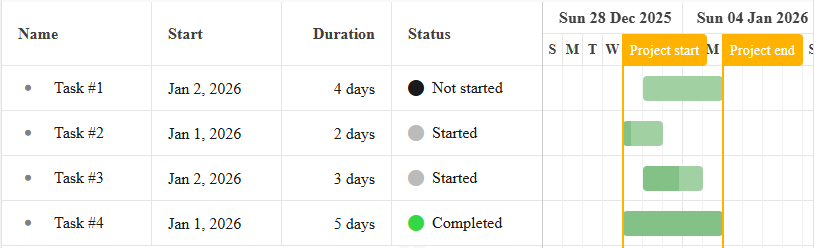
class StatusColumn extends Column {
static $name = 'StatusColumn';
static type = 'statuscolumn';
static get isGanttColumn() {
return true;
}
static get defaults() {
return {
field: 'status',
text: 'Status',
editor: false,
readOnly: true, // For FillHandle etc.
cellCls: 'b-status-column-cell',
htmlEncode: false,
width: 120,
filterable: {
filterField: {
type: 'combo',
items: ['Not Started', 'Started', 'Completed', 'Late']
}
}
};
}
renderer({ record }) {
const status = record.status;
return status ? [{ tag: 'i', className: `fa fa-circle ${status}` }, status] : '';
}
}
ColumnStore.registerColumnType(StatusColumn);
class Task extends TaskModel {
get isLate() {
return !this.isCompleted && this.deadlineDate && Date.now() > this.deadlineDate;
}
get status() {
let status = 'Not started';
if (this.isCompleted) {
status = 'Completed';
} else if (this.isLate) {
status = 'Late';
} else if (this.isStarted) {
status = 'Started';
}
return status;
}
}
const project = new ProjectModel({
taskModelClass: Task,
});
window.gantt = new Gantt({
project,
appendTo: 'container',
columns: [
{ type: 'name', width: 60 },
{ type: 'startdate' },
{ type: 'duration', width: 110 },
{ type: 'statuscolumn', width: 150 },
],
});
DHTMLX Gantt solves the same task by simply adding a template function to the cell:
{ name: "text", tree: true, width: 120, resize: true, editor: { type: "text", map_to: "text" } },
{ name: "start_date", align: "center", width: 100, resize: true, editor: { type: "date", map_to: "start_date" } },
{ name: "duration", align: "center", width: 40, resize: true, editor: { type: "number", map_to: "duration", min: 0, max: 100 } },
{
name: "status", label: "Status", width: 100, resize: true, template: function (task) {
let status = "Not Started";
let greenColor = 1;
if (task.progress == 1) {
status = "Completed";
greenColor = 3;
}
else if (task.progress > 0) {
status = "Started";
greenColor = 2;
}
const color = `rgb(100,${100 * greenColor},100)`;
const styles = `font-size: 40px; color: ${color}; vertical-align: middle;`
const icon = `<span style="${styles}">•</span> `
const text = `<span>${status}</span>`;
return icon + text;
}
},
{ name: "add", width: 30 }
];
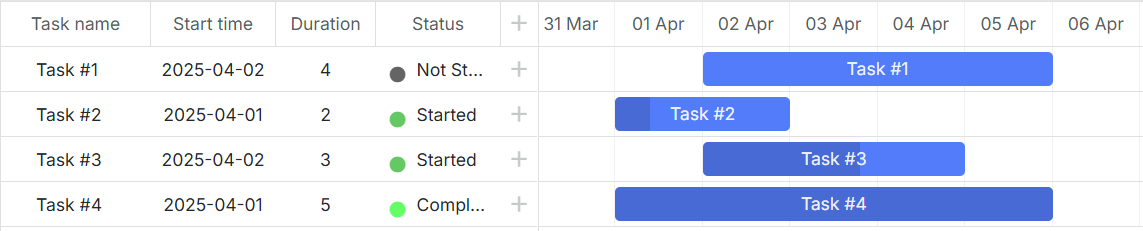
In addition, DHTMLX has the ability to easily add various UI elements directly to the Gantt timeline with a reference to schedule dates and tasks. Using the API, it is possible to add baselines as well as any indicators and markers that may be needed.
In Bryntum Gantt, similar functionality is implemented with two separate features – Baselines and Indicators.
Different approaches of both libraries to the feature implementation manifest themselves differently. Bryntum Gantt provides an API that allows you to add typical elements to the chart. The API of DHTMLX gives you full control over the added element, which allows you to deliver extra features that are not included in the library’s package but are required for the project.
All in all, we can say that DHTMLX has a high-level API with just one Gantt object, making it much easier for web developers to get started with the library on a practical level. Bryntum Gantt has a larger but more complex API with an intricate architecture. As a result, DHTMLX has an easier learning curve than Bryntum.
Using the DHTMLX Gantt component, it is easy to perform non-standard customization, as it directly uses HTML/JavaScript. Customization options of Bryntum Gantt are also quite extensive, but they require deep knowledge of Bryntum architecture and the different widgets used in the Gantt.
In general, Bryntum Gantt, built upon a modular architecture of diverse Bryntum widgets, poses a sharper learning curve due to its intricate structure. However, its advantage shines through for teams already acquainted with Bryntum widgets, as this prior knowledge can be instrumental for a swift mastery of Bryntum Gantt. On the other hand, DHTMLX library provides a more centralized functionality, simplifying integration and enabling faster prototyping, testing, and development for projects of any scale, from agile startups to large enterprise applications.
Samples, Demos, and Guides
Using a commercial JS library, web developers always count on auxiliary materials that simplify the implementation of Gantt features. DHTMLX and Bryntum offer considerable packages of live samples (850+ for DHTMLX Gantt vs 150+ for Bryntum Gantt) that help to get a clear idea of how a particular feature should work and significantly shorten the learning curve.
Both Gantt charts boast that they can be easily integrated into apps based on the most popular frameworks (React, Angular, Vue.js) and provide detailed integration guides and demos. All in all, the official DHTMLX documentation contains 18 guides on the integration of Gantt with different client-side and server-side technologies. The number of official guides at Bryntum is fewer (11).
In addition to the guides available in the documentation, the DHTMLX technical support team has many demos showing how to use Gantt with different technologies (for example, with Svelte, Ionic, Electron, or Java + Spring), which they provide on demand. We assume that Bryntum Gantt also has some code examples at their disposal, which are not available publicly but on request.
Licensing and Pricing
Pricing is probably the final decisive factor when it comes to investing in commercial JavaScript tools.
Those who consider Bryntum Gantt for their projects should be ready to spend at least $1100 for one developer or $2820 for a small team of 3 developers, and be aware that this is the price for a license for internal and non-commercial use only. For commercial and SaaS apps, Bryntum offers OEM licenses upon request.
DHTMLX offers a more flexible and budget-friendly licensing model. For early-stage teams, the Startup license starts at $569 for up to 3 developers and one SaaS product for one year, making it an attractive entry point for MVPs and young companies.
The price for a standard commercial license starts at $799 (individual license). For growing teams, the Commercial license at $1399 for up to 5 developers and one project provides perpetual distribution rights with premium support, significantly more affordable than an equivalent Bryntum setup. For larger organizations requiring multi-product deployment, the Enterprise license includes usage in SaaS applications with perpetual rights and extended support, offering enterprises a clear and compliant path for cloud-based solutions.
Importantly, DHTMLX doesn’t limit the number of end-users of SaaS apps built with the library, while one has to pay more for Bryntum Gantt to scale up and cover additional end-users.
Unlike Bryntum, DHTMLX Gantt v10+ is available under an open-source MIT license, which makes it suitable for both open-source and commercial projects without copyleft restrictions. It offers fewer features compared to the paid edition. However, it still provides developers with a feature-packed Gantt well-suited for a wide range of projects.
Trial Period and Support
Trial periods slightly differ in time. Bryntum offers 45 days for a free evaluation of their library. DHTMLX gives a period of 30 days, but if it turns out to be insufficient, it can be prolonged for one more month.
The main channel of technical support at Bryntum for both trial users and customers is the forum. The response time varies from up to a day to 2-3 business days, depending on the level of support (standard or premium). However, it is also possible to reach tech specialists via email.
DHTMLX provides individual email support. Trial users can count on receiving answers within 1-3 business days. DHTMLX customers get help within 24, 48, or 72 hours, depending on their support plan. Very often, the DHTMLX support team answers even within a couple of hours. Each email request has a guarantee of getting a response. Besides, users are free to use the community forum, where developers leave questions and share knowledge.
Comparison Table
As a cherry on top of the cake, here is a detailed comparison table with ten sections covering various parameters that may be important for web developers when choosing the right tool for their products. Comparison items vary from general characteristics and features to peculiarities of both products. As of the time of writing, the latest DHTMLX Gantt version is 10.0.3, and Bryntum Gantt is 7.3.6.
| DHTMLX Gantt | Bryntum Gantt | |
| Trial period |
DHTMLX Gantt
30 days
|
Bryntum Gantt
45 days
|
| Primary tech support channel |
DHTMLX Gantt
Email
|
Bryntum Gantt
Forum
|
| Additional tech support channels |
DHTMLX Gantt
Forum
|
Bryntum Gantt
Email
|
| Response time |
DHTMLX Gantt
24-72 h
|
Bryntum Gantt
24-72 h
|
| Starting price |
DHTMLX Gantt
$799
|
Bryntum Gantt
$1,100
|
| Unlimited end-users of apps based on Gantt |
DHTMLX Gantt
|
Bryntum Gantt
|
| Reviews |
DHTMLX Gantt
4.7 stars based on 52 reviews on G2
4.6 stars based on 79 reviews on Capterra 9 score based on 30 reviews on TrustRadius |
Bryntum Gantt
4.5 stars based on 7 reviews on G2
4.8 stars based on 25 reviews on Capterra 0 reviews on Trustradius |
| Product Characteristics | ||
| Source code included |
DHTMLX Gantt
|
Bryntum Gantt
|
| NPM access |
DHTMLX Gantt
|
Bryntum Gantt
|
| Open-source version |
DHTMLX Gantt
MIT
|
Bryntum Gantt
|
| Archived Package Size |
DHTMLX Gantt
6 Mb
|
Bryntum Gantt
368 Mb
|
| Full Package Size |
DHTMLX Gantt
25.8 Mb
|
Bryntum Gantt
542.1 Mb
|
| Code examples |
DHTMLX Gantt
850+
|
Bryntum Gantt
150+
|
| Integration guides |
DHTMLX Gantt
18
|
Bryntum Gantt
11
|
| General Features | ||
| Locales |
DHTMLX Gantt
51
|
Bryntum Gantt
45
|
| Skins |
DHTMLX Gantt
8 total
(8 unique) |
Bryntum Gantt
12 total
(4 unique) |
|
Work on modern platforms (React, Angular, Vue, etc) |
DHTMLX Gantt
|
Bryntum Gantt
|
|
Work in all modern browsers: Firefox, Safari, Chrome, All Chromium browsers (Opera, Vivaldi, Brave, Edge) |
DHTMLX Gantt
|
Bryntum Gantt
|
| Work in Internet Explorer |
DHTMLX Gantt
|
Bryntum Gantt
|
|
Support for touch devices: iOS, Android |
DHTMLX Gantt
|
Bryntum Gantt
|
| Responsive UI |
DHTMLX Gantt
|
Bryntum Gantt
|
| Drag-n-drop | ||
| Drag tasks |
DHTMLX Gantt
|
Bryntum Gantt
|
| Resize tasks |
DHTMLX Gantt
(start date, end date) |
Bryntum Gantt
(only end date) |
| Drag project tasks with their children |
DHTMLX Gantt
|
Bryntum Gantt
|
| Drag timeline with the mouse |
DHTMLX Gantt
|
Bryntum Gantt
|
| Drag custom elements inside Gantt |
DHTMLX Gantt
|
Bryntum Gantt
|
| Assign resources to tasks by dragging avatars from the resource panel |
DHTMLX Gantt
|
Bryntum Gantt
|
| Tasks | ||
| Display task progress |
DHTMLX Gantt
|
Bryntum Gantt
|
| Projects, Milestones |
DHTMLX Gantt
|
Bryntum Gantt
|
| Automatic detection of task types |
DHTMLX Gantt
|
Bryntum Gantt
|
| Custom task types |
DHTMLX Gantt
|
Bryntum Gantt
|
| Text around task bars |
DHTMLX Gantt
|
Bryntum Gantt
|
| Multiple task selection |
DHTMLX Gantt
|
Bryntum Gantt
|
|
Several tasks on the same line (Split tasks) |
DHTMLX Gantt
|
Bryntum Gantt
|
| Grid | ||
| Configuration of columns in the grid |
DHTMLX Gantt
|
Bryntum Gantt
|
|
Predefined set of grid columns ("Add new column" column) |
DHTMLX Gantt
|
Bryntum Gantt
|
| Resize Grid and individual columns |
DHTMLX Gantt
|
Bryntum Gantt
|
| Hide Grid columns |
DHTMLX Gantt
|
Bryntum Gantt
|
| Vertically reorder tasks in the Grid |
DHTMLX Gantt
|
Bryntum Gantt
|
| Inline editing |
DHTMLX Gantt
|
Bryntum Gantt
|
| Filter in the Grid header |
DHTMLX Gantt
|
Bryntum Gantt
|
| Import/Export | ||
| Export to PDF, PNG |
DHTMLX Gantt
|
Bryntum Gantt
|
| Export to Excel |
DHTMLX Gantt
|
Bryntum Gantt
|
| Export to MS Project |
DHTMLX Gantt
|
Bryntum Gantt
|
| Export to Primavera P6 |
DHTMLX Gantt
|
Bryntum Gantt
|
| Import Excel |
DHTMLX Gantt
|
Bryntum Gantt
|
| Import from MSP |
DHTMLX Gantt
|
Bryntum Gantt
|
| Import from Primavera |
DHTMLX Gantt
|
Bryntum Gantt
|
| Timeline | ||
| Customize scales in the timeline |
DHTMLX Gantt
|
Bryntum Gantt
|
| Zoom, Zoom-to-Fit |
DHTMLX Gantt
|
Bryntum Gantt
|
| Infinite Scroll |
DHTMLX Gantt
|
Bryntum Gantt
|
| Highlight weekends in the timeline |
DHTMLX Gantt
|
Bryntum Gantt
|
| Hide days (or cells) in the timeline |
DHTMLX Gantt
|
Bryntum Gantt
|
| Fill scale cells (Fill ticks) |
DHTMLX Gantt
|
Bryntum Gantt
|
| Fixed with of the timeline cells |
DHTMLX Gantt
|
Bryntum Gantt
|
| Editors/Edit Forms | ||
| Task editor |
DHTMLX Gantt
|
Bryntum Gantt
|
| Link editor |
DHTMLX Gantt
|
Bryntum Gantt
|
| Calendar editor |
DHTMLX Gantt
|
Bryntum Gantt
|
| Resource editor |
DHTMLX Gantt
|
Bryntum Gantt
|
| Cost Rate Editor |
DHTMLX Gantt
|
Bryntum Gantt
|
| Tabs in the lightbox |
DHTMLX Gantt
|
Bryntum Gantt
|
| Visualy assign caledars |
DHTMLX Gantt
|
Bryntum Gantt
|
| Other | ||
| Resource load chart |
DHTMLX Gantt
|
Bryntum Gantt
|
| Histogram chart |
DHTMLX Gantt
|
Bryntum Gantt
|
| Show React elements inside Gantt |
DHTMLX Gantt
|
Bryntum Gantt
|
| Rounded corners of links |
DHTMLX Gantt
|
Bryntum Gantt
|
| Link rendering customization |
DHTMLX Gantt
|
Bryntum Gantt
|
| Quick Info |
DHTMLX Gantt
|
Bryntum Gantt
|
| Overlay |
DHTMLX Gantt
|
Bryntum Gantt
|
Conclusion
Bryntum looks like a full-featured framework that demands significant time, effort, and budget, while DHTMLX combines comprehensive functionality with a lightweight architecture built for speed and a small memory footprint. The advantage of DHTMLX Gantt holds up on a 100,000-task project tree with auto-scheduling enabled. In this configuration, DHTMLX reaches ready state in 2.4 seconds versus 61.8 seconds for Bryntum. Turn auto-scheduling off, and the difference only grows, with DHTMLX reaching ready in 1 second against Bryntum’s 53.5 seconds. Speed that holds up under both light and heavy workloads is what makes a Gantt component viable at scale, whether you’re building a startup MVP, a corporate project management tool, or a complex enterprise system. On pricing, DHTMLX offers options for startups, growing teams, and large organizations alike, plus an open-source Community Edition for projects of any kind.