JavaScript
DHTMLX Grid - JavaScript DataGrid (DataTable) Widget
Easily extensible JavaScript data grid for processing and managing datasets of any size and type at lightning speed to fit into web applications of any complexity and business realm.
Open a demo on desktop

DHTMLX Grid is a data-intensive UI widget by a renowned vendor
of JavaScript UI libraries,
which has helped thousands of companies develop top-notch web apps over the years.
which has helped thousands of companies develop top-notch web apps over the years.





Most Popular in JavaScript DataGrid by DHTMLX
Data grouping
Starting from v9.0, DHTMLX JavaScript Grid offers powerful data
grouping, enabling end-users to organize and analyze large
datasets effectively. You can group data by specific columns,
aggregate values within groups, and
display statistics in the summary rows.
Our widget allows full
customization of grouping,
including columns rendering, order, and data aggregation.

Row and column drag-and-drop
The drag-and-drop functionality enables end-users to manipulate
grid rows and columns comfortably. Users can reorder them inside
one grid or between several tables. They can drag and drop multiple
rows at once. Developers can disable this feature or adjust it to
project requirements via API.
Data filtering and multisorting
You can determine the ascending or descending sorting order,
specify custom sorting rules, and enable multisorting to arrange
data by multiple columns at a time. In DHTMLX Grid, you can also
add filters in headers, footers, or outside the table, set
filtering criteria, and choose filter type: search field, drop-down
list, or combobox with autocomplete.
Excel and CSV export module
Local export module to Excel and CSV ensures the safety of your
data. It comes free of charge under the Enterprise and Ultimate
licenses. You can purchase it as an add-on with the Individual
or Commercial license. It is also possible to export data for
free via our online service.
PDF/PNG export module
You can install the PDF/PNG export module locally to export the
grid without hassle. You can buy this module separately in addition
to the Individual license. It is shipped free of charge under the
Commercial, Enterprise, and Ultimate licenses. You are also
eligible to use the online export service.
Row expander
The row expander in JS Grid allows users to expand and collapse rows
to display additional hierarchical or related data within sub-rows.
This feature enhances data management by enabling the integration
of nested subgrids, forms, charts, and custom HTML. Sub-rows can be
configured dynamically based on specific conditions and highlight
corresponding rows.
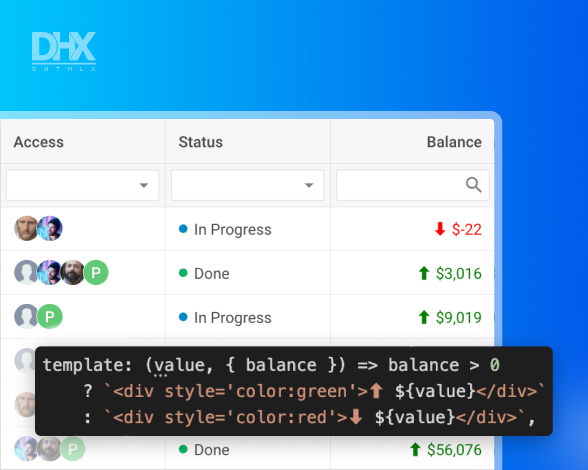
Custom content in cells
The DHTMLX JavaScript grid control allows customizing cell
content with HTML objects or custom templates. Cell templates
make it easy to modify the appearance of cells in an entire
column. Thus, your grid can contain anything you need, from
icons to checkboxes, for your business aims.
JS Grid with Real-Time Updates at Lightning Speed
DHTMLX Grid allows rendering 100,000+ rows in milliseconds. You can show the Chart widget from
DHTMLX Suite alongside the grid to visualize data changes and provide quick insights for your
end users.


 Angular
 Vue.js
 React
React
 NodeJS
Simplify Data Management with DHTMLX Grid

🧩 Attach a toolbar
Equip your Grid with a toolbar and put all the needed options for editing and managing data there.
Equip your Grid with a toolbar and put all the needed options for editing and managing data there.

Place filters in the header or footer of the grid or outside. Specify filtering criteria and set rules. Let users filter data using textarea, combobox, or drop-down list.
🎨 Add custom content in cells
Apply templates to cells and tooltips to display the content of your choice and attach event handlers so that users can effortlessly interact with content.
Apply templates to cells and tooltips to display the content of your choice and attach event handlers so that users can effortlessly interact with content.

Define the columns and order of sorting and add sorting rules if needed.

Set the desired format via the format configuration option for:
- numeric values
- percentage values
- dates
✏️ Create a menu with operations
Include essential grid operations in a drop-down menu attached to a cell.
Include essential grid operations in a drop-down menu attached to a cell.

Configure the Grid footer to show total values, set its height and style text.
Why Choose a JavaScript DataGrid by DHTMLX
Speedy with massive data
DHTMLX JavaScript Grid control is a full-featured DataGrid library that provides
cutting-edge functionality and works incredibly fast with immense data sets. DHTMLX
Grid can render 100,000+ rows in milliseconds in real time.
Adjustable to your needs
Due to an extensive JavaScript API, you can configure our HTML5 grid according to
your project requirements. You can use it as a simple data table or convert it
into a feature-packed versatile UI widget for complex enterprise-grade apps.
Fully customizable look & feel
DHTMLX Grid web control can conform to any design guidelines and behave the way
you need. CSS classes and HTML templates allow you to style all elements of the
JavaScript datagrid widget. Multiple event handlers help you control how it reacts
to user actions.
Excellent fit for any stack
No matter what frameworks you use, you can smoothly combine our JS data grid
library with any front-end and back-end technologies. To streamline this process,
you can benefit from ready-made code examples with popular frameworks - Angular,
React, and Vue.js.
Extensible feature set
Need more than just a grid control for data processing but also built-in
Excel-like formulas, multiple worksheets, and automatical aggregations and
pivoting? You can extend the DHTMLX Grid with the Spreadsheet and Pivot widgets,
coming in a bundle at a reduced cost.
Reinforce Your JS Data Table with Pivot
and Spreadsheet UI/UX

DHTMLX Grid Licensing
|
Individual
Total: $749
|
Commercial
Total: $1599
|
Enterprise
Total: $3199
|
Ultimate
Total: $6599
|
| License Terms | Read License Agreement | Read License Agreement | Read License Agreement | Read License Agreement |
| Developers | 1 | 5 | 20 | |
| Projects | 1 | 1 | 5 | |
| Use in SaaS (unlimited end-users) | ||||
| Source code | ||||
| Perpetual distribution rights |
|
Support Plan
|
Standard | Premium | Premium | Ultimate |
| Time Period | 1 year | 1 year | 1 year | 1 year |
| Updates | Major, minor, and maintenance updates | Major, minor, and maintenance updates | Major, minor, and maintenance updates |
Major, minor, and maintenance updates
Priority queue for bug fixing
|
| Support requests | 10 | 30 | 50 | |
| Response time | 72h | 48h | 48h | 24h |
| Personal Account Manager |
|
Functionality
|
PRO | PRO + 1 add-on | PRO + 2 add-ons | PRO + 3 add-ons |
| PRO features | ||||
| Online export to Excel | Free | Free | Free | Free |
| Free local Excel export module | ||||
| Online export to PDF/PNG without watermark | Free for 1 year | Free for 1 year | Free for 1 year | Free for 3 years |
| Free local PDF/PNG module |
Documentation
Consult documentation
The DHTMLX documentation contains comprehensive guides and tutorials to smooth your
learning process with the JS data grid and cut your development time.
Samples
Play around with code snippets
You can try out the JavaScript and HTML code of the data grid widget, share snippets
with your team or DHTMLX support specialists, and copy ready-made pieces of code into
your app.
Demos
Explore demo apps with Grid
Get inspiration for your web development projects with our demo app collection,
showing how to implement JavaScript Grid and other UI widgets in real-life solutions.
Widgets
Check other UI widgets
Apart from the JS data grid, DHTMLX offers 20+ feature-rich UI widgets, like charts,
forms, and calendar control, for building full-fledged CRM, ERP, and other enterprise
solutions.
Free trial
Download JS Grid free trial
No time to waste - grab a free 30-day evaluation version and test how the JavaScript
Grid widget fits your application. Get help from the DHTMLX tech support team during
the trial period.
Community forum
Browse DHTMLX community forum
Besides the official tech support channel during evaluation, you can learn from
fellow developers on our community forum. We also monitor topics and answer common
questions.
DHTMLX Demos with JavaScript/HTML5 Grid